September 29, 2014

iPhone 6 Plus review


By Cam Bunton - Senior Managing Editor
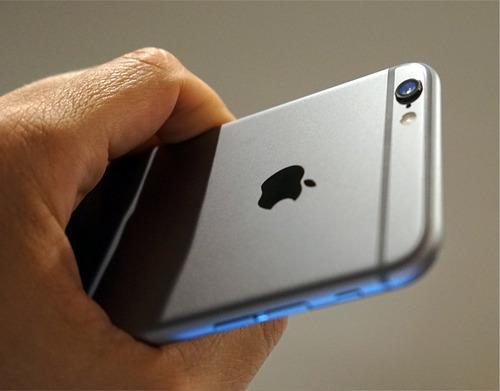
After 10 days with the device, Cam's gathered enough experience and information about the iPhone 6 Plus to give his full thoughts. It's a big device that — for the most part — performs brilliantly well in almost every aspect. Display and camera are fantastic and battery life is far better than what we've seen from an iPhone previously.
Key Specs:
  • 5.5-inch, 1080x1920 Retina HD display (401ppi)
  • 1.4GHz dual-core A8 custom chip
  • 2915mAh battery
  • 8-megapixel rear camera with 1080p video at 60fps
  • Slow-mo, panorama, time-lapse
  • 7.1mm thin, 158.1mm tall, 77.8mm wide
  • Weighs 172g (6.07oz)
In our mind, the iPhone 6 and iPhone 6 Plus are the finest iPhones Apple has ever released. And while some of the specs may seem like playing catch-up, the tight integration between hardware, software and services is still an aspect the company outperforms all its competition in.

Source: http://www.phonedog.com/videos/iphone-6-plus-review/?utm_source=feedburner&utm_medium=feed&utm_campaign=Feed%3A+phonedog_cellphoneblog+%28PhoneDog.com+Cell+Phone+articles%29

September 23, 2014

HTG Explains: How Does BitTorrent Work?

bittorrent-swarm


BitTorrent consumes 12% of total Internet traffic in North America and 36% of total traffic in the Asia-Pacific region, according to a 2012 study. It’s so popular that the new “Copyright Alert System” targets BitTorrent traffic alone.
BitTorrent may be popularly known as a method of piracy, but it isn’t just for pirates. It’s a useful, decentralized peer-to-peer protocol with significant advantages over other protocols in many situations.
This article will help you understand how the BitTorrent protocol works and why it’s not just a tool for piracy. We’ve previously explained how to get started with BitTorrent.

How BitTorrent Works

When you download a web page like this one, your computer connects to the web server and downloads the data directly from that server. Each computer that downloads the data downloads it from the web page’s central server. This is how much of the traffic on the web works.


network-with-central-server


BitTorrent is a peer-to-peer protocol, which means that the computers in a BitTorrent “swarm” (a group of computers downloading and uploading the same torrent) transfer data between each other without the need for a central server.


peer-to-peer-network


Traditionally, a computer joins a BitTorrent swarm by loading a .torrent file into a BitTorrent client. The BitTorrent client contacts a “tracker” specified in the .torrent file. The tracker is a special server that keeps track of the connected computers. The tracker shares their IP addresses with other BitTorrent clients in the swarm, allowing them to connect to each other.
Once connected, a BitTorrent client downloads bits of the files in the torrent in small pieces, downloading all the data it can get. Once the BitTorrent client has some data, it can then begin to upload that data to other BitTorrent clients in the swarm. In this way, everyone downloading a torrent is also uploading the same torrent. This speeds up everyone’s download speed. If 10,000 people are downloading the same file, it doesn’t put a lot of stress on a central server. Instead, each downloader contributes upload bandwidth to other downloaders, ensuring the torrent stays fast.
Importantly, BitTorrent clients never actually download files from the tracker itself. The tracker participates in the torrent only by keeping track of the BitTorrent clients connected to the swarm, not actually by downloading or uploading data.

Leechers and Seeders

Users downloading from a BitTorrent swarm are commonly referred to as “leechers” or “peers”. Users that remain connected to a BitTorrent swarm even after they’ve downloaded the complete file, contributing more of their upload bandwidth so other people can continue to download the file, are referred to as “seeders”. For a torrent to be downloadable, one seeder – who has a complete copy of all the files in the torrent – must initially join the swarm so other users can download the data. If a torrent has no seeders, it won’t be possible to download – no connected user has the complete file.
BitTorrent clients reward other clients who upload, preferring to send data to clients who contribute more upload bandwidth rather than sending data to clients who upload at a very slow speed. This speeds up download times for the swarm as a whole and rewards users who contribute more upload bandwidth.


utorrent-peers-and-seeds

Torrent Trackers and Trackerless Torrents

In recent times, a decentralized “trackerless” torrent system allows BitTorrent clients to communicate among each other without the need for any central servers. BitTorrent clients use distributed hash table (DHT) technology for this, with each BitTorrent client functioning as a DHT node. When you add a torrent using a “magnet link”, the DHT node contacts nearby nodes and those other nodes contact other nodes until they locate the information about the torrent.
As the DHT protocol specification says, “In effect, each peer becomes a tracker.” This means that BitTorrent clients no longer need a central server managing a swarm. Instead, BitTorrent becomes a fully decentralized peer-to-peer file transfer system.
DHT can also work alongside traditional trackers. For example, a torrent can use both DHT and a traditional tracker, which will provide redundancy in case the tracker fails.


dht-in-utorrent

BitTorrent Isn’t Just For Piracy

BitTorrent isn’t synonymous with piracy. Blizzard uses a custom BitTorrent client to distribute updates for its games, including World of Warcraft, StarCraft II, and Diablo 3. This helps speed up downloads for everyone by allowing people to share their upload bandwidth with others, leveraging unused bandwidth towards faster downloads for everyone. Of course, it also saves Blizzard money on their bandwidth bills.
People can use BitTorrent to distribute large files to significant numbers of people without paying for the web hosting bandwidth. A free film, music album, or game could be hosted on BitTorrent, allowing an easy, free method of distribution where the people downloading the file also help distribute it. WikiLeaks distributed data via BitTorrent, taking a significant load off their servers. Linux distributions use BitTorrent to help distribute their ISO disc images.
BitTorrent, Inc. – a company responsible for developing BitTorrent as a protocol, who also purchased and develop the popular µTorrent torrent client – is developing a variety of applications that use the BitTorrent protocol for new things via their BitTorrent Labs project. Labs experiments include a syncing application that securely synchronizes files between several computers by transferring the files directly via BitTorrent, and a BitTorrent Live experiment that uses the BitTorrent protocol to help broadcast live, streaming video, leveraging the power of BitTorrent to stream live video to large numbers of people without the current bandwidth requirements.


starcraft-2-peer-to-peer-download-feature


BitTorrent may be primarily used for piracy at the moment, as its decentralized and peer-to-peer nature are a direct response to efforts to crack down on Napster and other peer-to-peer networks with central points of failure. However, BitTorrent is a tool with legitimate uses in the present –  and many other potential uses in the future.

Source: http://www.howtogeek.com/141257/htg-explains-how-does-bittorrent-work/

September 17, 2014

Reviewed: iPhone 6 Is a Thin, Sexy Phone with a Killer Camera (David Pogue)

When Apple unveiled the iPhone 6 last week, it made the front pages of newspapers. It dominated Google Search and Twitter. It triggered an avalanche of sniping and worshiping on the Web’s comment boards.
About a phone? Really?
Well, that’s what you’d say if you were an alien. If you’re human, you know why all the fuss. The iPhone is not just a phone; it’s a symbol. The phone you own doesn’t just let you make phone calls; it marks you as belonging to a religion. Maybe a cult
Each year’s new iPhone is another test for Apple. The world wants to know if Apple’s still got it, even without Steve Jobs. The faithful want the company to hit another one out of the park. The enemy can’t wait for the company to fumble.
Well, this time, Apple hasn’t fumbled. Its two new iPhones are excellent. Beautiful. State of the art. Worthy heirs to the iPhone throne.
There’s nothing actually surprising about the iPhone 6 and iPhone 6 Plus. Partly that’s because in the post-Jobs era, Apple isn’t as good at suppressing pre-announcement leaks. And partly it’s because there’s nothing much surprising about any phones these days. They’re mature. These days, designing a phone is a matter of nips and tucks and playing catch-up and one-up — as attractively as possible.

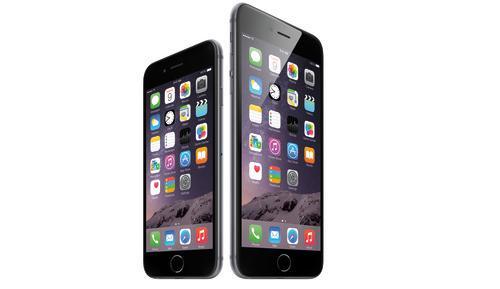
Meet the family
This year, there are two new models: the iPhone Bigger and the iPhone Bigger-er.
Reviewed: iPhone 6 Is a Thin, Sexy Phone with a Killer Camera
(Apple)
Their real names are the iPhone 6 ($200 and up with two-year contract) and the iPhone 6 Plus ($300 and up with contract). 

And yes, that’s the big news: They have bigger screens than any iPhone before them. Steve Jobs used to mock Samsung’s increasingly jumbo smartphones, calling them “Hummers.” But apparently big is what the public wants. So big is what we get.
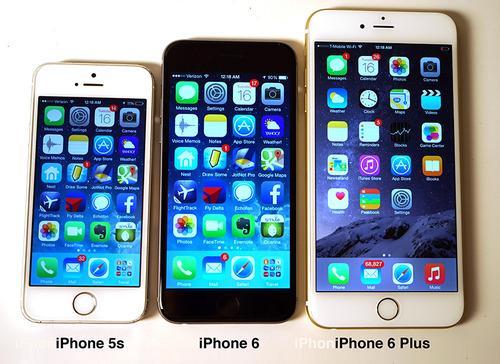
Here they are: the new iPhones, posed next to last year’s model, so you can get an idea of the scale:

Size comparison of iPhone 5s, 6, and 6 Plus

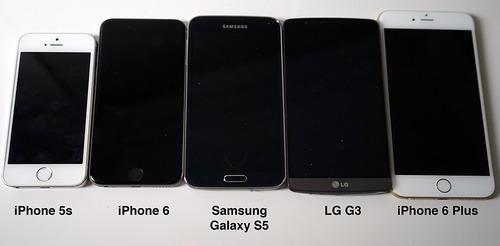
And here, for your reference, are the new iPhones among their Android rivals:

Size comparison of iPhones and phones from LG and Samsung

What’s wild is that at first, the iPhone 6 doesn’t seem bigger than the iPhone 5. The first thing most people say when they pick it up is, “It doesn’t seem that big!” You have to hold an iPhone 5s next to it before you really notice.
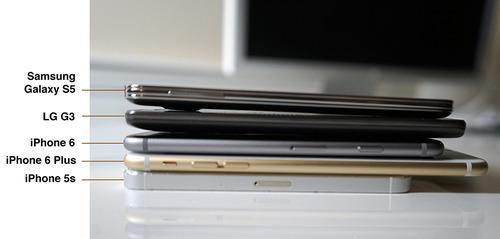
Part of the explanation may be the Apple diet: These new phones are thin. About a quarter of an inch. Thinner than their rivals from Samsung, HTC, or LG. If you order one online, FedEx will probably slip it under your door.

Thickness comparison of iPhones and phones from LG and Samsung

The aluminum body has smooth, rounded edges — a more comfortable shape than the sharpened corners of the iPhone 4 and 5 era. The ring around the camera lens on the back protrudes about a millimeter; it’s no longer perfectly flush.

iPhone 6 camera

The screens are terrific. The smaller iPhone 6’s screen has 1334 × 750 pixels (326 dots per inch), and the Plus’s screen is 1920 × 1080 pixels (401 dpi), which is full high definition. Other phones have more dots or smaller ones, but at this point, everybody is just chasing unicorns; these screens have long since exceeded the ability of our eyes to distinguish pixels.

What to do with more screenThere’s a downside to having a bigger screen: You have to carry around a bigger phone. The small of hand won’t be thrilled about the added width. The iPhone 6 Plus, in particular, is a pocket-filler.

Apple is clearly aware of the drawbacks of gigantism. It has made some tweaks to make the size less awkward. The power/sleep button, for example, is on the side now instead of the top, so your thumb can reach it. (That’s a problem for people who use a volume key on the opposite edge as the camera shutter. Now when you grip the phone for photography, your thumb naturally falls on the sleep switch — and turns it off!)
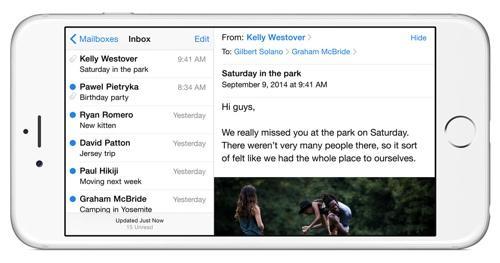
The plus-sized 6 Plus, in fact, is well on its way to becoming an iPad Nano. As on an iPad, many of its built-in apps sprout extra panes when you turn the phone 90 degrees — like Mail and Calendar, for example:

iPhone Mail program in landscape view

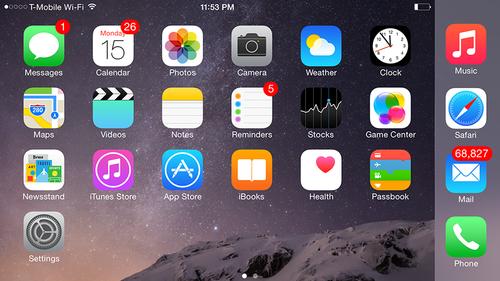
Even the home screen rotates now, for the first time in iPhone history. (Some of Apple’s own apps rotate this way only on the 6 Plus, not the 6. Other software companies’ apps may rotate on both.)

iPhone home screen in landscape view

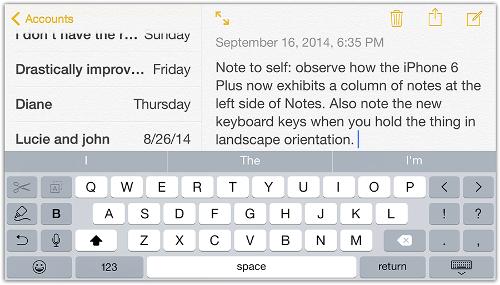
Also on the Plus: When you’re typing in landscape mode, there’s so much extra space that Apple has thrown in some additional on-screen keys. On the left: buttons for Cut, Copy, Paste, Bold, and Undo. On the right: Punctuation keys and actual cursor keys—a first on the iPhone.


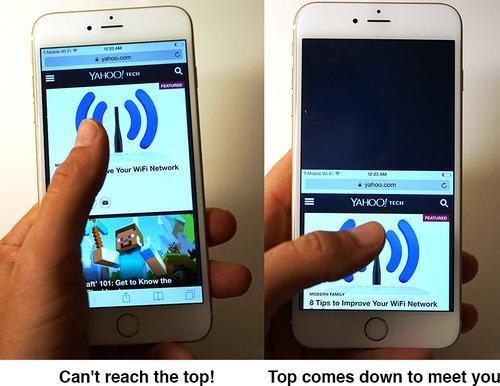
On both phones, if there’s something at the top of the screen, too far away for your shrimpy little thumb to reach, you can touch the home button twice (touch, not click) to make the screen image slide down so you can reach what was at the top.

Screen sliding feature on the iPhone 6

With this larger phone now usable one-handed, what do you really get for all that size? There are some huge advantages to having a huge phone. The obvious one, of course, is more screen. Both models are much better for reading ebooks, answering email, watching movies, surfing the Web, and so on. The iPhone 6 Plus may look a little goofy when you hold it to your ear to make phone calls, especially if you’re small of head, but, wow, is it luxurious when you’re trying to consult a map.

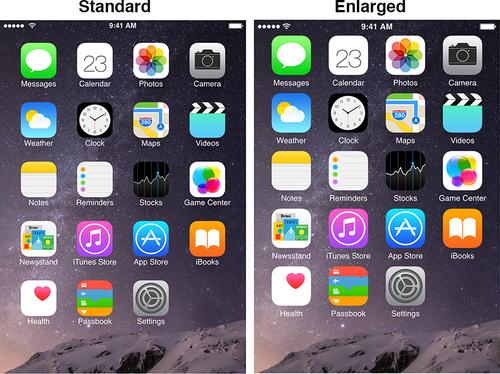
A less-obvious advantage to huge is compensating for over-40 eyes. In Settings, you can specify whether you want your phone to show more, or to show the same thing bigger. Here’s the effect:


iPhone 6 in Standard and Enlarged view

Apple has moved the Adjust Type Size (and Bold Text) controls out of the buried Settings panel where they used to be. They’re now front and center on the Display Preferences screen.
The upshot: With some Settings tweaks, these phones can be godsends for anyone who puts on reading glasses to check her phone.

The gutsInside, Apple has been up to its usual tightening and polishing. There’s a new chip inside that Apple says is 25 percent faster. You wouldn’t notice it without testing the old and new phones side by side. Apps, for example, pop open about a half-second faster on the new phone.
Apple says that the radio circuitry inside can tune into 20 bands of LTE (fast cellular Internet), which means that this phone works on the high-speed Internet networks of many more countries than its rivals. (The Samsung Galaxy S5, for example, gets six bands of LTE.) That’s a perk only if you travel overseas, of course.
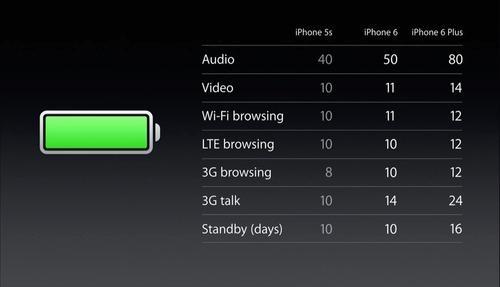
A bigger phone means there’s room for a bigger battery. The iPhone 6 gets slightly better battery life — 14 hours of reported talk time, up from 10; 11 hours of Web surfing on WiFi, up from 10. The iPhone 6 Plus gets substantially better life: 24 hours of talk time, 12 hours of browsing, and so on. You’ll still have to charge the iPhone 6 daily, but the iPhone 6 Plus might actually make it two days on a charge.

Battery life comparison for iPhone 5s, 6, and 6 Plus

The new iPhones still don’t have removable memory cards. But at least you can buy them with more storage than before: They come in 16-, 64-, and, now, 128-gigabyte versions. That’s a heck of a lot of text messages and photos, although it’s weird that the sweet spot — 32 gigabytes — isn’t in the lineup.
The cellular circuitry offers some really cool refinements, although you won’t see the benefits for a while. The iPhone 6 is among the first VoLTE phones (pronounced “VOLty”). It stands for “voice over LTE,” and it means super-clear, rich sound quality — like FM instead of AM — when you’re calling another VoLTE phone.
Unfortunately, VoLTE does nothing for you unless your cellphone carrier has upgraded its network. So far, only T-Mobile has done that nationwide. The other carriers are still experimenting.
The iPhone 6 can also place calls over WiFi. You call people the same way, but you get to use your indoor WiFi router, and you don’t use up any cellular minutes. In fact, if you start a call in WiFi and then walk outside into a cellular LTE area, you don’t even drop the call. To make this work, I had to change two settings in Settings and restart the phone — but it finally did work, and beautifully. These features, too, work only on T-Mobile at the moment.

Apple Pay
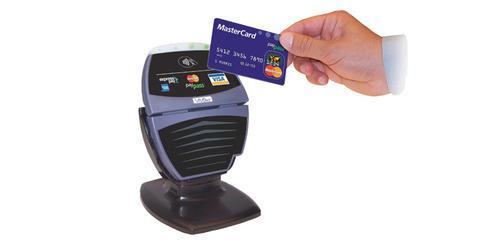
Two years ago, I sought out a 7-Eleven near my house because it had a contactless payment terminal on its cash register:
Contactless payment terminal
I was testing Google Wallet, a feature of some Android phones that lets you pay for things without even pulling out your wallet; you could just hold the phone near that terminal thing. But it took a lot of steps, including tapping in a security code with every purchase.
I recently visited the same 7-Eleven. You know what the guy told me? That the last person he remembered using his contactless terminal was me, two years ago.
Almost nobody pays by phone-tapping in this country, probably because it’s slower and clunkier than just swiping your credit card.
Apple Pay, new in the iPhone 6, will be different, Apple says.
The iPhone 6 models have an NFC chip inside (near-field communications), just like Android phones. That makes them work on those same contactless terminals, of which there are 220,000 across the United States. But you won’t have to turn on your iPhone, open an app, or fool around with credit cards. You just hold your phone (screen still asleep) near the terminal with your finger on the Home button. The screen lights up, shows your preferred credit card, sends you a receipt, and the deal is done.
The Home button, of course, is also a fingerprint reader; no bad guy can steal your phone and then start buying stuff, unless he also chops off your thumb. There’s more security stuff, too; you can read about it here.
Nobody can try out Apple Pay yet, though, because Apple won’t be turning it on until October; at that point, we’ll get an iOS 8 software update that includes Apple Pay features. (One important one: You’ll be able to store your credit card details in the Passbook app just by taking a picture of your physical cards — no typing.)

CameraThe iPhone camera is getting scarily good. Here are a few samples:

Image taken with iPhone 6

There’s now ultra-smooth, ultra-slow motion video (see the watermelon-smashing test in my video, above). There’s phase-detection autofocusing, which compares incoming light from two pixels for fast, precise focusing — or quick, smooth refocusing while recording video (hallelujah!).

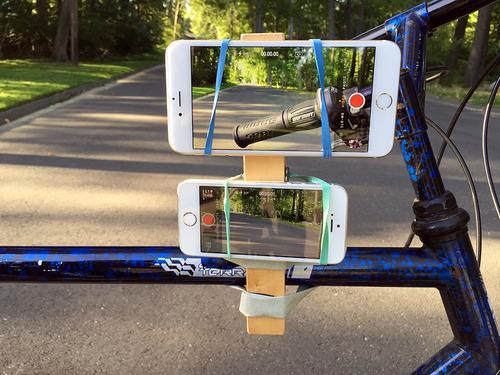
The Plus model has optical image stabilization — the lens jiggles in precise motion to counteract the handheld movement of the phone itself — that works supremely well. To test it out, I fastened an iPhone 6 Plus and an iPhone 5s to a bike on this rig so that they would film exactly the same thing:

iPhone 6 and 6 Plus strapped to a bicycle

Then I rode around rough roads, filming. In my video above, you can see the side-by-side comparison of the two phones’ stabilization.
Free features for allSome of the iPhone 6’s features — design, screen, camera — are truly stunning. But you don’t have to ditch your old phone to get all of them. 
That’s because tomorrow you’ll be able to download the newest Apple software for iPhones, iOS 8. Free.

You’ll be reading a lot more about iOS 8 here on Yahoo Tech, but trust me: Its ratio of useful features to glitzy ones is the highest in years. You won’t find many big-ticket items changed, but you will find loads of truly ingenious touch-ups that make phone life easier and less stressful.
A few of my favorites:
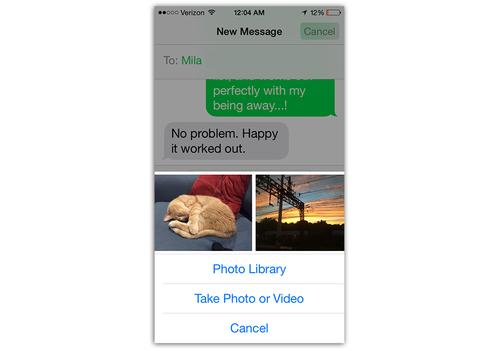
• When you tap the Add Photo button (to send a picture as a text message), you don’t have to burrow into your Photos collection; the last few photos you took present themselves immediately. Apple assumes that often, the photo you want to send is one of the most recent. (It’s correct.)
iPhone 6 Message app sharing photos
• You can use the fingerprint reader (iPhone 5s and 6 models) to do more than unlock the phone now. You can use it to log in to apps instead of remembering a password.
• There’s a Hyperlapse-style time-lapse video option.
• The keyboard is much better. Now you see the three words you’re most likely to type next, hovering just above the onscreen keyboard. (The video above shows it in action.)
• You gain the option to install other companies’ keyboards, like the popular Swype and SwiftKey keyboards.
• Siri’s command recognition (“Set my alarm”) has always been good, but now its dictation skills have been polished to a shine. It’s much, much more accurate — especially if you have an accent — and you see the words as you’re speaking them now.
• You can turn on hands-free, “always listening” mode for Siri whenever the phone is charging (for example, in the car). That is, even if it’s asleep, you can say, “Hey Siri” to make it listen to your next command.

A word to the armies of the faithful The iPhone 6 and iPhone 6 Plus are absolutely terrific phones. They’re fast and powerful and well designed. There’s not a single component that hasn’t been improved. These phones are a delight to behold and to be held.  

But before we part, here’s a question that’s been the elephant in this room for years: If the iPhone is fantastic, does that mean that your phone is no good?
You will hear, for example — and it’s true — that Apple did not pioneer many of the iPhone 6’s big-ticket features. Other companies’ phones were first to introduce bigger phone screens; “always listening” voice commands; wireless payments; predictive keyboard words; phase-detection autofocusing; time-lapse video; optical image stabilizers; VoLTE calling; and so on.
That’s right: Apple has adapted features that first appeared on Android. Just as Google has adapted many features from Apple.

Why does it matter so much? If Apple is praised for doing good work, why does it so enrage Android fans — and vice versa?
The answer, of course, is that cellphones are deeply personal. When you buy a phone, you’re making an expensive bet. You can’t easily switch between the Google and Apple worlds; you’ve invested a lot in accessories, you’ve bought apps, you’ve learned that company’s software conventions. And you never want to think your phone is inferior, because then you might feel inferior.  

So you wind up taking a side in this phone duopoly. You join a very silly — and unwinnable — religious war.
Judge the iPhone not just for what it is, but for the entire world that Apple has built around it: the apps, the music/movie/TV store, the integration with the Mac and iPad, the built-in online services. Does Apple generally do an excellent job with all of this? Yes.
Judge your Android phone the same way. Does it have a huge, open, lively world of apps and community online? Does it have a well-stocked movie/music/TV store? Is most of it well designed — and free? Yes.

Celebrate the iPhone’s excellence, even if you’re not in the Apple fold. And celebrate the best work of Samsung, HTC, and LG, even if you’re not part of the Android family.
Because, in the end, competition is what will make your phone better this time next year, or the year after that. The perpetual refinement of ideas, and the necessity to think up new ones, will benefit you — no matter which army you march with.
Get David Pogue’s columns sent to you by email! Details here. Or subscribe to his weekly videos on our YouTube channel here. Or email him here.

Source: https://www.yahoo.com/tech/when-apple-unveiled-the-iphone-6-last-week-it-97685451544.html

September 10, 2014

iPhone 6 vs iPhone 6 Plus: Apple's two latest smartphones go head to head


Design, screen and camera -from TechRadar, By David Nield

iPhone 6 vs iPhone 6 Plus: Apple's two latest smartphones go head to head
Side by side, how do Apple's big hopes measure up to each other?


It's been a long time since Apple was under this much pressure to impress with a new iPhone. After last year's rather straightforward upgrade, the Cupertino company needed something special, and something to fight back against the moves being made by its rivals.
The iPhone 6 and the iPhone 6 Plus are Apple's counter-punches, but how do they stack up against each other? And which one should you be spending your cash on?

iPhone 6 vs iPhone 6 Plus: Design

The world's iPhones have got thinner and lighter since 2007 but this year Apple has really worked some iPad Air-style magic on the dimensions of its latest handsets. The 4.7-inch iPhone 6 is just 6.9mm thick (shaving another 10% off the already slim 7.6mm iPhone 5S) while the 5.5-inch iPhone 6 Plus has a thickness of just 7.1mm.
The differences over the 2013 batch of iPhones is noticeable, and Jony Ive's team have rounded the corners of the iPhone 6 and 6 Plus to accentuate the slimness of these devices, as well as adding more premium metal to the mix.

iPhone 6 vs iPhone 6 Plus
Rounded edges enhances the slenderness of the two iPhones
The familiar iPhone button layout has been rejigged to allow for this new super-thin frame. Most significantly, the power button moves from the top to the side, while the bands running across the top and bottom of the devices are introduced to improve reception and connectivity.
These are two almost impossibly svelte handsets, with the iPhone 6 offering a slightly thinner design than its more expensive iPhone 6 Plus sibling. If you're a phablet fan or have particularly large hands, the bigger model is the one you'll have your eyes on. The same gold, silver and grey options are available across the board.

iPhone 6 vs iPhone 6 Plus: Screen

The screen is where we find the biggest gap between the iPhone 6 and the iPhone 6 Plus - it's the main distinction between the models. The iPhone 6's display measures 4.7 inches corner-to-corner at a resolution of 1,334 x 750 pixels (or 326 pixels-per-inch).
The 6 Plus ups this to 5.5 inches and a resolution of 1,920 x 1080 pixels (401ppi). These figures put the iPhone 5S firmly in the shade, with its 1,136 x 640 pixel, 326ppi display.
All that means you get more pixels on the 6 Plus spread across a larger area. Website text will be bigger, movies can be viewed from further away, text will be sharper, and so on. It also makes the device harder to hold in just one hand, but the one-handed mode built into iOS 8 should be able to alleviate some of those problems. The weight of either the iPhone 6 or the iPhone 6 Plus shouldn't be a problem, at least.
One extra benefit you get from the additional screen space on the iPhone 6 Plus is the ability to run apps in landscape mode, iPad-style - it's a bonus for anyone who wants more room to work with on their handset. If you use any serious productivity apps on the go then bear this in mind, though compatibility varies between apps.

iPhone 6 vs iPhone 6 Plus: Camera

Both of the new iPhone models feature the same camera lens technology. That means an 8-megapixel shooter (as with the iPhone 5S) but an improved f/2.2 aperture and processing algorithms, so your pictures are going to look better than ever in all conditions. Bear in mind that the iPhone 6 will be easier to handle with one hand when framing shots, but the iPhone 6 Plus will give you more viewfinder screen space to get your image lined up correctly.

iPhone 6 vs iPhone 6 Plus
The iPhone 6 Plus screen goes all the way to 1,080p
The iPhone 6 Plus features optical image stabilization (OIS), while the iPhone 6 only has regular image stabilization. Also built into the iPhone 6 and the iPhone 6 Plus is the NFC technology required for Apple's new mobile payments system, so you can use either phone to make contactless payments when you're out and about. The iPhone 6 is a little more pocket-friendly, which can help if you want to travel light.

iPhone 6 vs iPhone 6 Plus: CPU and RAM

The iPhone 6 and 6 Plus unsurprisingly make the jump to Apple's A8 64-bit dual-core processor, giving it more oomph for your games and video editing. On-board RAM remains constant at 1GB, however, so for most day-to-day tasks you're not going to notice a huge difference in the capabilities of these two phones.
The iPhone 6 and the iPhone 6 Plus match in terms of storage capacities too: for the first time there's a 128GB level to join the 64GB and 16GB options. You can pick any of these three with any handset, though the iPhone 6 Plus is more expensive across the board, so you'll be paying more for the same amount of space in return for a larger device and clearer display.

iPhone 6 vs iPhone 6 Plus: Health

We heard plenty about iOS 8 and HealthKit back at WWDC 2014 in June, and the newest iPhones come with all the sensors and gadgetry required to make the most of these features.
There are no differences between the two devices in terms of the sensors they include - driven by the all-new M8 processor - and the main Health app that they run to keep track of all your vital signs.

iPhone 6 vs iPhone 6L
New sensors will make health monitoring even more effective
Again, the only variation you need to think about is the size: the iPhone 6 is slightly easier to take out on a jog or to the gym, while the phablet-style iPhone 6 Plus is better suited for sitting back on the couch and checking out how well your fitness has improved over the past few weeks. Both give you full access to Apple's new health platform.

iPhone 6 vs iPhone 6 Plus: Battery

The iPhone 6 Plus's larger frame means more room for a bigger battery. It also has more screen to illuminate.
Apple is telling us that its battery lasts for longer than the standard iPhone 6 - 16 days of talk time as opposed to 10, 24 hours of 3G talk time as opposed to 14, 80 hours of audio playback as opposed to 50, and 14 hours of video playback as opposed to 11. Both phones are upgrades on the iPhone 5S in terms of battery life, but the Plus goes even further.

iPhone 6 vs iPhone 6 Plus: Price

If you've read all the way through this article, you'll know that the iPhone 6 Plus comes with some premium features - bigger screen, more pixels, landscape mode - and those features come with a premium price too.
It's $100 more than the iPhone 6 at each price point, with the smaller iPhone 6 starting at $199 for the 16GB edition and the larger iPhone 6 Plus starting at $299 for 16GB. If you splash out on the new 128GB version of the Plus, you're looking at the most expensive iPhone yet.
SIM-free in the UK, the iPhone 6 will set you back £539 (16GB), £619 (64GB) or £699 (128GB). For the iPhone 6 Plus you can add on £80 or more - that equates to £619 (16GB), £699 (64GB) and £789 (128GB). Those prices will be lower on any contracts you sign with mobile operators.
For the US, contracted prices are all we have right now. $199 (16GB), $299 (64GB) and $399 (128GB) for the iPhone 6, and exactly $100 more expensive at each point for the iPhone 6L. Pre-orders open on September 12 with the phones on sale on September 19.

Source: http://www.techradar.com/us/news/phone-and-communications/mobile-phones/iphone-6-vs-iphone-6l-what-will-be-the-key-differences--1263120/1#articleContent

September 9, 2014

iPhone 6 vs iPhone 5S

Versus How does Apple's latest iPhone compare to the last one?

Apple's annual iPhone update is one of the tech events of the year. Last year's iPhone was well-received, but it didn't shine with the same intensity as previous releases. A fresh new handset is an opportunity to deliver something special for the fans, draw in new customers, and prove that the post-Jobs company still has what it takes to dominate.
Smartphones have been growing steadily bigger and better since last year. How can Apple build upon the iPhone 5S? Both phones will run iOS 8, so what will set the iPhone 6 apart? Let's take a closer look at what the iPhone 6 has to offer and examine how it measures up to its predecessor in the areas that really matter.

iPhone 6 vs iPhone 5S: Design

It's no surprise to find that the iPhone 6 has the same reassuringly expensive feel we've come to expect from Apple products, but it marks a real departure from the iPhone 5S in some respects.
It's still a blend of glass and aluminium, but it's much bigger in order to accommodate the larger display. It's also extremely svelte and Apple has rounded off the edges to accentuate that slim feel.
The iPhone 5S is 7.6mm thick and the iPhone 6 has shaved a little off that to come in at 6.9mm, although it looks even slimmer thanks to those rounded edges. The 5S measures 123.8 x 58.6mm and the iPhone 6 is around 14mm taller and 8mm wider.
The iPhone 6 has the same Touch ID home button, but everything else has been softened off and the volume controls have been flattened and elongated to work with the thinner frame. Despite the increased screen size, it's not much heavier than the iPhone 5S.

iPhone 6 vs iPhone 5S: Screen

Average smartphone screen sizes have rocketed in recent years from around three inches in 2009, to 4 inches in 2012, to nearly 5 inches in 2014. The latest wave of Android flagships boast full HD 1080p resolutions and the LG G3 went even further with a staggering QHD screen that hits 538 pixels per inch (ppi).
iPhone 6 vs iPhone 5S
The screen is significantly bigger though no sharper
Apple resisted the trend with the iPhone 5S, choosing to stick with a 4-inch wide screen display with a resolution of 1,136 x 640 pixels. That gives the iPhone 5S a ppi rating of 326. Cupertino always contended that the iPhone was the right size to hold and operate one-handed, but it looks like it has finally bowed to the pressure and gone large.
The iPhone 6 has a 4.7-inch display with a resolution of 1,334 x 750 pixels, giving it the same 326ppi rating. It's not as high as some of the other top smartphones. The screen may be significantly bigger, but it's no sharper than the iPhone 5S.

iPhone 6 vs iPhone 5S: Camera

The megapixel race has created a false impression in the smartphone market. While manufacturers vie for ever-bigger numbers, savvy phone photographers know that great photos are about the whole camera module and how it works with the software, not just the number of megapixels you can pack in.
iPhone 6 vs iPhone 5S
Multiple camera improvements promise outstanding advances in iPhone photography
The iPhone 5S has an 8MP camera with a 1/3 sensor and an f/2.2 aperture. It's fast and it gets great results without any tinkering. Apple has stuck with the 8MP nit for the iPhone 6, dramatically improved autofocus, noise reduction, and image stabilization. The pixel size has also been increased and that means better low light performance.
Despite the modest megapixel rating, the iPhone 6 camera will compete with the best phone cameras on the market right now and it should offer a significant improvement over the iPhone 5S.

iPhone 6 vs iPhone 5S: Battery

With such a boost in screen size the iPhone 6 inevitably needs more power, and so Apple has equipped it with an 1,810mAh battery. That's a fair bit bigger than the 1,560mAh battery in the iPhone 5S, but it's still significantly below your average Android smartphone. For example, the Galaxy S5 has a 2,800mAh battery.
Apple will have done some work to optimize the hardware and deal with power management efficiently, but it has been a weak point for the iPhone 5S, so the iPhone 6 really needs a bit more stamina. Apple claims it equals or beats the iPhone 5S battery on everythingWe'll have to get a real world hands-on to really assess it.

iPhone 6 vs iPhone 5S: CPU / RAM

A vital component in the fight for power efficiency comes in the shape of the new A8 processor. This is a serious jump for the iPhone 6 over the iPhone 5S, from a 1.3GHz dual-core processor to a 2GHz dual-core processor. It's more efficient and it enables a much faster response time and more demanding graphics rendering. Apple says the CPU is 20% faster.
Apple has decided that the 1GB of RAM in the iPhone 5S is sufficient for the iPhone 6.

iPhone 6 vs iPhone 5S: Health

Fitness is big business and it's driving the wearable technology market right now, so it makes sense that Apple has added some new sensors to the iPhone 6 to take advantage of the new Health app in iOS 8.
iPhone 6 vs iPhone 5S
THe new sensors in the iPhone 6 will make it an even more powerful fitness monitor
The iPhone 6 is equipped with a range of sensors to measure your health and fitness, accurately tracking your heart rate, calories burned, and your sleep patterns. It should give a more accurate picture of your health than the iPhone 5S and help you to stay in top condition.

iPhone 6 vs iPhone 5S: Price

The iPhone 6 starts at $199 (around £123, AU$216) for the 16GB version and goes up to $399 (around £248, AU$433) for the 64GB version on a two-year contract. The iPhone 5S has been discounted by $100 to make way for the new release.
We expect you'll be able to pick up the new iPhone 6 for no money down on a two-year contract for around £40 per month in the UK. If you're sold then you can get your hands on the iPhone 6 from September 19. The iPhone 6 also boasts faster Wi-Fi and LTE.
You won't have to wait long for our full iPhone 6 review which will reveal exactly how else it differs from the iPhone 5S.

Source: http://www.techradar.com/us/news/phone-and-communications/mobile-phones/iphone-6-vs-iphone-5s-1264497#articleContent


July 31, 2014

5 Best Free Messaging Apps For Android


It was a strange day when text messages took over phone calls as the primary way to communicate with personal contacts. For those of us without unlimited texting plans, it can be a pain to keep up with friends and family. Need a free way to send messages with your phone? Check out these apps.

Disclaimer:
The “free text messages” in these apps is not the same as SMS messages. None of these apps can send SMS or MMS for free. If that’s what you want, you may be more interested in how to send a free SMS online instead. 


Facebook Messenger

android messaging apps facebook messenger   5 Best Free Messaging Apps For Android


Not so long ago, we compared Facebook Messenger with Google Hangouts, looking to determine which of the two reigns supreme. Facebook came out on top (not unlike the actual social networks themselves), beating out Google in every way except in quality of audio/video calls. Today, Facebook Messenger remains a strong contender in the messaging arena.

What’s good?

The best “feature” of Facebook is its massive userbase. Even if the recipient doesn’t use Facebook Messenger itself, you can still send free messages to them. You can also make calls for free to other Messenger users over WiFi and data (though data charges still apply). The Chat Heads feature, which causes messages to pop up even when you’re using another app, allows you to continue conversations no matter what you’re doing.

What’s not?

No capability for video calling, which could be a huge bummer for those of you who want something similar to Apple’s FaceTime. Not being integrated with the official Facebook app is a bit of an annoyance. In fact, the app being associated with Facebook (not the most privacy-sensitive company out there) is probably this app’s greatest drawback. Requires a Facebook account to log in.


Path Talk

android messaging apps path talk   5 Best Free Messaging Apps For Android
Path Talk is one of the newer messengers to hit the scene, but already it’s making a big splash throughout the community. It claims to be good enough to replace the need for SMS and Facebook altogether, but does it have enough features to back up that claim?

What’s good?

Messaging is free. Path Talk can keep your friends updated on your status, such as whether you’re in transit or low on battery. The interface is familiar and sleek, which is important for day-to-day comfort and ease of use. In addition to text messages, you can send simple voice messages.
But most importantly, Path Talk cares about your privacy. Every message sent with Path Talk is stored on their servers for a maximum of 24 hours before they’re automatically deleted. Worried about text messages being logged? Here’s one answer to that.

What’s not?

Path actually started out as a social network and Talk was its communication feature. Path Talk is the result of Path splitting their Talk functionality away from the social network and putting it out there on its own. For Path users, this is an unnecessary redundancy. Requires a Path account to log in.


LINE Messenger

android messaging apps line   5 Best Free Messaging Apps For Android


LINE is a very well-known messaging app that deserves its reputation. With over 480 million users spanning over 230 countries, it really is international, worldwide, and global in every sense of those words. It’s so good that it’s been labeled “the most downloaded app” in over 50 of those countries.

What’s good?

LINE’s killer feature is the ability to make free calls and send free messages at any time in any place. Calls include voice and video and they’re free both domestically and internationally. There are a few other features of lesser importance, such as the “Timeline” that tracks what you and your contacts have been doing lately as well as the ability to use Emoji. There’s also a LINE Call feature for reaching non-LINE users at a low rate.

What’s not?

LINE messages can only be sent between LINE users, which means you’re out of luck if your social group doesn’t use it. Despite being used all over the world, LINE’s popularity is mostly concentrated in Asian countries. Requires a LINE account to log in.


WeChat

android messaging apps wechat   5 Best Free Messaging Apps For Android


WeChat is an all-in-one communication app that doesn’t have many distinguishing features to set it apart from its competition, yet has built up a massive community of users regardless. It’s not as popular as LINE, but it still blows many other messengers out of the water.

What’s good?

Completely free for sending text messages, multimedia messages, voice calls, and video calls. Group chats can fit up to 100 participants. There’s also the ability to share “moments” with your friends, which is essentially a stream of your photos. Localized to support over 20 languages and certified by TRUSTe to ensure user privacy.

What’s not?

The interface feels a little crowded at times. Requires a WeChat account to log in.


Viber

android messaging apps viber   5 Best Free Messaging Apps For Android


Last year, we noted that Viber on iOS is pretty good. As it turns out, Viber on Android is pretty darn good too. Not too long ago, they released the “Viber Out” feature that lets you make low-cost calls around the world, making it a fantastic option for VOIP. But how does it fare for text messaging?

What’s good?

Not only can you make calls, but Viber is great for sending text, photo, and video messages for free over WiFi and data. Group chats are available for up to 100 participants. Quality is great, there are over 200 million Viber users, and the app has support for over 30 localized languages. Free without ads.

What’s not?

Viber collects names and phone numbers for functional reasons, which is understandable given the nature of the app, but it does raise some concerns regarding privacy and security. Messages can only be sent between Viber users. Requires a Viber account to log in.

Final Thoughts

So which is the best? In terms of raw features and performance, I think it’s a toss-up between Viber and LINE. Both are simple and clean with feature-complete messaging and cheap calling. However, if you care much about privacy, Path Talk‘s commitment to deleting messages from server after 24 hours is enticing.
However, which one is best for you? It really depends on your social circle. None of these can send SMS messages, so if you want to take advantage of free messaging, you should use the one that most of your friends and family use.
Do you use a messaging app rather than SMS text messages? Which one? Are they worth the hassle or have you reverted back to basics? Share your experience with us in the comments below!

Source: http://www.makeuseof.com/tag/5-best-free-messaging-apps-android/

July 28, 2014

Samsung Galaxy S6 release date, news, specs and all the rumors

We know the Galaxy S6 is a long, long way off, but that hasn't stopped the rumor mongers from starting up all kinds of Galaxy S6 business. Some of it has credibility and some of it is pure speculation, so let's try to cut through the crap and stick with what actually seems likely.
ANDROIDPIT samsung galaxy f teaser
The Galaxy F/Alpha may be next on the starting block, but the Galaxy S6 will be very important for Samung. / © @evleaks

Samsung Galaxy S6 release date

This is the easiest one, with the last two Samsung Galaxy flagships being announced in either late February or March and being released to the market in April. The Galaxy S3 popped out a little later in May, but we tend to think that Samsung will try to dominate Mobile World Congress again next year just as they did this year with the S5, giving their 2015 flagship a likely April market start with a public unveiling in the first few days of March.
Considering the Galaxy S5 wasn't as well received as Samsung had hoped though, we might even see a super early appearance at CES in Las Vegas in January if the management floors at Samsung are freaking out at having to give back some of their bonuses due to lackluster S5 sales. As you may recall, the S5 launch was initially supposed to be accelerated to make up for less than spectacular Galaxy S4 sales.
AndroidPIT Galaxy S5 LTE A 2
The Galaxy S5 LTE-A has previewed some of what we might see pushed in the Galaxy S6. / © Takor/Samsung

Samsung Galaxy S6 news

Perhaps the biggest news in terms of what to expect from the Galaxy S6 is that Samsung is definitely feeling the pinch, not just financially but also in the popularity stakes. The S4 failed to impress the masses and the S5 performed much the same, even if we still think it's a solid offering, as you can read in our Galaxy S5 review. The problem is that the general consensus is that Samsung is getting lazy, not innovating and pumping out the same micro-variations one after the other. Considering Samsung are set to post their biggest quarterly loss in two years, it seems very likely that Samsung are going to go all out in the Galaxy Note 4 and Galaxy S6 to regain that market share, profit margin and reputation as a serious market leader.
Samsung Projected Profits Q2 2014
Whichever way you cut it, Samsung has to step up quickly to fix this slide. / © Korea JoongAng Daily

Samsung Galaxy S6 specs

Without giving credibility to unfounded rumors we can do a bit of logical extrapolation on this front. A 64-bit processor is guaranteed and we will surely get two versions again, one Snapdragon powered and another with an octa-core Exynos chip to power what we hope with be Android 5.0 with a refined version of TouchWiz. The Qualcomm processor will likely be the Snapdragon 808, depending on when it will be commercially available, as the Snapdragon 805 has already started to appear in devices restricted to South Korean markets and the Snapdragon 810 may still be a bit too far away for mass production volumes. 3 GB of RAM seems certain but you won't be able to keep the rumor hounds away from higher numbers, especially considering the next Android version will support up to 4 GB of RAM. Let's wait and see on that one.
The camera will likely get a bump in megapixels, perhaps to 20 MP, from the 16 MP camera we've seen in the Galaxy S5. The Galaxy S6 will definitely get Optical Image Stabilization as we were expecting that to debut in the S5 but are now holding out for the Note 4. Battery performance will be outstanding if the Galaxy S5 is anything to go by. Even if Samsung bumped the capacity up to 3,000 mAh and stuck with their existing battery management tech we'd be very happy, so any additional improvements between now and then will be very eagerly awaited. We're interested to see just how committed Samsung are to the dedicated home button and finger scanner combo, but I'd say we'll see a repeat of both with the heart-rate monitor tacked on the back as well for even more wearable integration.
samsung galaxy F
The camera has always been one of Samsung's strong points. / © Samsung
The screen can't get much larger than it currently is in the Galaxy S5 at 5.1-inches, and it seems unlikely that Samsung would want to start encroaching on their phablet territory by pushing it to 5.5 inches. A QHD display seems a certainty though, considering the Galaxy S5 LTE-A has already appeared with a 2K display and the battery performance is reportedly even better than the Galaxy S5 with Full HD display. Samsung has beaten their chest publicly already about UHD displays (3840 x 2160 pixels) in 2015 but this seems more likely to be reserved for the Galaxy Note 5. There's no reason to believe that Samsung would abandon its successful Super AMOLED display tech in the S6. One thing we are looking forward to is smaller bezels, which we've already caught a glimpse of on the Galaxy S5 LTE-A.

Samsung Galaxy S6 rumors

This section could get very, very long so I'll keep it brief and migrate rumors that firm up as time goes by to the sections above. We already know that the Galaxy Note 4 is more than likely going to be Samsung's debut device with a curved OLED display. We've covered more Note 4 news and expectations in our Galaxy Note 4 release date, news, specs and rumors article. The interesting comes down to whether Samsung will bring that same tech to their flagship smartphone? I really can't say at this stage, but I expect Samsung will have two versions being prototyped until there's some kind of public response to the Note 4. That may seal the deal for whether or not we see curved in the Galaxy S6's display.
samsung iris reader
We already know that Samsung is invested in iris scanning tech, but will it appear in the Galaxy S6? / © PatentBolt
The iris scanner rumors just won't die, and there's every possibility that the Note 4, the Galaxy S6 or even both will sport an iris scanner. Samsung has confirmed they were working on the tech, but costing, manufacturing and precision need to be just right to implement it. I suspect Samsung are still stinging from the public perception of the finger scanner in the S5. Nevertheless, it seems unlikely that Samsung would abandon that tech after only one go around the market place. Other rumors about the Tizen platform, graphene and a metal body are nothing more than that right now. Keep in mind too, though, that the Galaxy Alpha/Galaxy F is nearing its time in the spotlight and Samsung are now obviously committed to releasing multiple versions of their flagship at every possible opportunity.
What are your expectations for the Galaxy S6? What do you think Samsung needs to do to get back on top?

Source: http://www.androidpit.com/samsung-galaxy-s6-release-date-news-specs-features

July 25, 2014

The Pirate Bay Goes Mobile With New Site


Photo
The Pirate Bay’s new mobile website offers the same features as the desktop site.Credit Screenshot via The Pirate Bay


People can complete all sorts of tasks with a smartphone now — order tickets, check the weather or call a taxi. Starting Thursday, people will also be able to easily steal copyrighted content on their mobile phones.
The Pirate Bay, one of the most popular sites on the web for illegally downloading copyrighted material, announced that it is releasing a mobile-centric version of its website, called The Mobile Bay.

The new site offers the The Pirate Bay’s practically limitless list of links to material, and the site’s full search capabilities, on a clean and concise layout for mobile phones. People can reach all the same content available on the desktop website, including movies, e-books, music and television shows.

While the mobile site is easy to navigate, it comes with the same sort of advertising that litters the desktop site. There are a few 1990s-style pop-ups, too.
The mobile site was first reported by TorrentFreak, a blog covering piracy and file-sharing, which noted that this was one of the biggest changes to The Pirate Bay since it opened for business over a decade ago.

The Pirate Bay team told TorrentFreak in an interview that the update on Thursday was the first in a series of new features that would make it easier for people to discover content. “The TV, movie and music sections on The Pirate Bay will each get their own dedicated sites,” TorrentFreak reported.

The Pirate Bay is also working on a new feature called “RSSbay,” its organizers said, which will let people create personalized RSS feeds to automatically download torrents from remote locations.

The Pirate Bay has been in a constant legal battle with authorities around the world since the site began, but the people behind the service almost always manage to stay one step ahead of government agencies.

Some media companies have acknowledged using pirating sites, including The Pirate Bay, to their benefit. Last year, a senior Netflix executive said the company used such sites to determine the genre of new shows that viewers might be interested in, and the type of shows Netflix should produce or license. Time Warner’s chief executive, Jeffrey L. Bewkes, also said that pirated content could be “a tremendous word-of-mouth thing.”

While authorities and some entertainment companies have tried to stop The Pirate Bay from growing, the site has doubled its traffic since 2011, according to internal numbers about site use that Pirate Bay organizers released this month.

Source: http://bits.blogs.nytimes.com/2014/07/24/the-pirate-bay-goes-mobile-with-new-site/?_php=true&_type=blogs&partner=rss&emc=rss&_r=0

July 10, 2014

Mobile security: Apps to protect Android devices


There are hundreds of free and paid security apps for Android phones and tablets. But many of those offerings are of uncertain quality.
Here’s a sampling of some of the best software for keeping Android devices free of malware, managing passwords, locking up your data, and more.

Android needs third-party security apps

If you have an Android phone or tablet, there’s good news and bad news.
The good news: You’ve picked the world’s best-selling mobile operating system. Something like 70 percent of all new phones and tablets run Google’s OS. That’s a strong incentive for software developers to build cool applications for the platform.
The bad news: Android’s open architecture and popularity have made it a favorite target for malicious hackers, thieves, and other criminals.
Android’s built-in security features have never been strong, and even the latest version (4.4.4, as I write this) offers only modest safeguards for your personal data and communications. For that reason, all Android devices need third-party security apps in order to be safe. (Virtually no operating system, by itself, is safe from malicious hacking.)
Fortunately, there are plenty of Android security tools to choose from. The Google Play Store has all manner of free and commercial apps. Note, however, that some are junk — amateurish software that could cause crashes, hangs, slowdowns, or other problems.
Other tools seem to work fine — until you look at them more closely. Take, for example, some “free” virtual private networking (VPN) apps, which provide some Web-browsing anonymity (especially on public Wi-Fi) by routing your data through the VPN provider’s servers. If the service is free, how does the provider pay the bills for running the servers and buying Internet bandwidth? How does the provider keep the lights lit? A cautious person might suspect that the company is mining user data.
That said, there are many reputable companies with excellent Android security products. Some are familiar and well-respected names you might recognize from the Windows world, while others are relative newcomers who develop products exclusively for mobile operating systems.
Below, I’ll provide summaries of well-regarded security apps — some paid, others free — in five essential categories:
  • Antivirus/anti-malware suites
  • Password management and encryption
  • Lost or stolen device recovery
  • VPNs
  • Secure file-wiping (to delete personal data when you’re selling or trading in your device)
(Note: The following information applies equally to all portable Android-based devices, including tablets. But for brevity, I’ll use “phone” throughout the rest of the article.)

Security suites: The absolutely must-have apps

The cornerstone of Android safety is a good security suite from a reputable vendor. Even a single, well-designed security app can provide coverage against a wide range of attacks and dangers.
Lookout Security & Antivirus (Google Play page; publisher’s website) is a typical example of a reputable suite in the security category. It offers a comprehensive selection of tools (see Figure 1) — some free and others paid. (I’ll list other brands in a moment.)

Lookout Security

Figure 1. Lookout Security & Antivirus offers basic security features for free; additional features are in its paid version.
Lookout’s free version provides:
  • Anti-malware: It gives automatic, always-on protection from viruses, adware, spyware, and other types of malware.
  • Lost/stolen phone recovery tools: A map shows you the phone’s location (see Figure 2), viewable via a free, private account on the Lookout website.
    The Scream option sounds a loud alarm, even if the sound was turned off. The alarm might scare a thief into abandoning the phone, but it can also help in more mundane situations such as when you simply misplace the phone at home or the office. The sound will lead you to the phone’s location.

    Lookout scream feature

    Figure 2. Lookout can help you locate and recover a phone, whether it's been stolen or just lost in the sofa cushions.
  • Signal flare: This option saves your phone’s location when the battery is about to run out. It might help you find the phone once it’s gone dead.
  • Automatic backups: Your contacts are saved to your private account on the Lookout website. You can download the contacts to your PC or to a new or secondary device.
  • Multiple device support: The free account is limited to two devices.
Lookout’s paid version adds:
  • Expanded Theft Alert features: You can have the phone send an email to your PC in the following circumstances:
    1. The phone’s unlock passcode is incorrectly entered more than three times in a row.
    2. The SIM card is removed.
    3. Airplane mode is enabled or the device is turned off (two tricks thieves might try to avoid detection), or a thief tinkers with the phone’s Device Administrator mode.
    Lookout’s notification email includes a map of the phone’s location when the Theft Alert was generated plus a theftie — a photo of the person holding the phone at the time the alert was triggered, taken automatically with the phone’s built-in camera. The same Theft Alert information is posted on your private account on the Lookout website.
  • Privacy Advisor: This lets you manage the permissions and personal data that each app on the phone can access.
  • Remote lock and wipe: In the event the phone is stolen and not recoverable, you can remotely lock it and erase your personal data.
  • Safe Browsing: This option alerts you when you visit websites known to harbor malware or other security threats.
  • Photo and call-history backups: Use this tool to automatically clone photos and call data to your private Lookout account.
  • Multiple device support: This lets you manage up to three devices from a single Lookout account.
You can test-drive Lookout’s paid version for up to two weeks at no cost; after that, it’s a modest U.S. $3 per month or $30 per year.
Again, Lookout Security & Antivirus is just one example of a typical, comprehensive, Android security suite. There are other suites with similar features.
For example, Avast Mobile Security & Antivirus (Google Play page; publisher’s site) doesn’t take “thefties” of would-be phone thieves, but its paid version does offer Geo-Fencing — the phone performs a specified action (lock, siren, send location, and so forth) if it passes outside a perimeter you’ve established, such as a set distance from your table in a café. It also offers App Lock, which lets you passcode- or gesture-protect access to specified apps.
Avast Mobile Security & Antivirus is available in both free and paid versions; after a 30-day free trial, the premium edition costs $2 per month or $15 per year.
Bitdefender is another name that might be familiar to Windows users. Its Mobile Security & Antivirus (Google Play page; publisher’s site) is also available in free and paid versions. Its features are similar to Avast’s, but it tries to differentiate itself with aggressive pricing. After a two-week free trial, the paid version costs only $1 per month or $10 per year.
You can download Kaspersky Internet Security (Google Play page; publisher’s site) for free. You must register with Kaspersky for the paid edition’s 30-day free trial; it’s $15 per year to keep. Two advanced features are Call & Text Filter, which helps block unwanted calls and texts, and a theftie option similar to Lookout’s; it can automatically take a photo of a would-be thief.
Again, you can find many more security suites, apps, and options by visiting the Google Play Store and using the search string “security” or “security suite.”

Password management and data encryption

It’s likely you’ve already been affected by one or more of the recent and massive corporate hacking incidents such as the data thefts at Adobe, Target, eBay, and others.
One of the best ways to protect yourself against these increasingly common hacks is to use a unique password for every site. (See the Oct. 17, 2013, Top Story, “Protect yourself from the next big data breach.”)
Remembering potentially dozens of passwords sounds burdensome, especially on a phone or tablet where typing can be difficult. But password-management software makes it vastly easier. The software does the hard lifting for you, remembering all passwords and storing them in a securely encrypted database.
If you’re using password-management software on your PC, there’s a good chance you can find an Android equivalent. That can greatly simplify setup and use because the software will already be familiar. It might even be able to access and use the database of passwords on your PC, saving you from the chore of re-entering everything again.
For example, RoboForm (possibly the world’s most popular password manager) has a free Android version (Google Play page; publisher’s site) that connects with an existing desktop RoboForm Everywhere account ($10 per year). Android’s built-in browser (a version of Chrome) doesn’t work with third-party password apps, so RoboForm comes with its own mini-browser that you can use to sign in to password-protected sites. You can also use the RoboForm app with Android editions for Dolphin or Firefox.
Similarly, there are two free Android versions of the popular, open-source, desktop Keepass Password Safe. One is called Keepass2Android Password Safe (Google Play page; publisher’s site) and is shown in Figure 3.

KeePass2Android

Figure 3. As with other password managers, enter a site's password once and Keepass2Android will then remember it for you.
The other Android version of Keepass is called KeepassDroid (Google Play page; publisher’s site). Both versions operate much like the desktop version of KeePass, and they share the same database format.
If desktop commonality isn’t an issue for you, the free/donationware, open-source Universal Password Manager (Google Play page; publisher’s site) might be of interest.
You can find many similar apps by using the search terms “password manage” and “manage password” (though seemingly similar, the two searches yield slightly different results).

Apps for recovering lost or stolen phones

As already mentioned, many of the best Android security suites (Lookout, Avast, Bitdefender, Kaspersky, and so forth) come with robust tools that can help you find and recover a lost or stolen phone — typically by sending you a map of the phone’s location, letting you wipe or lock the phone, and even snapping a photo of the thief.
But most versions of Android also include basic, built-in features that can reconnect you with your phone — or wipe it clean. For example, Android 4.1 and higher includes the Device Manager app (see Figure 4) that can, when linked to your Google account, locate your phone on a map and let you remotely ring, lock, or erase it. The specific details are explained in the Android Device Manager support page

Android Device Manager

Figure 4. Android's built-in Device Manager lets you locate, ring, lock, or erase a lost phone remotely from your Google account running on another device (shown above).
Older versions of Android — 2.2 and higher — allow for basic remote wiping, as explained on the Remote Wipe a Mobile Device support page.
Those tools are better than nothing, but third-party apps such as the following can do more — for example, take photos of a would-be thief. Visit the associated websites for full details.
  • Where’s My Droid (Google Play page; publisher’s site) offers basic capabilities for free (see Figure 5) plus extended features — such as remote lock — for $4. 
  •  
    Where's My Droid

    Figure 5. Where's My Droid offers good lost device–recovery features, including a GPS-based locator.
  • AndroidLost (Google Play page; publisher’s site) is completely free, though the program’s author accepts voluntary donations.
  • Locate My Droid (Google Play page; publisher’s site) also is free, with voluntary donations accepted.

Virtual private network apps for Android

A virtual private network (VPN) connection can let your phone operate securely, privately, and anonymously from any site — even from public hotspots in coffee shops, airports, restaurants, hotels, and so on.
A VPN uses encryption to establish a secure, private channel between your PC and the VPN provider’s server. That server, in turn, then connects to whatever website or other server you want to reach (see Wikipedia’s VPN article).
But you really want to trust the VPN provider, because it’ll potentially have access to your unencrypted data. Most legitimate VPN services recover their costs by charging a modest fee based on your data usage — or by displaying ads as you use their service. I think this is an important consideration, because a provider with a viable revenue stream should never feel tempted to mine your data stream for usernames, passwords, credit-card numbers, and so on.
Here are some of the better regarded Android VPN services and their associated client software:
  • VyprVPN for Android (Google Play page; publisher’s site) — three-day free trial; $7–$20 per month thereafter, depending on plan details
  • ExpressVPN (Google Play page; publisher’s site) — one-day free trial; $8–$13 per month thereafter
  • IPVanish (Google Play page; publisher’s site) — one-week, money-back guarantee; $5–$8 per month thereafter
  • Hotspot Shield: VPN Proxy WiFi (Google Play page; publisher’s site) — free, ad-supported version; ad-free Elite version, $30 per year.

Apps for thoroughly sanitizing Android devices

No, this is not dipping your phone into a glass of Lysol. When it’s time to sell or trade in your phone, all recent-vintage Android-based models let you easily restore the original factory configuration. That makes it harder — but not impossible — for the next user to recover traces of your data left behind in the phone’s flash memory.
In fact, completely erasing flash memory is technically difficult and could require special tools and extra steps. (For more info, see the Sept. 13, 2012, Top Story, “Rethinking the process of hard-drive sanitizing.”)
If your phone uses a removable SD memory card, scrubbing it is relatively easy. The best bet is to remove the card, connect it to your PC, and use the tools described in the aforementioned Top Story. (Or, if you can, simply keep the SD card, possibly reusing it in some other device you own.)
But when the flash memory is built into the phone, it’s harder to get at — and harder to erase. These apps can help:
  • SaniDroid (Google Play page; publisher’s site) — $1 
  •  
    Sanidriod

    Figure 6. Special-purpose apps such as Sanidroid can help remove lingering traces of personal data from a phone you're selling or trading in.
  • iShredder 3 (Google Play page; publisher’s site) — free and Pro versions ($3.50); see site for details
  • Secure Wipe (Google Play page; publisher’s site) — free
  • SHREDroid (Google Play page; publisher’s site) — free (doesn’t work on Motorola devices)
  • File Shredder (Google Play page; publisher’s site) — free (works only on a file-and-folder basis; reportedly, whole-phone erasure in a future paid-for version)

Security tools can help keep you safe

Mobile devices such as phones and tablets are wonderfully convenient, but they also pose huge security risks. Not only are these devices subject to the same kind of malware and hacking that your Windows PC must cope with, they’re also far more likely to be lost or stolen than your desktop or laptop system.
But with one good tool from each of the categories above, your portable Android device can be as safe and secure as current technology allows. None of these products will dent your pocketbook, so protect yourself!

Source: http://windowssecrets.com/top-story/mobile-security-apps-to-protect-android-devices/