June 12, 2022

The Best Torrent Sites That Still Work in January 2022


1. The Pirate Bay — The Most Well-Established Torrent Site
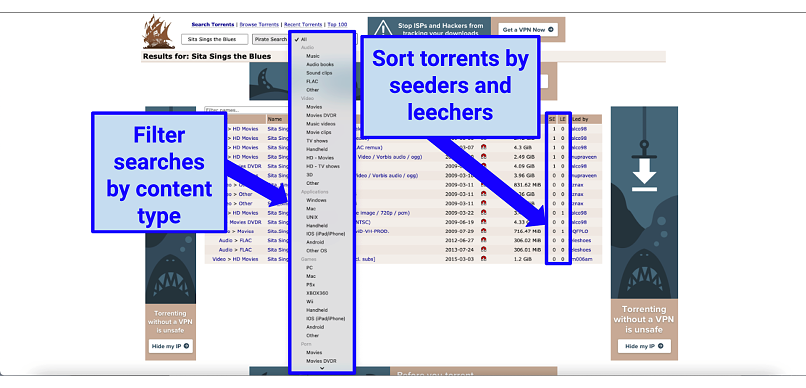
Graphic showing Pirate Bay interface

  • Year founded: 2003
  • Mirror sites/alternate URLs: thepiratebay.org, tpbpirateproxy.org, proxybay.xyz, thepirate-bay.org, thepiratebay10.org, thepiratebay.rocks, thepiratebay.vip, pirateproxy.id, ThePirateBay.red, Tbp.tw, TPBMirror.org
  • Alexa ranking: 224
  • Banned locations: United Kingdom, Spain, Singapore, Argentina, Netherlands, Malaysia, Australia, Austria, Norway, Finland, Sweden, China, Denmark, France, Iceland, Italy, India, Saudi Arabia, Indonesia, Iran, Ireland, Kuwait, Russia, Sri Lanka, Germany, Turkey, United Arab Emirates, and Belgium
  • Instant download support: Yes

The Pirate Bay is one of the best-known torrent sites globally, with up to 60 million visitors a month. It is available in 35 different languages, and has held the title for the world’s best torrent site since 2018. Even though it was temporarily shut down in early 2020, it’s still thriving and has avoided numerous takedown attempts over the years. The exact number of torrenting files on the site is estimated to be in the millions.

What I liked most about The Pirate Bay was the site’s focus on safety. It verifies uploaders and indicates whether torrents are trustworthy or not. While you can’t guarantee protection from malware and spyware, this verification reduces the likelihood of infection. I also liked its filtering system, too, where I could specify torrents by file format, quality, and console. This saved me a lot of time when searching for Sita Sings the Blues.

Another benefit is that most torrents have at least a few seeders for faster downloads due to the large community (including even old and obscure torrents). In addition, The Pirate Bay has a simple, easy-to-navigate interface. When I searched for a torrent, I could filter my searches by file format, quality, and gaming console (for games), which meant that I didn’t need to assess each torrent individually to find the right one.

A minor con of The Pirate Bay is that it displays a few ads on the site. But you can always use a trusted ad blocker, or even better, protect yourself while downloading torrents with a VPN that comes with an ad blocker built in.

Check out The Pirate Bay

2. RARBG — Verifies All Torrents to Ensure High Quality
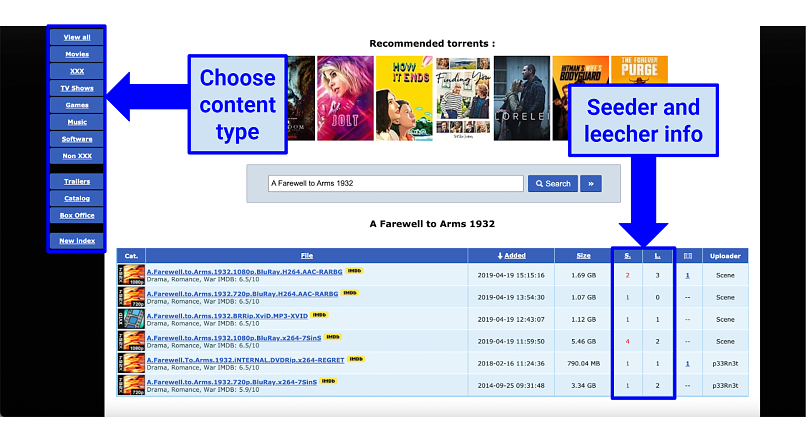
Graphic showing RARBG homepage

  • Year founded: 2008
  • Mirror sites/alternate URLs: 185.37.100.122, rarbg.is, rarbgprx.org/index70.php, rarbgunlock.com, rarbgunlock.com/index70.php, rarbgmirror.com, rarbgmirror.com/index70.php, rarbgmirror.xyz/index70.php, rarbgmirror.org/index70.php, rarbgaccess.org/index70.php
  • Alexa ranking: 7,542
  • Banned locations: The UK, Bulgaria, Portugal, Denmark, Morocco, Saudi Arabia, Pakistan, Indonesia, and Ireland
  • Instant download support: Yes

RARBG is known for high-quality torrents, thanks to its group of moderators and active community. The site verifies each torrent that gets uploaded to weed out all the bad ones effectively. But this also means that its library is smaller than other sites, even though it gets updated regularly.

Thanks to its personalized user experience, I found it easy to find and assess torrents. Once I found a torrent, I could hover over the file to see some screenshots, album art, and posters that popped up. I could also filter torrents by size, date added, or the number of seeders and leechers by clicking on the respective icons in each category. Although it does have an unnecessary amount of pop-up ads, so it's a good idea to use an ad blocker. The easiest solution is to use a VPN with ad blockers built-in to protect your downloads and block all the ads at once.

The site also displays the top ten rankings for each category, and users can add reviews to torrents, too — so you know the files are legitimate. It also lets you use the site as a guest or as a registered member, which makes it a hybrid between a private and a public torrent site.

But since the site verifies all torrents, it has caught the attention of many authorities, which have tried to shut it down. Luckily, no attempts have succeeded.

Check out RARBG

3. 1337x — Huge Torrent Library With Great Variety
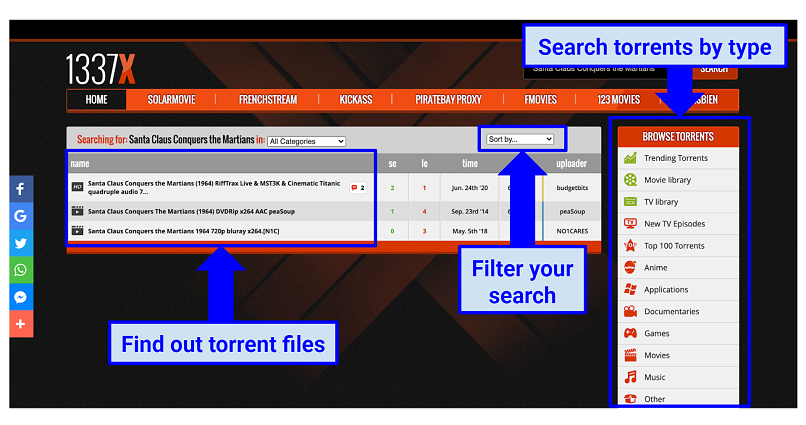
Graphic showing 1337x homepage

  • Year founded: 2007
  • Mirror sites/alternate URLs: 1337x.st, x1337x.se, 1337x.gd, 1337x.is, x1337x.ws, x1337x.eu.
  • Alexa ranking: 257
  • Banned locations: Australia, the UK, Austria, and Ireland
  • Instant download support: Yes

1337x is a well-known torrent website with over 53 million monthly visitors and a vast selection of high-quality torrents. Most of its torrents are movies, TV shows, and music, although it has several games as well. It has been around for a long time and its community is very active, meaning that its torrents are regularly updated every few hours.

I found its user interface is simple and informative, as it includes the technical details of each torrent and other useful information. For example, it’ll display whether a show or movie has been nominated for an award or not, and the number of times it’s been downloaded (this can tell you whether it’s a good quality torrent or not). This is a massive improvement compared to a few years ago when the user interface was slow and clunky.

1337x has very few ads and it shows some dedication to protecting your privacy — it only makes money through Bitcoin donations, for example.

That being said, it can only do so much to protect you — you’re still at risk of third parties spying on your online activity when browsing any torrenting site. A VPN will add another layer of security by hiding your IP address and encrypting your traffic, so your online movements remain anonymous.

Check out 1337x

4. YTS — Best Torrent Site for High-Quality Movies
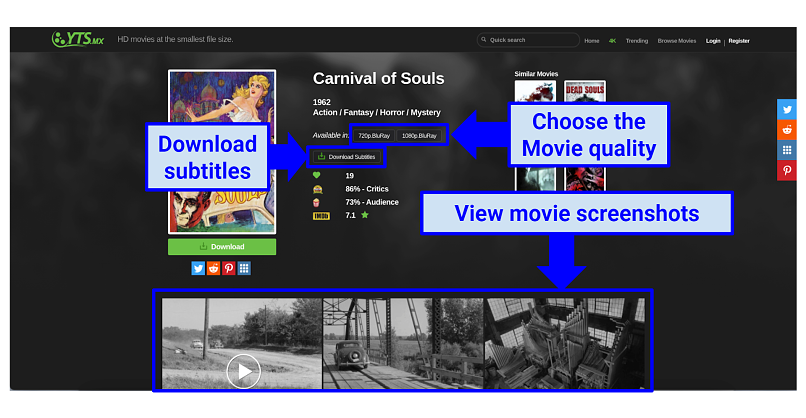
Graphic showing YTS homepage

  • Year founded: 2011
  • Mirror sites/alternate URLs: yts.am, yts.gd, yts.pm, yts.gm, yts.unblocked.mx, yts.unblockit.app, ww.yts.vc, yts.lt
  • Alexa ranking: 696
  • Banned locations: Ireland
  • Instant download support: Yes

YTS (sometimes known as YIFY) is arguably the best torrent website for high-quality movies, with over 75 million users worldwide. The site contains almost 30,000 titles, many of which come with subtitles and are available in 1080p. Its files are small and don’t compromise quality, so it’s excellent for all bandwidth levels.

It also has a clear and simple interface that reminds me of Netflix. When I searched for the film Carnival of Souls, it provided the tech specs, synopsis, and IMBD ratings of the film, along with a list of similar films and film pictures. But the site has been the target of several copyright infringement lawsuits recently, which raises concerns.

Since YTS specializes in movies, it lacks other types of content, so you’ll need to go elsewhere for music, games, or software. Also, it has annoying pop-up ads, which can jeopardize your privacy. However, the amount of ads has reduced over the years. If you would like to avoid ads altogether, I suggest using a reliable ad blocker. I use a VPN that comes with a built-in ad and malware blocker (CyberGhost). That way I don't have to endure the ads and I'm anonymous while downloading torrents at the same time.

Check out YTS/YIFY

5. Torrentz2 — Optimized Torrent Search Engine With a Focus on Music
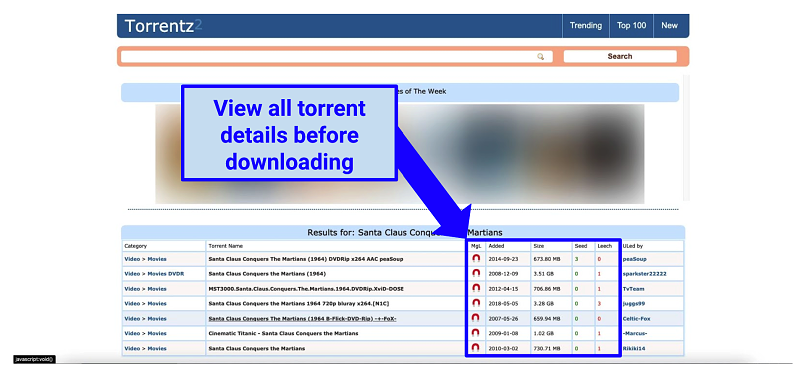
Graphic showing Torrentz2 interface

  • Year founded: 2016
  • Mirror sites/alternate URLs: torrentz2.is, torrentz2.me, torrentz2eu.org, torrentz.eu, torrentzeu.org, torrenteu.org, torrentz2.cc, Torrentzwealmisr.onion
  • Alexa ranking: 21,682
  • Banned locations: None
  • Instant download support: No

Torrentz2 (formerly known as Torrentz) is a torrent search engine that uses your search query to index torrents from over 90 torrent download sites. From your search results, you can go to one of the sites to download your torrent by clicking on the magnet link. If your favorite torrent site doesn’t have the file that you’re looking for, then Torrentz2 is a great alternative.

Even though you can download all kinds of torrents on Torrentz2, it’s mainly used for music. It gives you access to an extensive music library with an impressive choice of genres but isn’t great for other media types. When I tested it, I had to spend a few minutes looking for the file I was after because the site lacks filtering options. However, you can filter torrents to see if they’re verified or not, which is convenient.

Torrentz2 used to have a lot of pop-ups with fake and misleading links but, its most recent update has fixed a lot of bugs to make the site safer.

This offers a degree of protection, but your torrenting activity can still be exposed to prying eyes. However, a VPN will enhance your safety by encrypting and rerouting your traffic through a different IP address.

Check out Torrentz2

6. EZTV — Great Torrent Site for TV Shows
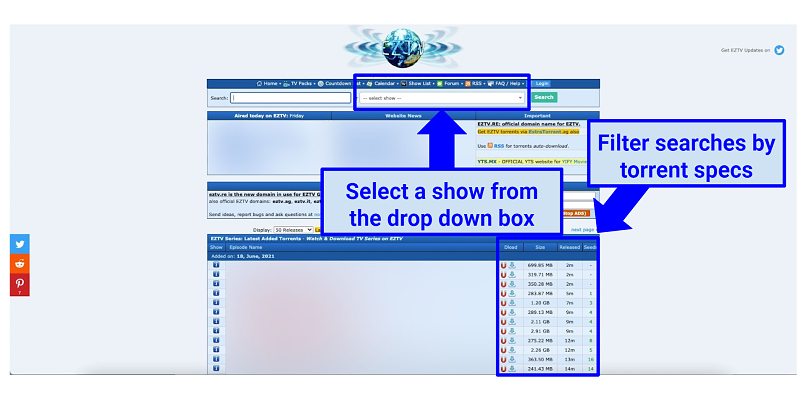
Graphic showing EZTV homepage

  • Year founded: 2015
  • Mirror sites/Alternate URLs: eztv.unblocked.krd, eztv.tf, eztv.unblockall.org, eztv.yt, eztv.ag, eztv.red, eztv.unblocked.mx, eztv.unblocked.bet, eztv.unblocked.llc, eztv1.unblocked.is, eztv1.unblocked.si
  • Alexa ranking: 3,163
  • Banned locations: The UK, Ireland, and Australia
  • Instant download support: Yes

EZTV is known for its selection of TV shows, which are in HD or 1080p. It may not have an extensive library like The Pirate Bay or 1337x, but that’s what happens when you specialize in a particular type of content. It has a convenient “live countdown” list for new releases and a large collection of TV shows, with more old shows than new ones.

Just be aware that new releases tend to be under copyright, so downloading them is illegal and can land you in serious trouble. I strongly advise against it. EZTV also copies content from other torrent sites, which could get you in trouble unknowingly.

That being said, EZTV has a handy drop-down search box — no matter what I searched, I always got results. However, its interface is pretty old and unappealing, and the large number of ads were intrusive.

Also, I found it pretty annoying that you can’t download full seasons in one go. You need to download episodes separately, which is very time-consuming. And if you're using a VPN for added security while you torrent, it might slow your downloads down even more. Luckily, I could download episodes at top speeds with ExpressVPN. It's lightning-fast, so I didn't notice any effect when I tested it with EZTV.

Check out EZTV

7. Limetorrents — Huge Torrent Library With Tons of Variety
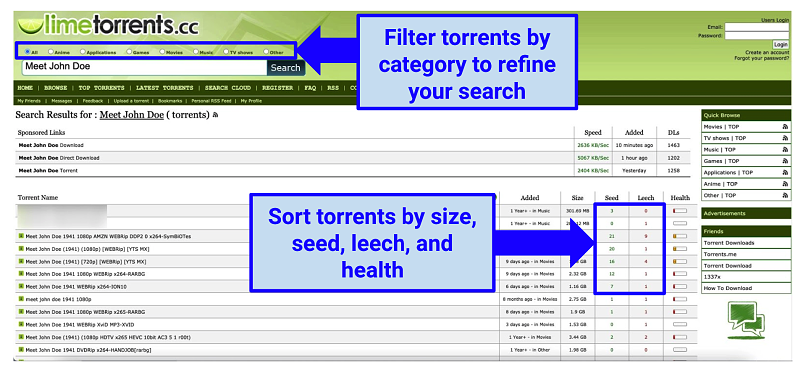
Graphic showing Limetorrents interface

  • Year founded: 2009
  • Mirror sites/alternate URLs: limetorrents.co, limetorrents.asia, limetorrents.zone, limetor.com, limetorrents.in, Limetorrents.info, limetor.club, limetor.pro
  • Alexa ranking: 3,001
  • Banned locations: France, Australia, and the UK
  • Instant download support: Yes

Limetorrents boasts a massive torrent library with over 10 million torrents across all media types, and attracts more than 20 million users every month. Searches on the site always yield plenty of results so you won’t be disappointed. Its library is even larger than The Pirate Bay’s library, which is very impressive.

You can download torrents of movies, games, music, apps, and TV shows, and the site shows the top 100 torrents available for each category. This top 100 list focuses on newer releases — which means most of them are under copyright and illegal to download — so be careful when using this list to make sure you're not breaking any laws.

Otherwise, Limetorrents has tons of other files which are in the public domain that you can download safely. I also found its interface to be sleek and visually pleasing and liked being able to filter torrents by their health or verification status.

But having millions of torrents has its drawbacks, as quite a lot of them are fake. Also, irritating ads are pretty common on the site.

Check out Limetorrents

8. Torlock — Good Site for Safe Torrent Downloads
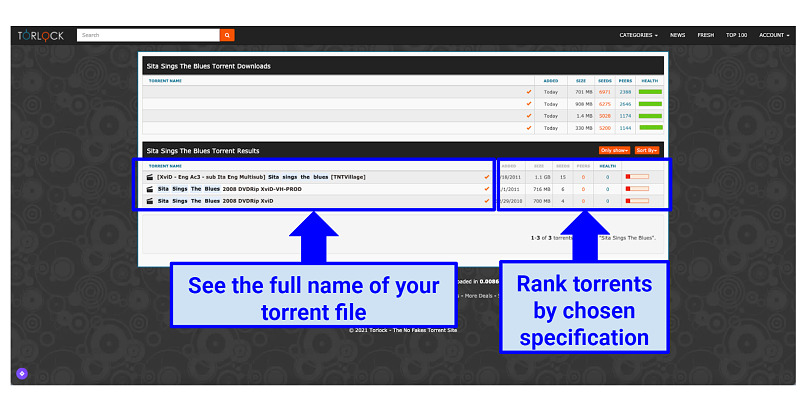
Graphic showing Torlock homepage

  • Year founded: 2010
  • Mirror sites/alternate URLs: torlock.unblocked.krd, torlock.unblocked.mx
  • Alexa ranking: 21,900
  • Banned locations: The UK, India, and Australia
  • Instant download support: Yes

If you’re concerned about downloading unsafe torrents, then consider using Torlock. The site pays its users $1 for every fake torrent reported, which shows its commitment to your safety. It’s also one of the few torrent sites that still uses its.com domain name, which means it’s well established. In particular, it has a lot of music, eBooks, and anime series in its library.

Its homepage displays the most recent and popular torrents for each category. However, new releases are usually under copyright, which means downloading them is illegal — so beware. I liked that the site also displays all the file specifications for each torrent, including the file size, upload date, seeders, and health. When you search for a torrent, the site will also display torrents containing all of your search terms.

Check out Torlock

9. Zooqle — User-Friendly Interface and an Extensive Torrent Library
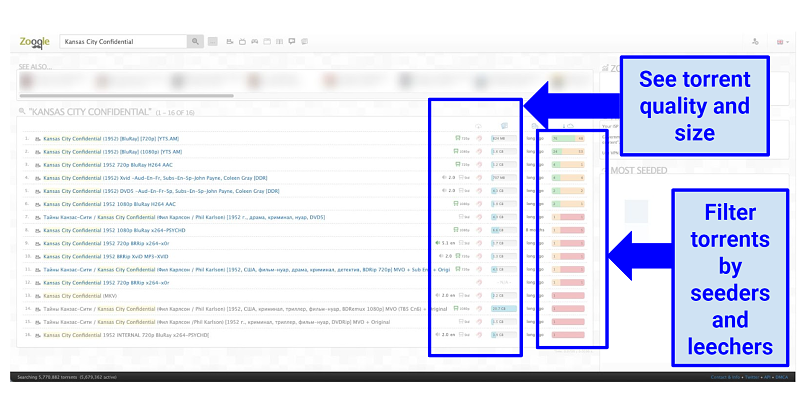
Graphic showing Zooqle homepage

  • Year founded: 2013
  • Mirror sites/alternate URLs: zooqle.bypassed.org, zooqle.unblocked.mx, zooqle.unblocked.krd, zooqle.nocensor.club, zooqle.g2g.casa, zooqle.u4m.pw
  • Alexa ranking: 2,086
  • Banned locations: None
  • Instant download support: Yes

Zooqle is a new torrent website that’s becoming popular. It has an extensive library that’s particularly good for games, as well as movies, software, TV shows, and eBooks. To diversify its torrent library, it uses links from other torrent sites like Torrenthound and Katcr.

Keep in mind that because games are a relatively new media, most of them are under copyright protection and therefore are illegal to download. My team and I don’t condone illegal torrenting, so be sure to check the rules and regulations in your country.

I found its interface simple and visually pleasing, and its search bar pretty useful. Simply search for any torrent you’re after, and you’ll be given a comprehensive list of related torrents. You can also filter by seeder to leecher ratio and by the quality of each torrent. All torrents contain file specifications as well as comments and reviews from other users. This made it easier to select a good quality version of Kansas City Confidential when I searched for it.

Check out Zooqle

10. IPTorrents — Private Torrent Site That’s Safe
Graphic showing IP Torrents homepage

  • Year founded: Unknown
  • Mirror sites/alternate URLs: iptorrents.eu, iptorrents.me, iptorrents.ru, iptorrents.us
  • Alexa ranking: 4,731
  • Banned locations: Not available
  • Instant download support: Yes

Unlike the other sites on this list, IPTorrents is a private torrent download site with over 7 million monthly visits. This means you can only use it if you get invited and make a donation. But once you’re in, you’ll get access to a big library and an active community — without any pop-up ads. It’s also safer because it’s much harder for people to spread spyware or malware since not just anyone can use it.

Another benefit of IPTorrents is that its download speeds tend to be faster because members need to comply with seeding quotas. Its only downside is that you’ll need to pay a donation of $20 to get in, which is quite high. Without this donation, you won’t be accepted.

Check out IPTorrents

11. Demonoid — Well-Established Torrent Site With Many Media Types
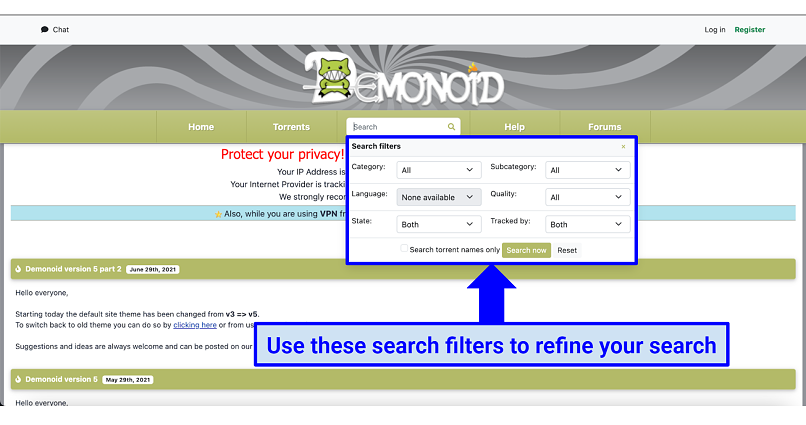
Graphic showing Demonoid homepage

  • Year founded: 2003
  • Mirror sites/alternate URLs: Dnoid.me, Demonoid.unblocked.bet
  • Alexa ranking: 160,289
  • Banned locations: Not available
  • Instant download support: Yes

Demonoid is one of the original torrent sites that’s still active today. The site once struggled due to increased political pressure to get it taken down but now has over 10 million users and 1 million torrents. You can find a great variety of media types on Demonoid, including movies, TV shows, music, games, and more. Movies and TV shows are especially popular on the site.

In the past, you needed to create an account to use the site, and registration was only open to those who received the invite. However, this doesn’t seem to be the case anymore. I was able to download Night of the Living Dead without signing up.

Check out Demonoid

12. NYAA.si — Specialized Site for Asian Content
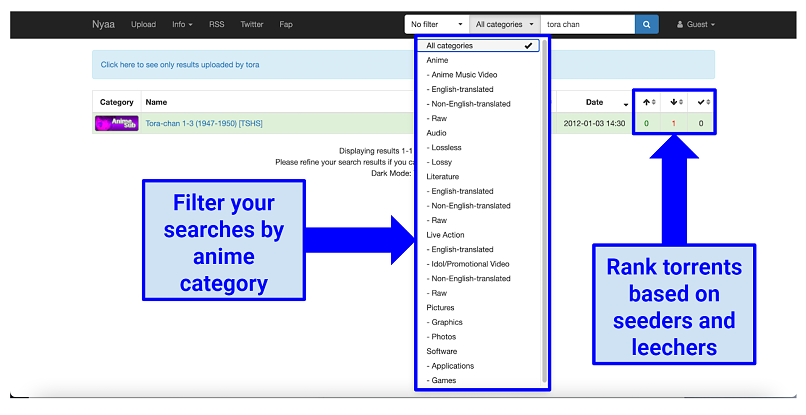
Graphic showing NYAA homepage

  • Year founded: 2005
  • Mirror sites/alternate URLs: nyaa.net, nyaatorrent.com
  • Alexa ranking: 895
  • Banned locations: The UK, US, Japan, South Korea, and Australia
  • Instant download support: Yes

NYAA.si is a specialist site for Asian content, particularly from Japan, China, and South Korea. Its main focus is on anime series, but I also found music and software. The site is a resurrection of the anime torrent site NYAA.

What I liked about NYAA.si is its simplistic interface, which makes it easy to access the files you’re after. Just keep in mind that it’s quite intrusive with its pop-up ads, so you might want to use an ad blocker, or a VPN that comes with an ad blocker built-in.

Check out NYAA.si

Tips on How to Choose the Best Torrenting Sites

Torrent sites can be dangerous places: a lot of the sites aren’t regulated, so they can contain fake links with viruses, tracking software, or malware.

Therefore, choosing a trusted torrent site is crucial in minimizing the risks involved. But to be fully protected, I recommend that you use a trusted VPN (my favorite is ExpressVPN) while browsing any torrent site. It will keep your data safe and can protect you from malicious links.

When choosing a torrent website, I strongly suggest making sure the site you use has some (if not all) the following:

  • Security features — Choose a site that has been around for at least 5 years, doesn’t have many ads, and verifies its torrent files. But keep in mind that no torrent site is 100% safe because they can leave your data and activity exposed to third parties. To increase your safety when torrenting, I recommend using a VPN.
  • Lots of variety — Make sure your site’s library has a wide mix of different content types. If you’re after a particular type of content, such as movies, then consider specialist sites too.
  • Well established — The established year of the torrent site indicates its reliability. If the site has been around for 5-10 years or more and has never been shut down, then that’s a good sign.
  • High popularity — Choose a website that has a high number of engaged users. Specifically, look for a site with a lot of comments. Comments from past users on torrent files are very useful because they can help you find out whether a file is fake or not.
  • High seeder/leecher ratio — A high ratio of seeders to leechers indicates a high level of sharing and results in faster downloads.
  • As few ads as possible — Intrusive pop-up ads are an inevitable feature of many torrent sites. Avoid sites that bombard you with ads or use a VPN with an ad blocker instead.
  • High Alexa ranking — The Alexa ranking shows how popular the site is in relation to internet users worldwide. A high ranking indicates an active community.
  • Availability in your region — Some regions block torrent sites more than others, so make sure you can access the site in your area.

How to Stay Safe and Avoid Fake Torrent Sites

Staying safe while torrenting goes beyond choosing a reputable site. Anytime you use P2P file-sharing software, your personal data is exposed to anyone else seeding or leeching the same file. To prevent your info from being exposed, I recommend using a highly secure VPN like ExpressVPN.

When you use a VPN, it encrypts your torrenting traffic and hides your IP address from prying eyes. As a bonus, some VPNs offer built-in ad and malware blockers to protect you in case you encounter a malicious file.

These additional steps will also help you stay safe:

  • Inspect every torrent — Unverified torrents are often filled with malware. Make sure any torrent you download has been verified, and check its seeder to leecher ratio, user comments, and the uploader’s history.
  • Use a private search engine — Mainstream search engines like Google hide the URLs of many torrent sites due to the DMCA (Digital Millennium Copyright Act), and display dangerous fork sites instead. A private search engine like DuckDuckGo won’t hide URLs and will keep your searches private.
  • Use a safe torrent client — A good torrent website on its own isn’t enough to stay safe and protected. Using a reliable torrent client like uTorrent or qBittorrent will add further protection against viruses, malware, and spyware.
  • Check files for malware — Check files like RAR, TAR, and ZIP for malware. Pay close attention to EXE files and stay away from WMA, WMV, and password-protected files because they’re outdated and can be dangerous.
  • Look out for copycat sites — Strange-looking URLs, numerous pop-up windows, and registration demands are all signs of dangerous copycat sites that can expose you to malware and hackers.

Beware of These Fake Torrenting Sites

Some torrenting sites might be popular but could expose your activity and infect you with malware. Here are a few torrent sites that I recommend avoiding:

  • KickAssTorrents — KickAssTorrents (KAT) was once the most popular torrent site globally, only to be taken down for good. Its founder, Artem Vaulin, has been on the run from US authorities due to numerous charges of copyright infringement. Several copycat sites look similar but require you to install browser extensions to use them, which is a huge red flag.
  • SUMOtorrent — This site always asks you to download its torrent client to access its library. It’s usually best to stay away from sites that request this because it’s not common and therefore suspicious.
  • PassThePopcorn — This site is an invite-only site that requires a login and password to use. There’s nothing wrong with invite-only sites, but since you can’t register properly, it’s best to avoid it.
  • Torrent Galaxy — Torrent Galaxy is a fake version of 1337x and attracts over 8 million users each month. However, it bombards you with ads to no end, so it warrants a mention.
  • TorrentFunk — A site that was once decent is now full of unwanted ads that are highly intrusive. Its library is pretty small too.

Quick Guide: How to Use Torrent Sites Safely in 3 Easy Steps

  1. Get a VPN. I recommend ExpressVPN because its strong security features keep you safe while torrenting.
  2. Install a safe torrent client. You’ll need to use a torrent client like uTorrent to extract your downloaded torrent files.
  3. Start torrenting safely! Go to a reliable torrent site, find the torrent you want, and click the magnet link to begin downloading.

Why Do I Need a VPN for Accessing Torrent Sites?

Most torrent websites explicitly warn you to use a VPN before downloading anything – and there’s a good reason for that. Even the most reputable torrent sites and clients come with inherent dangers. It’s easy for cybercriminals to steal your IP address, monitor your connection, and even upload malware-infected torrents.
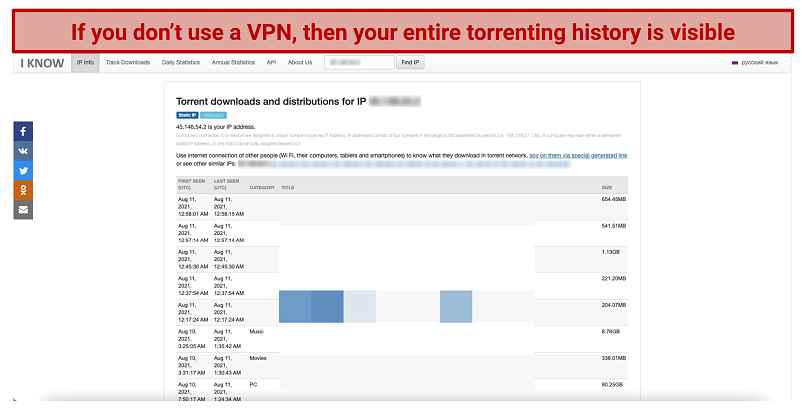
Graphic showing torrenting history

It's very easy for other people to see your torrenting activity

A reliable VPN keeps you safe while you’re browsing a torrent website. It masks your original IP address, which means no one will be able to see what you’re downloading, or where you’re downloading it from. This means no one will be able to see what you’re downloading, or where you’re downloading it from. VPN encryption makes your traffic and data unreadable, even to hackers.

Another benefit of using a VPN is that it prevents your ISP from throttling your connection, which it might do if it notices excessive downloading activity on your end. When you use a VPN, your ISP can’t see what you’re doing online, which means you could get faster torrenting speeds.

Source: https://www.vpnmentor.com/blog/10-best-torrent-websites/#RARBG
January 31, 2022

November 29, 2021

Best Android phones under $200 in 2021

JOE MARING, JERAMY JOHNSON and NAMERAH SAUD FATMI, 29 Nov 2021


Source: Joe Maring / Android Central


BEST ANDROID PHONES UNDER $200 - ANDROID CENTRAL2021


Believe it or not, there are plenty of great, inexpensive smartphones you should consider, so we rounded up the best Android phones under $200. Smartphones that cost $1,000 and more have quickly become commonplace in the market, and for anyone on a budget, those steep prices can quickly induce a headache. If you need a new handset but only have a couple of hundred bucks to spend, the Moto G Fast is our top favorite with three cameras and a large screen to enjoy all those photos and videos. Today, we're not only talking about the Moto G Fast, but also some of the best phones that bring tremendous value to the low-end space.


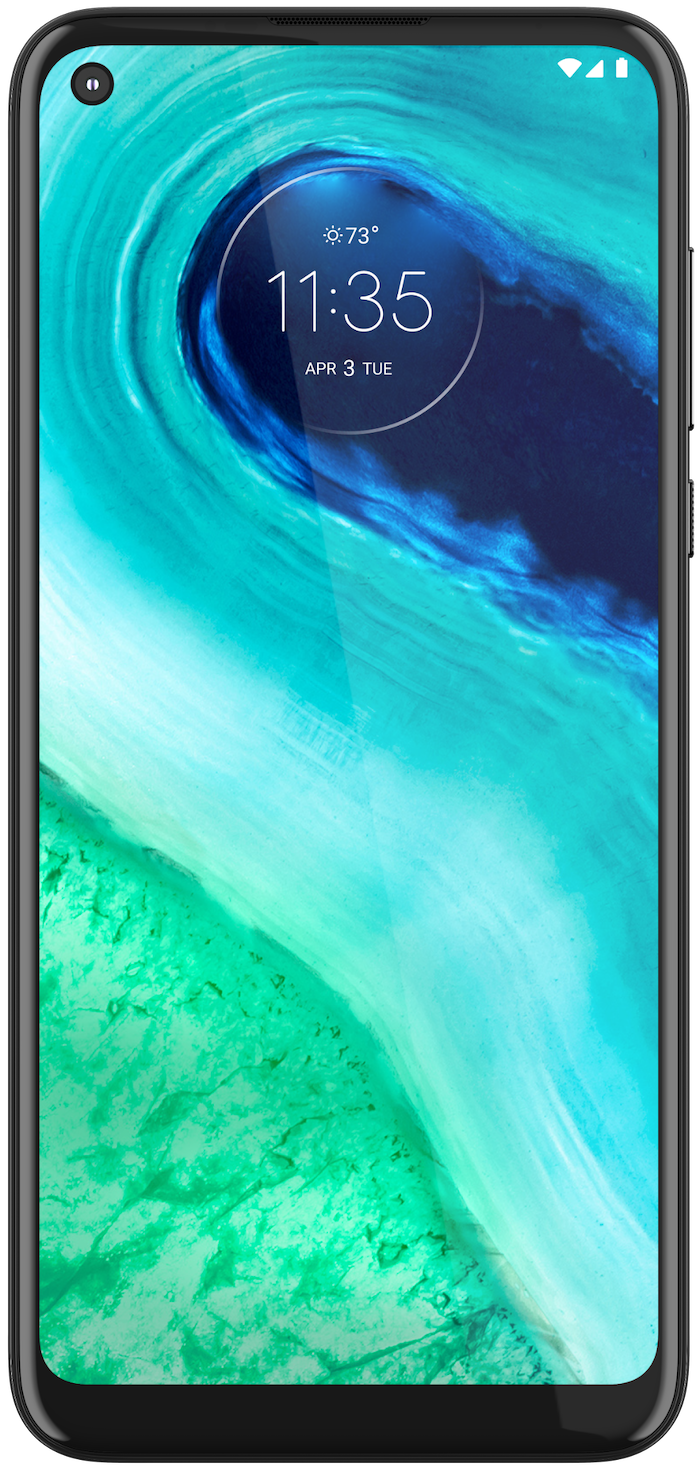
Best overall Android phone under $200:Moto G Fast
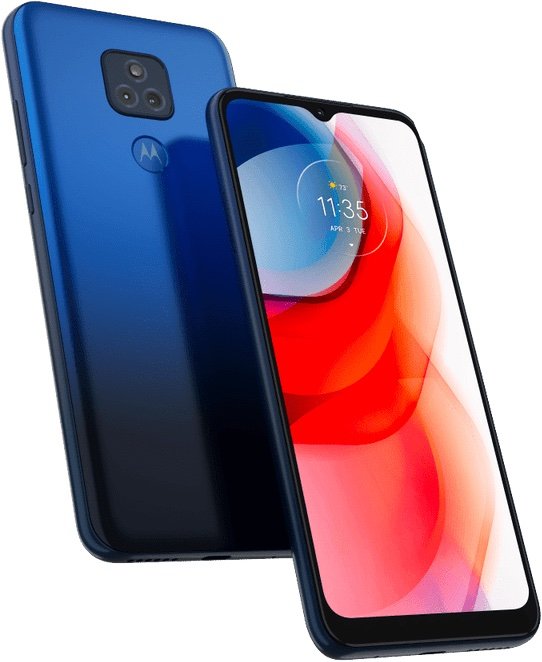
Best alternative Android phone under $200:Moto G Play 2021 - Blue
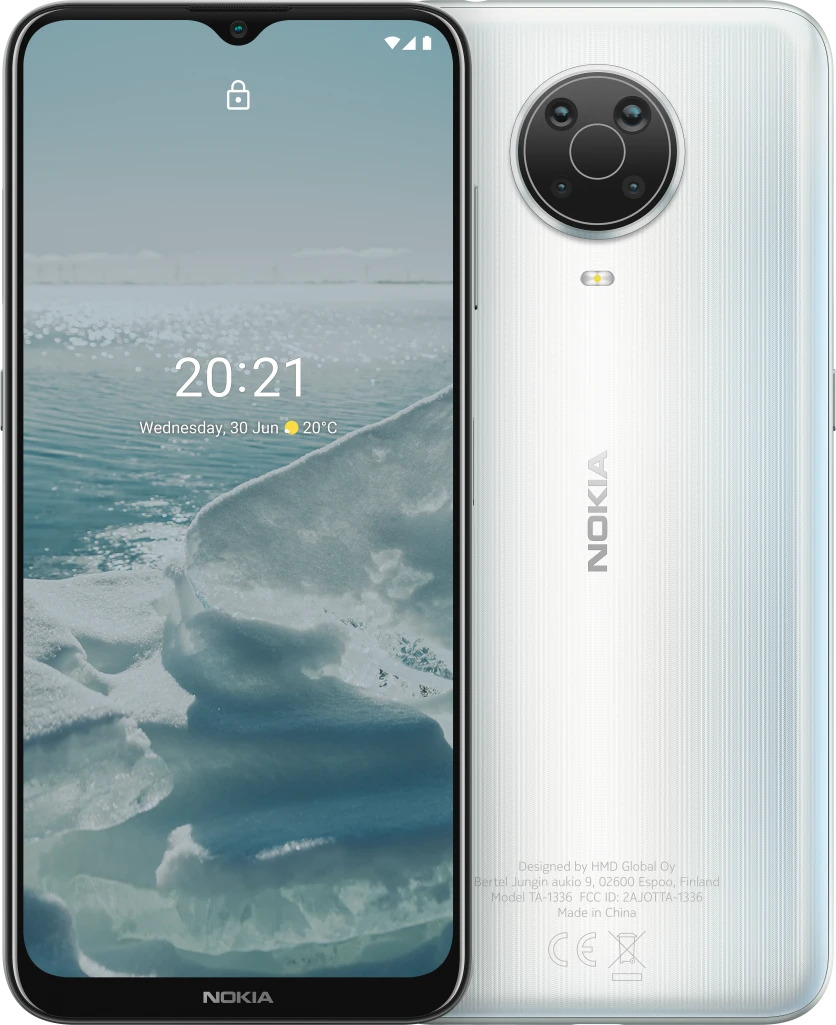
Best value Android phone under $200:Nokia G20 - Glacier
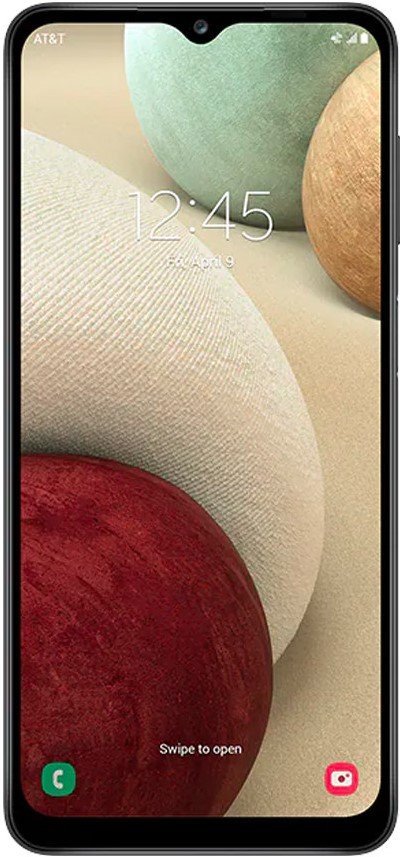
Best Samsung Android phone under $200:Samsung Galaxy A12
Best OnePlus Android phone under $200:OnePlus Nord N100 - Midnight Frost
Best battery on an Android phone under $200:Moto G Power 2021 - Silver
Best rugged Android phone under $200:Blackview BV5900 - Rugged Smartphone
Best international Android phone under $200:Xiaomi Redmi Note 9 - Forest Green


Best overall Android phone under $200: Moto G Fast


Source: Joe Maring / Android Central


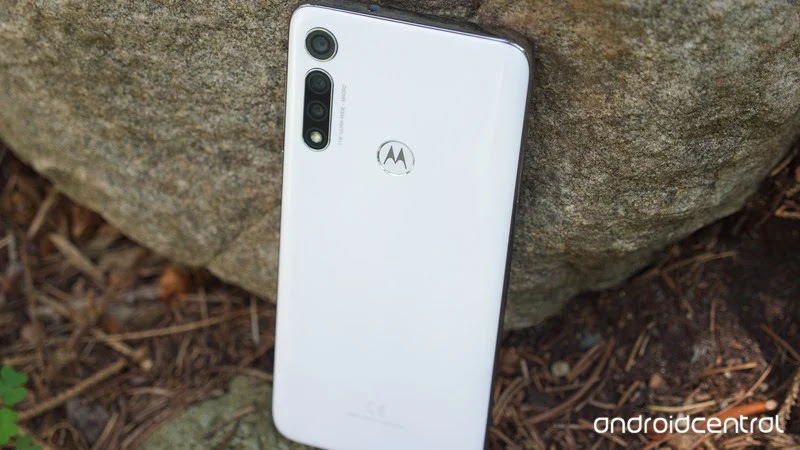
The Moto G Fast hits the very top of our $200 budget, and all things considered, it's the best phone you can buy when looking at Android devices this cheap.


G Fast's hardware is built far better than you'd expect for a phone in this price tier. It feels substantial when held, doesn't rattle or creak, and all physical buttons feel very clicky. The 6.4-inch LCD is also good, giving you a large canvas with minimal bezels, great colors, and good viewing angles. The HD+ resolution means that things aren't quite as sharp as you may like, but all things considered, it's a fine screen.

You get three cameras on the back, including a 16MP primary camera, 8MP ultra-wide camera, and 2MP macro camera. That 16MP sensor takes surprisingly detailed and vibrant shots, and while the quality dips with the other sensors, it's still a lot of fun to have them for expanded shooting possibilities. Battery life is another strong point, with the 4,000 mAh battery allowing for up to two days of use for some folks. Thankfully, it also charges via USB-C.

Making all of this even better is the Moto G Fast's software, which is excellent. The user interface is reminiscent of what you'd find on a Google Pixel, with Motorola making a few thoughtful changes that only elevate the experience. Moto Display continues to be the best Always-On Display on any Android phone, in addition to Moto Actions allowing you to chop the phone to enable the flashlight and twist it to open the camera app. Of course, only being promised one software update is less than ideal, with no more platform updates after Android 11.

The cherry on top of the Moto G Fast is that it works with all carriers in the United States, so whether you rely on AT&T, Sprint, T-Mobile, or Verizon, you can buy the phone and use it without a hitch.

Pros:
Large display with minimal bezels
Outstanding build quality
Rear cameras are a lot of fun
Excellent battery life
Compatible with all U.S. carriers

Cons:
No more updates after Android 11
HD+ display doesn't look amazing
Small amounts of RAM and storage

Best overall Android phone under $200
Moto G Fast

The best in this price range


The Moto G Fast has its faults. But if you're shopping with a limited budget, it's the most well-rounded phone out there.


Best alternative Android phone under $200: Moto G Play (2021)


Source: Joe Maring / Android Central


Moto is the king of the sub-$200 category, and the updated Moto G Play (2021) is its most affordable new phone for the year. Of course, it makes a few spec compromises to reach this price tag, but it's still a perfectly enjoyable piece of tech.

The display is a 6.5-inch, 720p HD+ LCD, but it does the job. You also benefit from respectable bezels and a small waterdrop notch, making this a pretty good phone for watching videos or playing light games. You'll find more noticeable downgrades with the 13MP + 2MP dual rear cameras, but they're serviceable for quick uploads to your favorite social media app.

The Moto G Play (2021) has a fingerprint sensor on the rear in the Moto logo, which is every bit as fast and reliable as you could ask for. There's also a headphone jack and support for expandable storage, along with an awesome 5,000 mAh battery and support for all U.S. carriers. Unlike cheaper phones like the Moto E (2020), this device thankfully has USB-C charging (but no wireless charging).

Perhaps the biggest downside to the Moto G Play (2021) is that Motorola has all but confirmed that it would only see one major platform update — and that is to Android 11! That's right, this thing ships with an out-of-date version of Android (10). While Motorola's custom take on Android is just as strong here as it is on the Moto G Fast, offering at least one update would've been greatly appreciated.

Pros:
Large, bright HD display
Huge 5000 mAh battery
3.5mm headphone jack
Motorola's custom software
Works with every U.S. carrier

Cons:
No NFC or official IP rating
Only 3GB of RAM
Ships with Android 10

Best alternative Android phone under $200
Moto G Play 2021 - Blue

Another affordable Moto


The Moto G Play (2021) sports a 6.5-inch HD display and 5000 mAh battery with a headphone jack to help you stream on for hours.


Best value Android phone under $200: Nokia G20


Source: Michael Hicks / Android Central


None of the phones on this list are considered expensive, but if you're trying to spend your money on something reliable, the Nokia G20 is for you. Sitting towards the upper limit of $200, it's worth considering at the end of the day. You can get a lot of value from every dollar spent on the G20 instead of the cheaper G10.

The Nokia G20 is equipped with a 6.52-inch IPS LCD, making it larger than its cheaper predecessors. While it costs a bit more, you get an HD+ resolution of 1600, a MediaTek processor, 4GB of RAM, and 128GB of expandable storage (up to 512GB). Unfortunately, there's no fast charging, but you shouldn't have to mess with it too much, thanks to the generous 5,050 mAh battery.

The Nokia G20 is powered by Android One, which means you'll get two years of Android upgrades and three years of monthly security patches, which should get you through 2023. The phone ships with Android 11, but it's slated to get Android 12 in the future.

The phone comes with a lovely textured back available in two colors, with a side-mounted fingerprint scanner. You also get a quad-camera setup, including a 48MP primary camera that is surprisingly decent.

Pros:
Clean software with Android One
Large 5,050 mAh battery
Quad cameras
Storage is expandable

Cons:
No IP rating or fast charging
Weak processor
Pricier than other options in this list

Best value Android phone under $200
Nokia G20 - Glacier

How low can you go?


Trying to stretch your investment as much as possible? Go with the Nokia G20. It gets the basics done and then some, coupled with many years of updates for security.


Best Samsung Android phone under $200: Samsung Galaxy A12


Source: Samsung


When you think of the best Samsung phones, your mind probably drifts to devices like the Galaxy S21 and Note 20 Ultra — big, flashy, and expensive phones that are sure to break the budget. However, if you're eager to own a Samsung phone for yourself but need to keep costs low, the Galaxy A12 is a solid device.

First thing's first, the Galaxy A12 has an impressive display. It's fairly large at 6.5-inches, goes edge-to-edge with the phone's left and right frame, and has a teardrop selfie camera cutout with a small bottom bezel. So if you do a lot of media consumption, the A12 will make your movies and games stand out wonderfully.

Around the back, the A12 boasts a total of four cameras — consisting of a 16MP primary, 5MP ultra-wide, 2MP macro, and 2MP depth sensors. The image quality won't blow you away, but the cameras get the job done for social media and allow some image-taking (especially with the ultra-wide camera). Other highlights of the Galaxy A12 include expandable storage, a very generous 5,000 mAh battery, USB-C charging, and Samsung's custom One UI software loaded with endless features and settings.

Pros:
Modern display with small bezels
Large 5,000 mAh battery
Charges with USB-C
Samsung's One UI software
Expandable storage

Cons:
Cheap plastic back
No NFC

Best Samsung Android phone under $200
Samsung Galaxy A12

Samsung on the cheap


Another great handset is the Galaxy A12. It boasts an impressive display, features, and software package with One UI.


Best OnePlus Android phone under $200: OnePlus Nord N100


Source: Android Central


Even though OnePlus made a name for itself by offering flagship-quality phones at more affordable price points, it wasn't until the Nord introduction series that it really started to produce true budget-level phones. Unfortunately, the original Nord and Nord 2 did not release in North America, though those in the U.S. and Canada can get their hands on the true value phones in the Nord lineup, including the Nord N10 5G and N100.

Coming in at under $200, the OnePlus Nord N100 is a pretty impressive package. It features a 6.52 LCD screen, a 5,000mAh battery, and 64GB of on-device storage with the ability to expand up to 512GB via the microSD slot. In addition, there is a triple camera setup on the back along with a fingerprint sensor, and it features dual stereo speakers up front.

Just about the only real downside to the N100 is that it ships with Android 10 and OnePlus's OxygenOS 10.5, and there's no word if or when it will receive Android 11 or future platform updates. However, if you've always wanted a OnePlus phone but couldn't afford it, this is a great option. Alternatively, if you can swing a little more, you can pick up the newer OnePlus Nord N200 5G for around $240.

Pros:
Large, bright display
Large 5,000 mAh battery
Charges with USB-C
OnePlus's OxygenOS software
Expandable storage

Cons:
Cheap plastic back
No official waterproofing
Ships with Android 10

Best OnePlus Android phone under $200
OnePlus Nord N100 - Midnight Frost

The budget-phone killer


OnePlus has consistently offered flagship-killer devices, and with the Nord N100, it has its sights set on the lower end of the Android market.


Best battery on an Android phone under $200: Moto G Power (2021)


Source: Joe Maring / Android Central


The Moto G Power (2020) was one of our favorite budget phones of 2020, so we were excited when Motorola announced that the device was getting a sequel. However, that excitement dampened once we learned about some of the upgrades (or downgrades) featured in its 2021 model.

The Snapdragon 662 processor is a step back from 2020's 665, and the clock speed is slower than the older model. In addition, the 2020 version had an HD+ display, but the 2021 model maxes out at 720p. And while Motorola kept the headphone jack, it again left NFC, wireless charging, and official IP water resistance off the spec sheet. On top of those issues, this device ships with Android 10 and received only one major platform update (Android 11).

Don't get us wrong — the Moto G Power (2021) is still a solid, capable, and affordable Android smartphone. It's just not the second act we were hoping for. Nonetheless, if you're looking for a three-camera setup, a bright and big screen, and a giant battery, it's hard to beat this offering.

Pros:
Large, bright HD display
Huge 5,000 mAh battery
3.5mm headphone jack
Motorola's custom software
Works with every U.S. carrier

Cons:
No NFC or official IP rating
Slower chipset than 2020 version
Ships with Android 10

Best battery on an Android phone under $200
Moto G Power 2021 - Silver

Powerhouse phone


The Moto G Power (2021) is a step back in terms of chipset and screen, but the 5,000mAh unit is still more than enough for most.


Best rugged Android phone under $200: Blackview BV5900


Source: Blackview


Putting a case on the phone is an excellent way to ensure it stays safe throughout your daily use, but some phones were designed to be rugged and durable right out of the box. One such phone is the Blackview BV5900, and if you're prone to clumsiness or work in a physically demanding environment, the BV5900 is a solid choice.

The design of the BV5900 makes its ruggedness unmistakable, and it has durability ratings to back it up. Not only is there an IP68 dust/water resistance rating, but you also get a MIL-STD-810G certification. This means the BV5900 was tested to survive drops of up to five feet.

Moving beyond its design, there are plenty of other highlights for the BV5900. It has a massive 5,580 mAh battery, USB-C charging, NFC for contactless Google Pay payments, and a fingerprint sensor on its side. There's also 3GB of RAM and 32GB of storage that can expand to 128GB.

Blackview's design of the BV5900 certainly isn't for everyone, but if you're someone that knows you'd benefit from a ruggedized handset like this, it's certainly worth a good, hard look.

Pros
Military-grade durability rating
IP68 dust/water protection
Gigantic 5,580 mAh battery
Side-mounted fingerprint sensor
USB-C and NFC

Cons
Design might be too much for some people
Very chunky and heavy

Best rugged Android phone under $200
Blackview BV5900 - Rugged Smartphone

Designed to withstand anything


Thanks to its military-grade durability rating and IP68 protection, the Blackview BV5900 is perfect for people with butterfingers.


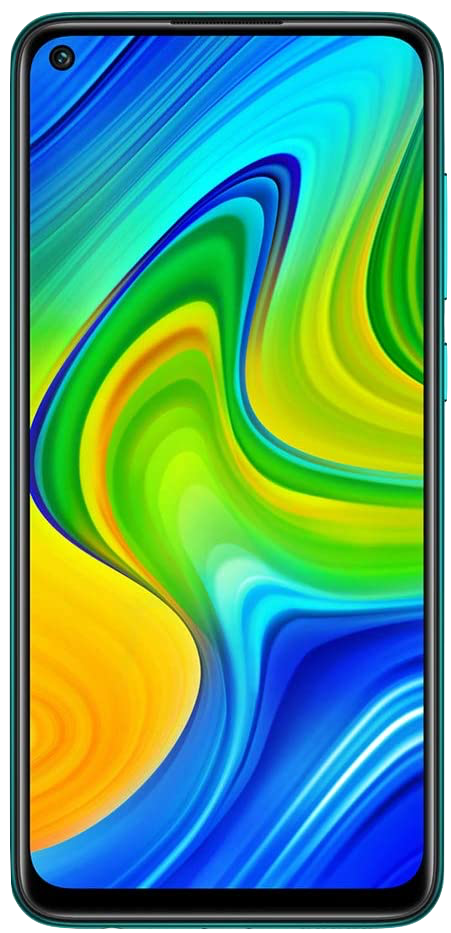
Best international Android phone under $200: Xiaomi Redmi Note 9


Source: Xiaomi


Rounding out this list, we have the Xiaomi Redmi Note 9. This is an international phone, so that means no warranty for U.S. users, and it's missing some LTE bands. However, those are pretty much the only real downsides.

The Redmi Note 9 is a darn impressive phone. The 6.53-inch Full HD+ display has very slim bezels and an unobtrusive hole-punch cutout for the selfie camera. Meanwhile, the situation on the rear involves four cameras, with the 48MP primary lens being the only one worth mentioning. Nevertheless, you can capture some unexpectedly great shots with it. Xiaomi also has a few fun colors to choose from, with Forest Green being our favorite.

Under the hood, the Note 9 comes equipped with the MediaTek Helio G85 processor, 4GB of RAM, 128GB of expandable storage, and a huge 5,020 mAh battery. We're also fans of the USB-C fast charging, 3.5mm headphone jack, and IR controller on the phone's top frame.

Xiaomi's custom MIUI software can feel rather bogged down at times, but in just about every regard, this is an astonishingly good phone. Even though the Note 10 is now available, you can still get good mileage out of the Note 9.

Pros:
Beautiful design
6.53-inch FHD+ display with slim bezels
Four rear cameras
128GB of storage
5,020 mAh battery
Fingerprint sensor

Cons:
Doesn't come with a warranty
Lacks support for all U.S. LTE bands

Best international Android phone under $200
Xiaomi Redmi Note 9 - Forest Green

An enticing international option


If you don't mind venturing into international waters, the Redmi Note 9 is a fantastic purchase. It's gorgeous, powerful, and affordable.


Bottom line

Just a few years ago, $200 couldn't buy you much in the way of the best Android phones. In 2021, however, it's pretty surprising just how many options you have in such a low price segment. There are plenty of "cheap" Android phones that are pretty great. We think the best Android phone under $200 is the Moto G Fast out of everything currently available.

For the average person shopping for a new phone, the Moto G Fast is excellent. The display looks good enough, the performance is great for most apps and light games, the three rear cameras are a bunch of fun to use, and that 4,000 mAh battery is a life-saver. Although newer phones like the Nokia G20, the Moto G Fast is yet to be toppled over as the value king of the sub-$200 segment. It all boils down to the powerful SD 665 chipset combined with underrated features like 4K video recording and water resistance.

The other phones on this list are certainly worth checking out, too, but if you want to keep things simple, go with the Moto G Fast and continue with your life. We think you'll be pleased with it.
Credits — The team that worked on this guide


Joe Maring has been talking/writing about Android in one form or another since 2012 and often does so while camping out at the nearest coffee shop.


Jeramy Johnson is proud to help to Keep Austin Weird and loves hiking in the hill country of central Texas with a breakfast taco in each hand. When he's not writing about connected home devices and wearables, he's defending his relationship with his voice assistants to his family. You can follow him on Twitter at @jeramyutgw.


Namerah Saud Fatmi is a freelance writer for Android Central. She has a passion for all things tech & gaming and has been an honorary Goodreads librarian since 2011. When she isn't writing, she can be found chasing stray cats and dogs in the streets of Dhaka or slaying dragons in the land of Skyrim. You can reach her on Twitter @NamerahS.


We may earn a commission for purchases using our links. Learn more.

Source: https://www.androidcentral.com/best-android-phones-under-200

November 1, 2021

Free VPN providers: Which ones are the best, and are they even worth it?

 A free VPN can do more harm than good, but only if you opt for a sketchy provider.

Opting for a free VPN for Android or any other device isn’t always a great idea. Some providers have bad intentions and will sell your personal info or your browsing history (or both) to the highest bidder. That’s why we always recommend paying a few bucks per month for a reputable VPN service.

However, a few trustworthy VPN providers offer free plans, but they have quite a few limitations in place. Almost all of them give you a monthly data allowance, and some even automatically select the location for you. If that doesn’t bother you, a free virtual private network may be a good option for you.

Related: The best VPN routers available

We’ve rounded up the best free VPN services for Android you can get, all of which are also available on other platforms. But before we dive into the list, let’s first talk about what VPNs are and why you should use one.

The best free VPNs for Android:


What is a VPN, anyway?

If you already know what a VPN is, how it works, and why you should use it, feel free to skip this section and scroll down to check out the list of the best providers. Everyone else, keep reading.

A VPN — short for virtual private network — routes your data through its servers and encrypts it before sending it to the website you are visiting. To put it simply, a VPN changes your IP address, making it seem like you’re located somewhere else than you really are. For example, if you live in Germany and connect to the internet via a VPN server located in the US, the website you’re visiting will think you’re based in the US.

This has a lot of advantages. One of them is that you can bypass geo-restrictions put in place by various streaming services. For example, Netflix offers way more content to its US subscribers than those in most other places around the globe. So by connecting online via a US VPN, you can get access to a lot more movies and TV shows.

A VPN also gives you access to popular services like BBC iPlayer, a free streaming service with loads of great content that is only available in the UK. Just connect online via a UK VPN server, visit www.bbc.co.uk/iplayer, and start binge-watching your favorite shows and movies.

A VPN gives you complete anonymity online. Using it hides your browsing history from everyone — if the VPN provider has a no-logging policy — including your ISP. Yes, your ISP can see your browsing history if you don’t use a VPN and can sometimes sell it to third parties such as advertisers, which is something we’ll talk about in more detail a bit later. Additionally, a VPN encrypts your data, which comes in handy when browsing the web on a public network — more on that later on as well.

This is a brief overview of what a VPN is. If you want more details on how it works, check out our dedicated post by clicking here, or just watch our very own Gary Sims explain it in the video below.


1. PrivadoVPN

Promoted

PrivadoVPN is a free premium zero-log VPN service based in Switzerland that offers a whopping 10GB of access per month with unlimited speeds and zero ads. It’s also the only free VPN that supports streaming services like Netflix and BBC iPlayer as well as torrenting.

It’s a breeze to set up and includes free apps for everything from Android to Windows, iOS, macOS, Fire TV, and Android TV. Once you download your app of choice, you can instantly connect to any server, change protocols, and even activate the built-in Internet Kill Switch.

The service offers complete end-to-end 256-bit AES encryption and a strict no-logs policy throughout its proprietary global network. Whether you stick with the free plan or opt for a premium option, you’ll get unlimited speeds 24/7 with no threat of throttling.

If 10GB of monthly data isn’t enough, you can always upgrade to a paid plan at just $4.99 per month when you pay for a full year. It adds unlimited data to the mix, access to all servers in all 43 countries, as well as access to the SOCKS5 proxy — great for torrent-heavy users that will increase transfer speeds without compromising your privacy. Premium upgrades are also protected by a 30-day money-back guarantee.

The nitty-gritty:

  • Free data allowance: 10GB per month
  • Server selection: Automatic or manual — 12 locations available
  • No-logging policy: Yes
  • Paid plans: Start at $4.99 per month

2. TunnelBear free VPN

The TunnelBear free VPN for Android, which McAfee owns, gets you 500MB of data per month. It’s super simple to use and doesn’t require a credit card to sign up. You can choose between servers in 23 countries, including the US, Germany, Australia, India, and more.

TunnelBear has a strict no-logging policy for peace of mind and isn’t ad-supported despite being free (hooray). It offers additional free data valid for the month to those who tweet about the provider, download the TunnelBear app on their PC, or invite a friend who then signs up for the service. Unused data does not roll over to the next month.

If you need more data than 500MB per month, you’ll have to upgrade to a paid plan. Pricing starts at $3.33 per month if you prepay for three years.

The nitty-gritty:

  • Free data allowance: 500MB per month
  • Server selection: Manual — 23 locations available
  • No-logging policy: Yes
  • Paid plans: Start at $3.33 per month

3. Kaspersky VPN Secure Connection

The free VPN by Kaspersky works like a charm but has its limitations, like the rest of the services on this list. It offers 200MB of data per day, which translates to about 6GB per month. That’s not bad considering it’s free, but the service still isn’t suitable for power users. Unfortunately, there’s no option to score additional free data.

There are many server locations available, but you can’t choose which ones to connect to using a free plan — the service will automatically choose “the closest server” automatically. The app is easy to use, allowing you to start browsing anonymously with just a simple tap. Signing up for the VPN is a breeze as well, and prices are pretty accessible.

The nitty-gritty:

  • Free data allowance: 200MB per day
  • Server selection: Automatic
  • No-logging policy: Yes
  • Paid plans: Start at $4.99 per month

4. Hotspot Shield free VPN for Android

A few things make Hotspot Shield one of the best free VPN services for Android you can get. It offers 500MB of data per day or around 15GB per month. That’s not enough for heavy usage, but it is more than what you get with most other free virtual private networks.

It’s also super easy to get started, as you don’t have to share your email address or your credit card info with the provider. Just download the app on your device, tap Connect, and you’re ready to go. The major drawback is that you can’t select the server you want to connect to — the app will do that for you automatically. There are also ads present in the Android app, which is annoying.

Like the rest of the services on this list, Hotspot Shield has a no-logging policy. It also offers paid plans starting at $7.99 per month that get rid of the ads and the rest of the limitations.

The nitty-gritty:

  • Data allowance: 500MB per day
  • Server selection: Automatic
  • No-logging policy: Yes
  • Paid plans: Start at $7.99 per month

5. Avira Phantom free VPN for Android

Avira’s Phantom free VPN Android service offers a monthly data allowance of 500MB. However, the service allows you to connect to any of the 40 locations available, unlike some of the competition that automatically selects the server.

Read next: Best cheap VPNs — what are your options?

The sign-up process is hassle-free. Just download the app, select a location, and then turn on the VPN to start browsing anonymously — no need to share any personal data with the provider. The free version offers everything you get with a premium plan, with a couple of exceptions. There’s no kill switch available for disabling internet access if the VPN connection drops, and you don’t get any tech support.

The nitty-gritty:

  • Data allowance: 500MB per month
  • Server selection: Manual — 40 available
  • No-logging policy: Yes
  • Paid plans: Start at $10 per month

6. Hide.me

This Android VPN limits you to 10GB of data per month, which is quite generous. There are five server locations available to choose from — Netherlands, Canada, Singapore, and the US (east and west coast).

Hide.me promises it won’t log your activities, giving you peace of mind that the provider won’t sell your data to the highest bidder. It’s easy to set up and start using, without the need to share your credit card info. All these things combined make it one of the best free VPN services to use.

If you need more data, there are a few paid plans to choose from. Pricing starts at $4.99 per month, and goes all the way up to $12.95 per month, depending on the length of the subscription.

The nitty-gritty:

  • Data allowance: 10GB per month
  • Server selection: Manual — five available
  • No-logging policy: Yes
  • Paid plans: Start at $4.99 per month

7. Speedify free VPN for Android

Speedify offers 2GB of free data per month and can only be used on one device. It’s easy to set up, as you don’t even need an account. Download the app, connect, and you’re ready to go.

The service can automatically connect you to the fastest VPN server based on your location, or you can select the server yourself. Like the rest of the VPNs on this list, Speedify promises a no-logging policy, meaning it provides full anonymity online.

If 2GB per month isn’t enough for you, the company also offers paid plans with unlimited data. Pricing is set at $9.99 per month, but you can get it down to just $2.99 per month if you opt for a three-year plan.

The nitty-gritty:

  • Free data allowance: 2GB per month
  • Server selection: Manual — 37 locations available
  • No-logging policy: Yes
  • Paid plans: Start at $2.99 per month

8. Windscribe VPN

Windscribe is quite a generous free VPN, offering 10GB of data per month. But only if you share your email address with the provider. If you don’t, you’ll have to do with just 2GB of data per month.

You have the option of manually selecting the server you want to connect to. There are plenty of them to choose from — there are servers in 10 different countries. There are also loads of great features available, including Split Tunneling, which allows you to choose which apps go over the VPN.

If you like using Windscribe but don’t like the data limits, you’ll need to step up to a paid plan. A monthly subscription will set you back $9, but you can get the price down to $4.08 per month if you prepay for the entire year.

The nitty-gritty:

  • Free data allowance: 2 or 10GB per month
  • Server selection: Manual — 10 locations available
  • No-logging policy: Yes
  • Paid plans: Start at $4.08 per month

9. ProtonVPN

The last provider on our best free VPN list is ProtonVPN, which stands out because it doesn’t have a data limit (you’re limited to “medium speeds”). You can browse anonymously online with your Android phone or any other device for as long as you want, but your speed will take a hit — especially when there are many users online. There are three locations available which include the Netherlands, Japan, and the US.

Read next: The best VPNs for torrenting

Setting up the VPN is easy, although you do have to make an account. But once you sign up, you get a full-featured seven-day trial for free. The Android app also doesn’t contain any ads, regardless if you’re on a free or paid plan.

ProtonVPN has a strict no-logging policy and can only be used by a single device at a time by free users. Paid plans start at $4 per month and go all the way up to $24 per month.

The nitty-gritty:

  • Data allowance: Unlimited
  • Server selection: Manual — three available
  • No-logging policy: Yes
  • Paid plans: Start at $4 per month

Are free VPNs even safe?

Yes and no — it depends on the provider you choose. Using one of the VPNs listed above is probably safe, although we can’t make any guarantees. However, there are many sketchy VPN providers out there that should be avoided at all costs.

The reason why is that some will try and make money off of you somehow. Running a VPN service is expensive, and the provider has to make money one way or another. So if it is not making it via subscription fees, it could be making it either via ads (which is understandable but annoying) or by selling your personal info or your browsing history — or both — to the highest bidder. Basically, a free VPN provider could be doing the exact thing it should be protecting you from.

Read next: The best VPN routers for gaming, business, and personal use

To put things into perspective, the Commonwealth Scientific and Industrial Research Organization (CSIRO) reviewed 283 VPN apps on the Play Store a few years back and found frightening results. 18% of the VPNs didn’t encrypt data, while 75% used third-party tracking libraries. Yikes! That just goes to show that you really have to be careful about which free VPN service you opt for.

When deciding whether or not a certain VPN is trustworthy, research is key. Do some digging online and check out what various publications and users are saying about it. Also, make sure the company isn’t based in a country with a bad track record on online privacy, like China or Russia. You could never be sure if a VPN is sticking to its promises, but research will at least give you some peace of mind.


Which platforms do free VPNs support?

In addition to Android, all the free VPNs on this list also support Windows, Mac, and iOS devices. Some also support Linux and offer extensions for various browsers, including Chrome, Firefox, and Opera.

Can I install a free VPN on my TV or gaming console?

VPNs don’t play well with TVs. While you can download and use them on Android TVs, most other smart TVs don’t support them. The same goes for gaming consoles like the Xbox One and PlayStation 4. However, there are hacks you can use to get around these restrictions.

One of them is to install a VPN on your router, which will then protect every device on the network, including TVs, gaming consoles, computers, and tablets. That means you don’t have to install a VPN app on every single device you use anymore. By having a VPN on your router, your device is protected as soon as you go online.

However, not all VPNs support this feature. From the providers on our list, the only ones that do are Hide.me, Windscribe, and ProtonVPN. Additionally, you need a supported router as well. But even if you have one, we don’t recommend installing a free VPN on it just to protect your TV or gaming console. The reason why is that the data limits offered by free VPN providers are too low for you to play games or watch content online frequently — we’ll talk about this more in the next section. Installing a VPN on a router makes much more sense if you have a paid subscription.

Do free VPNs work with Chromecast or Fire TV Stick?

You’re probably wondering why you should go through all the trouble of installing a VPN on your router just to get access to more Netflix shows via your TV app if you can just cast the shows from your phone to the TV via a Google Chromecast. Well, the problem is that VPNs and Chromecasts don’t play well together. While your phone is connected to a VPN, your Chromecast is not, so the two can’t communicate with each other. The way to get around this is to connect both the devices to the same VPN server, which you can do by installing a VPN on your router.

Things are a bit different for Amazon’s Fire TV Stick since the device doesn’t need to be paired with a phone. All you have to do is download a VPN app to the Fire TV Stick, switch it on, and you’re ready to go. The free VPN providers on this list that offer an app for the Fire TV Stick are Hotspot Shield, Hide.me, and Windscribe.

It’s a similar story with the latest Chromecast with Google TV, since it has a user interface, offers access to the Play Store, and doesn’t need to be paired with a mobile device to work.


Can I use a free VPN for Netflix?

Sure, you can, but you have to keep data limits in mind. If you want to watch an hour or more of Netflix or any other video streaming service per day, a free VPN likely isn’t for you. As explained in our “How much data does Netflix use” post, you’ll burn through around 300MB of data per hour when streaming at just 480p. When watching 4K content, the data usage per hour jumps to as much as 11.5GB. If you go down the middle and opt for Full HD (1080p) streaming, expect to use around 3GB per hour.

Netflix can use as much as 11.5GB of data per hour.

By comparing those numbers with the data limits set in place by free VPN providers, you can quickly figure out that free VPNs aren’t the best for Netflix. Speed may be questionable for some providers, especially ProtonVPN, which will reduce your speed when there are many users online. This may translate to a bad Netflix experience, as the video may stop and buffer multiple times while you’re watching it.

You also have to consider that many free VPNs will automatically select your location, which means they are more or less useless for Netflix. You would have to opt for a provider that offers manual server selection — like Windscribe, for example — so you can connect to a US server to get access to a larger library of content.

Another thing to keep in mind is that Netflix doesn’t like it when people visit its website via a VPN. The service constantly blocks VPN servers once it identifies them, so the one you go with may not work. This applies to both free as well as paid VPN providers, however.


Will a free VPN keep me safe on public networks?

Like a paid VPN, a free one should keep you safe when using public networks in places like restaurants, hotels, and airports.

The problem with public networks is that they aren’t very secure. It’s relatively easy for someone with the right equipment to capture the packets of data that go from your device to the router, allowing them to see exactly what you’re doing online. If the website you’re visiting is using a protocol called Hypertext Transfer Protocol (HTTP), the hacker can see your login details if you sign in as well as everything else you do on a website.

To protect your data, using a VPN on public networks is a great idea.

For that reason, using a VPN on public networks is a great idea, since the service encrypts your data so that the hacker can’t see your online activities. You can read more about this in our “How easy is it to capture data on public free Wi-Fi?” article written by the professor himself, Gary Sims.

However, it’s worth mentioning that hackers can’t see what you do online when visiting websites with encrypted connections (HTTPS). A VPN may not be required in this case, but you’ll always have to check whether a website is secure or not. If the connection is secure, you’ll see a green padlock in the address bar of your browser. Most popular websites do offer encrypted connections these days, but not all of them.

Unfortunately, there’s no padlock visible when it comes to Android apps, making it a lot harder to figure out whether a connection is encrypted or not. So in a case like this, using a VPN is a good idea.


Will a free VPN hide my activity from my ISP?

As already mentioned, your ISP can see the websites you visit and exactly what you do on them, provided they don’t have an encrypted connection. If you’re on an encrypted connection (HTTPS), your ISP can still see the websites you visit, but it can’t see what you do on them. For example, it sees you visited YouTube but doesn’t know which videos you watched. By using a VPN, your ISP will see nothing.

That means if the government comes knocking on their door demanding to see your browsing history, it’s out of luck. But you probably don’t do anything illegal online, so this shouldn’t be too big of a concern to you.

A bigger issue is that ISPs in the US can sell your browsing data to third parties like advertisers, which is a big no-no in my book. So by using a VPN, you can make sure your ISP won’t be making any extra money off you.

It’s important to keep in mind that while your ISP won’t see your browsing history anymore if you use a VPN, the VPN provider could. All the major VPN companies promise they don’t log your activities, so this shouldn’t be a concern. But then again, there’s no way you can check if that’s true.

It’s a lot easier to believe this claim if it’s coming from a reputable VPN that charges for its services than the one that doesn’t. As already mentioned at the beginning of this post, if the VPN provider isn’t making money from subscriptions, it might be making it by selling your data.


Free vs. paid VPN: Which one is right for me?

If you’re not a power user and only need an Android VPN now and then for some light browsing at home, and on public networks, a free VPN will do you just fine. But if you want to use a VPN to watch content on streaming services, regularly download stuff from the internet, and keep browsing history private at all times, a paid VPN is the way to go. Simple as that.

There’s a third option as well. If you only need a VPN for a week or so to test it out, you could just sign up for a free trial. Not all providers offer it, but some do. This will get you unlimited data, likely faster speeds than free VPNs, and you won’t have to worry about the provider selling your personal data as much. If you don’t need the VPN after the free trial, just cancel your subscription. To keep using it, pay the subscription fee at the end of the trial and remain anonymous online.

One of the best options for a free trial is ProtonVPN, which gives you full access to its services for seven days without spending a dime — click here to learn more. But if after reading this article you’ve decided to skip free VPNs altogether and don’t care much about free trials, check out the three paid providers we recommend, along with their prices, below:

  • ExpressVPN — from $8.32 to $12.95 per month
  • NordVPN — from $3.30 to $11.95 per month
  • Ivacy — from $1.33 to $9.95 per month

To learn more about good VPN providers, check out our guides for the best VPNs for gaming, torrenting, and Netflix.

Source: https://www.androidauthority.com/best-free-vpn-953904/