May 30, 2014

Five Ways to Download Torrents Anonymously


With anti-piracy outfits and dubious law-firms policing BitTorrent swarms at an increasing rate, many BitTorrent users are looking for ways to hide their identities from the outside world. Here's an overview of five widely used privacy services. P
The services discussed in this post range from totally free to costing several dollars a month. The general rule is that free services are generally slower or have other restrictions, while paid ones can get you the same speeds as your regular connection would.P

VPN (paid / free)P

Hundreds and thousands of BitTorrent users have already discovered that a VPN is a good way to ensure privacy while using BitTorrent. For a few dollars a month VPNs route all your traffic through their servers, hiding your IP address from the public. Some VPNs also offer a free plan, but these are significantly slower and not really suited for more demanding BitTorrent users.P
Unlike the other services listed in this article, VPNs are not limited to just BitTorrent traffic, they will also conceal the source of all the other traffic on your connection too. IpredatorItshiddenand StrongVPN are popular among BitTorrent users, but a Google search should find dozens more. It is recommended to ask beforehand if BitTorrent traffic is permitted on the service of your choice.P

BTGuard (paid)P

BTGuard is a proxy service that hides the IP-addresses of its users from the public. The service works on Windows, Mac, Linux and as the name already suggests, it is set up specifically with BitTorrent users in mind. Besides using the pre-configured client, users can also set up their own client to work with BTGuard. It works with all clients that support "Socks V5″ proxies including uTorrent and Vuze. In addition, BTGuard also includes encryption tunnel software for the real security purists.P
After these words of praise we're obligated to disclose that BTGuard is operated by friends of TorrentFreak, but we think that should be interpreted as a recommendation.P

TorrentPrivacy (paid)P

Torrentprivacy is another proxy service for BitTorrent users, very similar to that of BTGuard. It offers a modified uTorrent client that has all the necessary settings pre-configured. The downside to this approach is that it is limited to users on Windows platforms. TorrentPrivacy is operated by the TorrentReactor.net team and has been in business for more than two years.P

Anomos (free)P

"Anomos is a pseudonymous, encrypted multi-peer-to-peer file distribution protocol. It is based on the peer/tracker concept of BitTorrent in combination with an onion routing anonymization layer, with the added benefit of end-to-end encryption," is how the Anomos team describes its project.P
Anomos is one of the few free multi-platform solutions for BitTorrent users to hide their IP-addresses. The downside is that it's not fully compatible with regular torrent files as Anomos uses its own atorrent format. Another drawback is that the download speeds are generally lower than regular BitTorrent transfers.P
On the uTorrent Idea Bank, more than 1,600 people have asked for the Anomos protocol to be built into a future uTorrent build, making it the second most-popular suggestion overall.P

Seedbox (paid)P

A seedbox is BitTorrent jargon for a dedicated high-speed server, used exclusively for torrent transfers. With a seedbox users generally get very high download speeds while their IP-addresses are not shared with the public. Once a download is finished users can download the files to their PC through a fast http connection. FileShareFreak periodically reviews several good seedbox providers.P

51 298Reply


notavirus started this thread
8/20/10 12:50pm


JohnnyricoMC started this thread
8/20/10 12:37pm


Well, there's the option of only leeching and not uploading squat (since lots of countries only prohibit UPloading copyrighted content), but that's kind of a violation of the pirate code.
Well, you can always consider that code "guidelines". However, keep in mind that this kind of behaviour is very harmful to peer-to-peer. Especially on a system like the Bittorrent protocol.
Lula Mae Broadway started this thread
8/21/10 7:51am


So basically if I'm paying a monthly subscription rate to hide my identity, I might as well pay that same $ to Netflix (which I already do), and go back to waiting for the stuff I like.
Or I could just buy things legally so the $ goes to the actual artists who create content... so they can keep creating more stuff I love.
Agree with the poster who said there must be a middle ground. I'm spoilled now by the access and speed of BT, but have always felt guilty about it and would happily pay a fee to larger organization for access. Sort of like how ASCAP aggregates royalties for songwriters.
JerryAULula Mae Broadway

@Lula Mae Broadway: Well, in fairness, the cost of anonymous p2p is not as high as all the movies, music, TV, etc. Also, while some of the money goes to artists, most of it goes to industry leeches. I usually buy CDs from bands when I see them play nearby. They are cheaper and the money goes right into their pockets. For TV, I am stuck paying for DirecTV at the moment but would love to just go to a legit internet-only streaming solution if one existed and was not too expensive (~$10-20/month) .
As far as paying for access, there are already things like this for music. Zune Pass and others let you listen to anything at all as long as you are a subscriber. You even get some "for keeps" songs every month (10 I believe). For movies, there is Netflix and Hulu but they aren't so hot just yet. Too many restrictions on what they can carry but that's not their fault.
It's coming but it will take a while. Let's just hope it doesn't still end up costing $75-100 per month.
akuma_619 started this thread
8/20/10 5:30pm


You forgot one thing. Use your neighbor's wifi to anonymously download torrents. If it is WEP protected use Backtrack to crack it. This gives you the most anonymity but some people might find this unethical and possibly illegal.
Tills13 started this thread
8/20/10 12:33pm


Lula Mae Broadway started this thread
8/20/10 1:03pm


stevieboy started this thread
8/20/10 3:59pm


@stevieboy: I live in Canada, and I've had a few emails from my provider telling me to stop downloading, because they got an email from CBS (twice) and Paramount (I was downloading CSI:NY and Transformers 2).
They haven't done anything other than that, so they obviously don't give a crap. Which is sweet.
@stevieboy: Nahs. I just hate it when neighboring Grizzlies ask me to skooch over a bit on the couch so they can watch The Jungle Book with me.
I mean, I love the bears, but their getting all weepy when Baloo gets shot drives me to drink.
izikavazo started this thread
8/21/10 8:56pm


Izod517 started this thread
8/20/10 2:47pm


@rocker9455: PeerBlock (PeerGuardian) don't work because they block "known" bad guys. P2P works in such a way that a law firm or a movie studio can set up a laptop at home, connect to the torrent of their choice, and track any IP address that attempts (or does) download and upload the torrent. They then have proof that you have illegally downloaded and/or uploaded their intellectual property.
Most people just don't seem to understand how BitTorrent and programs like Peerblock work. Most people think "Well the RIAA and MPAA can just log in from their home computers" but that's not even it.
Peerblock (Peerguardian) is a simple IP blocking firewall. It blocks connections. Nothing more.
BitTorrent broadcasts your IP to the swarm at all times. Peerblock does nothing to block your IP from being broadcast therefore it doesn't really do anything.
Wabbited started this thread
8/20/10 2:11pm


All those options just make a central point where all data is collected and only one warrant or nudge or hacker is needed to have a complete history on you (this is all assuming the companies in question aren't run for the purpose of gathering people's personal info in the first place).
And I bet they all require a traceable payment system too in case the records are for some weird reason not enough.
@Wabbited: Some of these services have legitimate uses however. As a result, I think it would take a bit more effort for such details to be handed over, and not just a blanket warrant. The same way that Paypal has most certainly been used to pay for drugs and sex as some point, the authorities can't really issue a warrant for all of Paypals records to hunt down those uses.
Yes, it's not completely anonymous; however, it does give you a fair amount of anonymity and creates some resistance that will require more than a blanket warrant.
@spinnaker0: AT&T and Comcast have legitimate uses too. But if they get a valid subpoena from the RIAA that asks them who was using a particular IP address at a particular time, they will cough it up.
These services are vulnerable in just the same way.

May 25, 2014

Viber VoIP - 2 Reviews


Not a fan of paying through the nose for texts and calls? Viber offers a free, no-strings-attached service that lets you send texts and share both photos and videos with friends and family. You can also make high-quality VoIP calls using 3G, 4G or Wi-Fi via your existing mobile number. Plus, Viber automatically syncs with your contacts and knows which of your friends have Viber, making it easy to stay in touch on the cheap. Not only is this app incredibly simple to use, it's available to more than 200 million users for almost every mobile platform. Find out why Viber tops our list of messaging apps.

Setup

ViberGetting Viber up and running takes less than a minute. After installing the app, Viber first asks for your permission to send push notifications and access your address book. You then enter your phone number, which is your ID. You won't be assigned a different number on Viber, unlike such apps as TextPlus and TextFree. Next, you enter your name, add a profile photo and connect with Facebook to sync your profile, friend list, email address and newsfeed.
Viber works on just about every platform available: Android, BlackBerry, iOS, Symbian and Windows Phone 7. You can also run the service on Windows and OS X 10.7 systems.


Interface

ViberReminiscent of its competitor WhatsApp, Viber's overall interface is clean and simple. A bottom nav bar has buttons for Messages, Recents, Contacts, Keypad and More. Messages displays your text correspondences; Recents shows your recent calls (including Missed), Contacts displays your Viber contacts, all address book contacts and favorites; and Keypad lets you call someone who isn't already in your address book. The More button lets you invite friends to Viber and adjust settings, such as automatically saving photos and videos through Viber to your Camera Roll and turning notifications off.
What missing from Viber that WhatsApp has is a status option, which signals to your friends as to whether you're busy or free to talk.

Features

ViberWith Viber, you can message anyone for free, but you can only make free calls to other Viber users. If you wish to make a call to someone who isn't a Viber user, carrier rates apply. The emoticons on Viber are awesome: They're superanimated and a lot cooler than regular emoticons. Plus, the app has a stickers section, which are sent automatically after you tap on one.
ViberUsers can also send or take photos and videos from within the app, as well as share their current location. Viber supports group chats with up to 40 participants (10 more than WhatsApp's 30 participants).
MORE: 5 Best Keyboard Apps for Android

Performance

ViberWhen we synced our Facebook account, Viber didn't display our Facebook friends in Contacts; we could only view contacts that were in our phone's address book. However, this feature worked on a colleague's phone.
Messages were sent and received seamlessly, and call quality was crystal clear. We easily added contacts to our Favorites, so instead of scrolling through all our contacts, we could access those we talked with the most using just one tap.

Verdict

ViberViber is incredibly easy to use, lets you add favorites and it's fun. Users can send photos, videos, emoticons and stickers to their heart's content. Most importantly, you can call anyone around the world for free, provided your contact is using the service. Overall, Viber is our favorite messaging app.

Source: http://www.laptopmag.com/reviews/apps/viber.aspx

Viber Review

Free Calls and Group Messaging Using Your Mobile Number

Viber is a VoIP tool that is gaining popularity and is reaching its hundred million users. It doesn’t offer a lot of functions, but there are two that take it out of the lot: it allows you to communicate using VoIP for free bypassing your mobile carrier, but while using your GSM phone number, and it allows group messaging. It works on Wi-Fi and 3G. On the down side, free calls and text messages are only possible to Viber users, that is there is no possibility to make (even paid) calls to landline and other phone numbers, and the app is not available for platforms other than Android, iOS, BlackBerry and Windows Phone.

Pros

  • No need to register, use your mobile phone number.
  • Unlimited free calls and text messages to other Viber users.
  • Group text messages.
  • Huge user base.

Cons

  • No calling and messaging to non-Viber users.
  • Not available for most phone models including Nokia, Symbian etc.
  • Reduced quality with low Wi-Fi or 3G signals.

Review

Viber is getting famous as it makes things free between peers. You have a set of friends that use Android, iOS (iPhone, iPad), BlackBerry or the latest Windows Phone, you get them to install Viber on their devices and register their phone numbers – you are set to make ever free calls and group messaging among yourselves. This applies even if some of your correspondents are abroad, because it used only the Internet to channel its calls and messages.

The first thing that I found interesting is that you do not need to register or sign in when using the service. Once you download the app to your device, you are asked to enter your phone number and you are given an access code through SMS, which you type in on activation. You are then identified through your mobile phone number on the huge user-base of Viber.
Group messaging is another thing that I found interesting, but many other apps have preceded Viber in this. The app allows you to select and add contacts from your address book for participation.

The app integrates your phone’s address book and each time you decide to make a call or send a text message to a contact, you are prompted to either place a regular call (or SMS) through your mobile carrier to the contact or to make the call or send the message using Viber. Before initiating anything in the event Viber is selected, the number is verified to see if it is registered with Viber, as free service is allowed only to those.
The app isn’t very heavy on resources and installs quite quickly. It is simple to use. It runs in the background (if you allow it to do so of course) taking advantage of the multitasking possibility of new smartphones. Viber also allows you to post and send photos and map locations.
A word about connectivity. Viber does not use your GSM architecture and service to channel the calls and messages. You need to have Internet connection through either Wi-Fi or 3G. Things will remain free if you use Wi-Fi, with chances of maintained good call quality, but you will then be terribly limited in mobility. When you use 3G on the move, take into consideration that you would be paying for each megabyte of data used on your data plan. Some of you, in some regions and with certain operators, might find that the service is blocked because apps and services like this stand as serious threats for mobile carriers.

You have a Nokia or a Symbian phone? Viber isn’t for you. Maybe because these don’t really have a future. Viber has good apps for Android and iOS. While the list of supported Android devices is quite long, you won’t get the app with an iPhone, for instance, whose version is earlier than 3GS. The BlackBerry and Windows Phone apps are quite limited, and as I write this, these two do not yet have voice call support.

Read more on how to install Viber on your smartphone and get it running.

Source: http://voip.about.com/od/servicesandsolutions/fr/Viber-Review.htm

How to Install Viber for Android

If you are reading this, it means you have an Android device and want to make free calls on it, or participate in group messaging. While you have many VoIP apps out there for making free calls on Android, Viber is one of those that have some specialties: it does not require a username and password as it uses your mobile phone number and integrates in your contact list; and it has a huge user base. Here is a walkthrough on how to get Viber running on your device and making the most out of it.

What You Require

The first thing on your checklist for Viber is a compatible and supported smartphone. If you have an Android device, chances are that it is covered, as Android devices are most numerous in the list of supported models. This is because Android is more open an operating system with respect to hardware integration and software development. Check whether your device is supported there.

You could use the same walkthrough to install and configure Viber on your iPhone and iPad, as the procedures are more or less the same. Check the system requirements for the iPhone there. Note that the iPad is only partially supported.

The second thing you require is an Internet connection. Viber works only with Wi-Fi and 3G. While you can have Wi-Fi hotspots in many places for free, including at home and at the office, you will need to have a 3G data plan for calls while you will be on the move. This often costs money as you will be paying for each MB of data you use on your calls and messages. Viber support says the app uses 240 KB of data per minute of utilization, up and down. That makes 14 MB per hour of communication. So, to put it simply, using Viber isn’t fully free if you intend to have it always with you wherever you are, but it can be fully free if you use it only within hotspots.
The third thing you need is a list of buddies to talk to. You can’t make Viber calls or send Viber messages to people who don’t use Viber. Sure, there is nearly a hundred million people out there using Viber, but you don’t have to or want to talk to them, do you? So if you are moving to Viber, some other people have to do so too.

Download and Installation

On your Android device, open the Market (now Google Play) app and go to this page
Just click on the link if you are reading this page on your Android device. If this is not the case, then it would be easier to make a search on ‘Viber’ in your Google Play app. Then click Download and Install. The installation will be done in a short time, as the app is only 7 MB.
After installation, you are presented with a welcome screen with the features of the app, click Continue. Then it asks you to enter your mobile phone number. It automatically detects your location and area code. If you see it is not correct, you can select the right one using the drop down list.

A pop up asks you permission to allow Viber access your contact list. You can choose not to grant it, but then you would be forsaking an interesting feature of the app. I allowed it and found nothing wrong so far.

The next step asks you for an activation code, which by that time must already have reached you through a text message from Viber. Enter the four-digit code and you are done. This access code is used to verify that you are the real owner of the phone number you entered.

Getting the Most out of Viber

You will save a lot of money if you use Viber in the following scenario: You have a number of contacts that you can frequently (family, friends, colleagues) and that use smartphones. Ask them to install Viber, and the calls with them will be free, especially if you make them using Wi-Fi hotspots. The service can lighten the burden from your home phone service. You can also organize group messaging among you, turning the app into a collaboration tool.


Viber setup for iPhone


  1. After installing Viber from the App Store, find and open the application on your device
  2. Select Continue on the Welcome screen
  3. Viber will request access to your phone’s address book. Select Allow
  4. Select your country from the dropdown menu and enter your phone number
  5. You will receive an SMS message with your Viber access code
  6. Enter the access code in the Viber setup screen and select Enter
  7. Enter your information to login or login with Facebook

That’s it! Viber is now setup on your iPhone and you can connect freely!


May 20, 2014

Verizon Wireless Names Faster Part of Its Network: XLTE

Verizon's new campaign is a play on the name of the latest fourth-generation network technology, LTE, already used by it and many other carriers.John 

Minchillo/Associated PressVerizon’s new campaign is a play on the name of the latest fourth-generation network technology, LTE, already used by it and many other carriers.
Data-guzzling smartphones and tablets are so ubiquitous that even Verizon Wireless, the No. 1 American phone carrier, was getting crushed by network traffic last year in big cities like New York. The company now says it has fixed its network in problematic areas, and this week it is introducing an advertising campaign to make consumers aware of improved portions of its network.

Verizon calls its new campaign XLTE — a play on the name of the latest fourth-generation network technology, LTE, already used by Verizon and many other carriers. The X refers to an extra-fast, higher-capacity version of LTE available on about half of Verizon’s network, according to Nicki Palmer, a chief technology officer for Verizon.

In 2012, Verizon bought a huge swath of spectrum, the radio waves that carry wireless communications, from the country’s largest cable providers. Ms. Palmer said that in the middle of last year, Verizon started upgrading its LTE cell sites with new antennas and base-station equipment to use that new spectrum, called AWS, which delivers data at faster speeds and for higher capacities.

Not all cities are activated with the new spectrum yet, and not all devices are compatible with it. Verizon on Monday published a list of about 260 markets and 100 devices that are ready for so-called XLTE. Those markets include New York, Los Angeles, Chicago, San Francisco, Oakland, Houston and Dallas. Compatible device include the iPhone 5S and 5C, Samsung’s Galaxy S4 and S5 and Motorola’s Moto X.

For older devices that are not capable of using the AWS spectrum, like the iPhone 5 or Galaxy S III, Verizon’s existing 4G LTE network should work faster as well, Ms. Palmer said. People using the newer devices move over to so-called XLTE, freeing up capacity for more people on LTE.

So far, Verizon’s network upgrades appear to be turning in strong numbers, even in Manhattan, where Verizon acknowledged it was having trouble last year. The most recent data from Ookla, a company that allows smartphone users to measure their Internet speeds, found that on average, Verizon Wireless subscribers were getting the fastest speeds in Manhattan, with T-Mobile in No. 2, AT&T in No. 3 and Sprint in last place.
“We definitely had a short-term blip in high-traffic areas in Manhattan, driven by the popularity of our service and density of the market,” Ms. Palmer said. “We quickly overcame that by the end of the year with some really nice work.”

Source: http://bits.blogs.nytimes.com/2014/05/19/verizon-wireless-names-faster-part-of-its-network-xlte/?_php=true&_type=blogs&partner=rss&emc=rss&_r=0

May 18, 2014

How to change the voice on your Android phone

Changing the voice used for navigation on an Android phone from robotic to something more natural is easy, but buried in the menus.

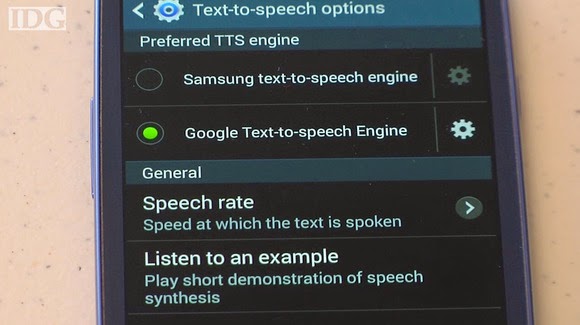
First hit the menu or options key on your phone and select settings. Scroll down to Accessibility. Then scroll down to Text to Speech Options. Depending on what is installed on the phone, there may be a few options listed. The phone will typically default to the manufacturer’s voice option.
android speech poster

By tapping on the gear, users can change language settings for the default voice, but for the more natural text to speech synthesis, choose Google text to speech engine.


There are also applications in Google Play that will allow for more voices and languages.

Video:
http://www.pcworld.com/article/2154420/how-to-change-the-voice-on-your-android-phone.html#tk.rss_howto

   
For comprehensive coverage of the Android ecosystem, visit Greenbot.com.

Source: http://www.pcworld.com/article/2154420/how-to-change-the-voice-on-your-android-phone.html#tk.rss_howto

May 5, 2014

Best Android apps for VoIP and SIP calls

Staying connected has never been so easy, thanks to the modern-day smartphone, keeping us in touch with our friends even when they are out of reach. With advancements in the field of communications, smartphones have also evolved in how we communicate with other people.
Thanks to VoIP (Voice over Internet Protocol) technology, users can now get in touch with the special people in their lives by using the Internet connection on their phones. Since VoIP relies on the Internet, calling someone is relatively free of charge, with the exception of possible charges for using the Internet data connection.
Here are some of the best VoIP applications that are available in the Google Play Store.

Skype


Skype
is arguably one of the best VoIP services being used all around the world, and remains as popular as ever, keeping faithful to its service by giving users free Skype-to-Skype video calls. The Android version of Skype still packs a lot of punch and provides the same features as its desktop counterpart.
Users of Skype for Android version will be able to make free Skype video calls, send instant messages, and voice calls via 3G or Wi-Fi. Not only that, users can make low-cost calls and send SMS messages to other mobile users directly using their Android phones.

100,000,000+ downloads
974502 ratings (4.0 avg)

Fring


Once you get used to the buddy system on Fring, there’s no telling when you will stop chatting with your online buddies. Fring for Android is an innovative mobile application that lets you communicate and stay connected with your friends in a fun and easy-to-use environment.
Fring is not your ordinary buddy messenger. It is a complete package of all the best communication tools available on the Internet. Users can either choose from Fring’s list of communication services such as a 4-way group video chat, 1-on-1 video chat via 3G or Wi-Fi, or hook up with friends courtesy of the Live Texting feature.
Enjoy high quality video chat, thanks to Fring’s video calling DVQ technology that will give users the best video and audio quality possible, as it automatically adjusts to your data connectivity.

Line2


For those of you who are looking for separate lines for calling and texting on Android, Line2 is definitely the right app for you. Whether it’s used for business or personal use, Line2 is an exceptional app that serves as a landline replacement and will keep your mobile number private.
Take advantage of Line2’s different calling options. Choose from Wi-Fi, 3G, or 4G connections, depending on the service that you have applied for. In addition, users can benefit from the unlimited calls from U.S. to Canada, absolutely free. The app also supports SMS messaging with 24-hour support for the service. Line2 also has a built in Caller ID, call waiting, and call forwarding among its several features. There is a paid plan that gives you access to voicemail and conference calling.

Tango


Tango
has already been considered as one of the best free video call/chat apps for Android. What makes Tango the prime choice for many users is its top-notch voice calls. Tango has very good quality when it comes to making VoIP calls. It also easily integrates with any Android phone. Users can have free calls via 3G, 4G, and Wi-Fi connection.
Tango seamlessly integrates with any device and is always ready to receive calls 24/7. This is a huge plus factor for users who heavily rely on VoIP calls as a means of transacting business or personal matters. Another plus factor for Tango is the fact that you don’t have to disconnect when you don’t want to use the service. Tango is always connected, even when you’re not using the service. This can easily eat up your phone’s battery, since the app always stays connected to the Internet.

50,000,000+ downloads
490493 ratings (4.3 avg)

Viber


Viber
from Viber Media, is another excellent app that allows you to make free VoIP calls using your data plan. Viber basically functions the same as Tango but has better sound quality when it comes to making calls. With the use of Viber’s cutting-edge HD sound quality, phone calls are much better than GSM calls.
Viber is simple to use and lets you connect with friends easily, as it synchronizes your contact lists almost instantly once you launch the application. Gone are the days when you had to manually set your own contacts or build usernames from scratch. Unlike Tango, Viber has good battery management and runs in the background. With over 40 million Viber users around the world, staying connected has never been so easy.
50,000,000+ downloads
816218 ratings (4.3 avg)

Linphone


Developed by Belledonne Communications, Linphone is another popular VoIP application that lets you make free calls, as well as video calls. Linphone is not your ordinary VoIP app, as it is opensource and is constantly updated and developed by the community.
Linphone uses SIP for its connections, making your calls sound good while keeping bandwidth at a minimum. This is quite handy for users who have a tight restriction on their data plan. Linphone also offers video calls to other users using MPEG4 and H264 codecs, but it is only made available to ARMv7 devices. It also supports a wide variety of audio codecs like iLBC, G711, GSM, G722, and Silk, just to name a few. The app also introduces audio multi-call and conferencing if you have multiple users on the line. Linphone also features echo cancellation, address book integration, and call history.

100,000+ downloads
1244 ratings (3.8 avg)

Groove IP Lite


Here’s a groovy application that will surely satisfy your calling cravings. Groove IP Lite from Snrb Labs is an Android application that connects to Google Voice using VoIP. Users of Groove IP Lite can make free unlimited calls to any phone in the United States or Canada without costing a cent on voice minutes. Groove IP Lite works on any Android device, allowing you to make calls over a Wi-Fi connection.
Turn any ordinary mobile phone into a fully featured phone without paying any charges to your carrier. For those of you calling with a data network plan, each call uses 1.2 MB of data. If you’d like to do away with ads and to get more features, you can also purchase Groove IP’s pro version.

100,000+ downloads
1774 ratings (4.1 avg)

CSipSimple


VoIP apps couldn’t get much simpler and easier to use than with CSipSimple for Android. CSipsimple is just the same as the VoIP apps you can find on the market but it is also one of the simplest to use. CSipSimple connects via WiFi just the same as those wired IP phones but minus the connection delay.
The user-interface has a minimalist feel and pretty much resembles the stock dialer found on most Android phones. The app features multi-accounts, call recording, supports a multitude of codes, as well as themes. The only downside of CsipSimple is that it uses a higher amount of bandwidth than any other VoIP app.

500,000+ downloads
7323 ratings (4.4 avg)

WiCall


Want to make cheap calls without bleeding your budget? If the answer is yes then say hello to WiCall from Zenitalk. Make cheap calls using WiCall and choose from WiFi or 3G connection. WiCall is cheaper than most VOIP service available in the Google Play Store and undoubtedly better than Skype and Viber.
WiCall is basically a prepaid mobile wireless telephone service with no plans and contract to maintain; that makes calling cheaper than most VoIP services. Compared to Skype, Wicall doesn’t need a connection, neither does it ask you for a maintenance fee as your credits can last the whole year round. WiCall bypasses regular carrier restrictions and any VoIP calls you make are automatically routed via WiFi or any connection that you have at your home or at the office.

TiKL Touch Talk Walkie Talkie


Here’s something that is so simple to use that you don’t have change any additional settings to get started. Transform any ordinary Android phone to a Walkie Talkie, just by downloading TiKL Touch Talk Walkie Talkie.
Instantly communicate with someone or a group of friends with a single tap of a button. No set-up is required as the app only requires your phone contacts or Facebook friends to start communicating. The app is fast, simple and reliable as TiKL turns your phone into the ultimate Push To Talk Walkie Talkie.
TiKL works by connecting through a WiFi. 3G, 4G, EDGE and GPRS connection so you don’t have to worry about voice charges from your carrier. Get free real time one-on-one push-to-talk calls at lightning fast speed or go global by taking group voice push-to-talk calls with friends from other networks.

10,000,000+ downloads
146895 ratings (4.3 avg)

Google Voice


If you are fond of making international calls then look no further than Google Voice. What makes Google Voice the top choice among VoIP applications is Google’s interconnectivity with its products. Google Voice eliminates the problem of having to use multiple numbers for different purposes as users can enjoy a single number and still be connected with their close circle of friends, even if it’s for business or personal use.
Creating a Google Voice account is easy as you just need to sign-up for a Google account. Google Voice has also a built in voicemail system that allows users to eavesdrop on someone during the recorded message. SMS is power, and Google Voice is fully integrated with it. Google Voice is not limited to just chit chat, but also allows you to send text messages to someone from anywhere in the world. Not only that, Google Voice also allows you to make cheap international calls using your own Google number.

10,000,000+ downloads
104491 ratings (4.2 avg)

With an abundance of VoIP apps available for Android devices, you’ll be able to make calls to anywhere in the world using your Internet connection. Save money on making calls today. If your favorite VoIP app didn’t make it to our list, let us know what your VoIP app of preference is in a comment.

Source: http://www.androidauthority.com/best-android-apps-voip-sip-calls-wi-fi-calling-internet-calling-87396/

May 4, 2014

How To Make Free Internet Phone Calls Using Groove IP & Google Voice


Groove IP: Voice without Minutes!Due to changes in Google Voice, this app will be switching to a different provider to make and receive calls. You can find the most up to date information on our Facebook page https://www.facebook.com/snrb.labs
GrooVe IP is an android app that connects to Google Voice using Voice over IP (VoIP). What this means for you is you can make free unlimited calls to any phone in the US or Canada without using your voice minutes. GrooVe IP works on any android device, phone or tablet, and allows you to make calls using the device’s data (WiFi or mobile data) connection. If you have a smartphone with Wi-Fi connectivity but no mobile plan, you can use this app to convert it to a free, full-featured working phone.
This app has a separate dialer that can be used to make calls. Alternatively, the native dialer, call-log, contacts, and favorite functionality can be shared between the phone and app on a call-by-call basis.
** NOTE ** Please ensure that your Google Voice account is associated with either a gmail or google apps account.
** NOTE ** To receive incoming calls you MUST go into your Google Voice account and forward calls to Google Chat.
** NOTE ** GrooVe IP uses 1.2 MB per minute during a call
For requirements, setup details, answers to frequently asked questions, known issues, or more information, please visit http://snrblabs.com/snrb/grooveIp.aspx
If you have any questions, feature requests, or run into any problems please contact us! We cannot help you if you only leave a comment. We have a 24 hour refund period! If you would like a refund please send us your order receipt and a description of why you want a refund. If you are having trouble with the app and contact us within 24 hours we will extend the refund period while we help troubleshoot!
*** FINE PRINT ***
- Google Voice℠ services are provided by Google, Inc. SNRB LABS, LLC is NOT affiliated with Google, Inc.
- Google Voice℠ is a call enhancement service which will not route emergency (911) calls.
- All calls are subject to Google Voice℠ calling rates. Currently calls within the US & Canada are free. Complete rate information can be found https://www.google.com/voice/b/0/rates. Rates are subject to change at any time by Google, Inc.