June 15, 2013

How To Transfer Your Contacts from iPhone to Android


How to Transfer Your Contacts from iPhone to Android
When you change your handset, one of the most annoying tasks is to transfer contacts from your old phone to the new one. One way to transfer your contacts from iPhone to any other device would be to connect it to your computer, sync the contacts using iTunes and pray that the new device can sync with iTunes as well. Here are a few ways you can easily transfer contacts from iPhone to Android.

Backup Up iPhone contacts

Method 1: backup contacts to a vcf file

There is a very handy iOS application known as My Contacts Backup that allows users to backup their contacts in VCF or CSV format and save them online.
Once installed, run the application and it will show you the total number of contacts you have on your iPhone.
transfer-contacts-iphone-app
Before you start the backup, first tap the small wheel cog icon at the bottom right and change the export type to “vCards”.
transfer-contacts-iphone-settings
Next, go back to the main screen and tap the “Backup” button. This will backup all your contacts in the vCards format. After creating the backup, email the file (to your Gmail address) from within the app to yourself.
transfer-contacts-iphone-email

Method 2

If you don’t like installing third party applications, you can configure your iPhone to backup your contacts to Google. All you have to do is to setup a CardDAV account using your Gmail address. To do so, go to “Settings -> Mail, Contacts, Calendars and tap on Add account”. From there, tap on “Other” and select “Add CardDAV” account under Contacts heading.
transfer-contacts-iphone-google
Just enter the details including your login credentials and server. Make sure you write your complete email address in the username field and use google.com as the server. Tap Next and you are done. After setting it up, open your contacts application and it will automatically sync your contacts with your Google account.

Restoring Contacts on Android

If you are using Method 1 to create a backup of your contacts, open the Gmail app that comes with the phone and open the vcard file that you sent to yourself earlier. It will ask you which application you want to use to open the file. Select “Phone” and it will restore all the contacts to your device.
transfer-contacts-iphone-open
If you are using Method 2, you just have to make sure that your phone is connected to your Google account. Go to “Settings -> Accounts & Sync” and tap on your Google account.
transfer-contacts-iphone-accounts
Now, tap on “Sync Contacts” and it will restore all your contacts.
transfer-contacts-iphone-sync

In the End

Personally, I used the first method to transfer the contacts as it’s less time consuming and can get things done in five minutes or so. Which method do you use to transfer your contacts from your iPhone to any other device? We’d love to hear about it in the comments below.

Source: http://www.maketecheasier.com/transfer-contacts-from-iphone-to-android/2013/06/13

June 14, 2013

Find your own private Internet with Freenet-PCWorld


Anonymous peer-to-peer communication on the Internet isn’t just a handy tool for privacy enthusiasts; it’s critical for preserving free speech in the digital world. Anonymous file-sharing services like BitTorrent are legion, but their utility is limited—you can share only files—and their reputations are unfairly tarnished by people who use them to share media illegally. If you’re looking for a highly anonymous peer-to-peer network with websites, forums, and more, look no farther than the Free Network, one of the best-kept secrets in anonymous communication.
Here’s how it works: Freenet is an anonymous peer-to-peer data-sharing network similar to BitTorrent, but with one key difference: All uploaded data is assigned a unique key, sliced up into small, encrypted chunks and scattered across different computers on the network. That form of data storage means that—unlike with BitTorrent—you don’t have to keep your Freenet client running to seed files you want to share on the network.
Instead, when someone wants to access a piece of data—a document or photograph, for example—they “fetch” it from the network using the unique key assigned to that piece of data. Freenet routes fetch requests through intermediary computers on the network that don’t store records of the request, ensuring that no single computer on the network knows the contents of any one file.
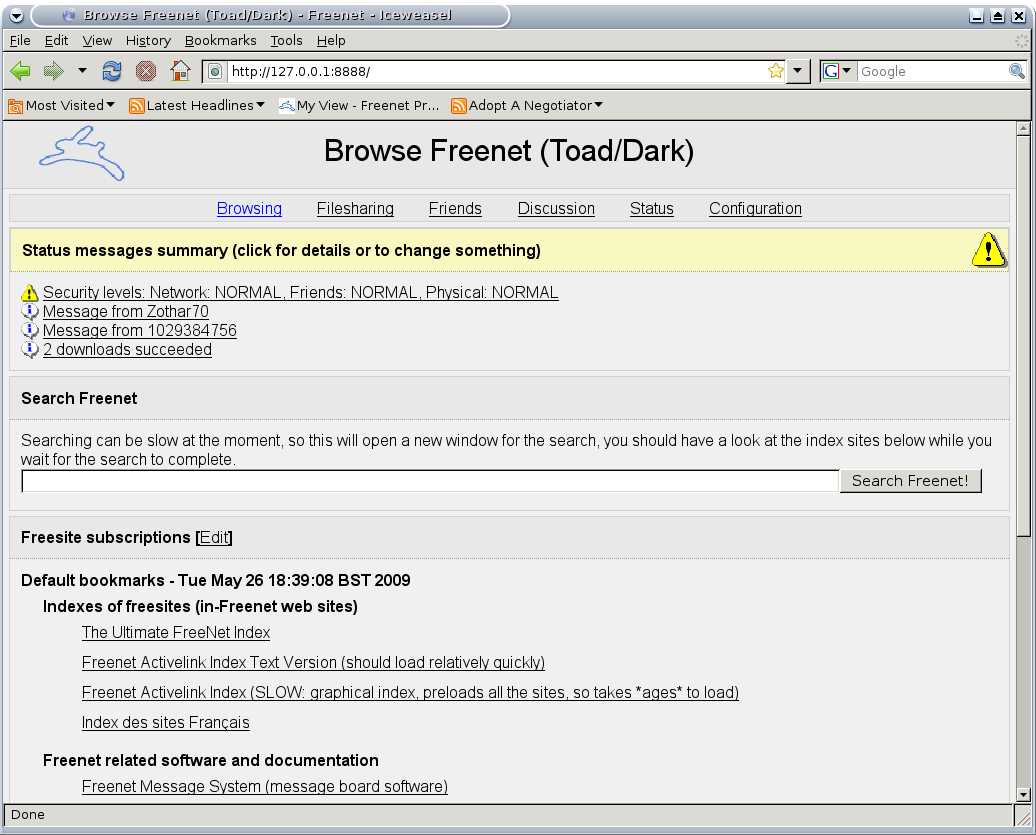
An example of a Freenet website, or freesite.
If that sounds familiar, it’s because this fetching system works very similarly to the way your Web browser does when it fetches websites from the Internet. In fact, once you have the Freenet client running on your PC, you can use most Web browsers to browse files and websites stored on the Freenet. For optimal security, download the most recent version of a browser you don’t normally use—say, Firefox or Chrome—and use it exclusively to browse Freenet, with private browsing enabled.
Next, head over to the Freenet Project website, and download the Freenet client for your operating system. The Freenet installer will walk you through the setup procedure and provide excellent explanations of the different levels of security you can choose from at each step of the process: who to connect to, how much of your hard drive and bandwidth to permit the Freenet client to use while it’s running, and so on.
Accessing Freenet is a fairly spartan experience; this is about as exciting as it gets in terms of fancy visuals.
The biggest choice you have to make is whether to use Freenet in friends-only mode—also known as darknet mode—for maximum privacy. In darknet mode, you can connect to Freenet only through trusted friends with whom you exchange encryption keys, which makes it very difficult for anyone to track what you’re doing on Freenet or even to determine that you’re accessing Freenet in the first place. Of course, funneling your Freenet access through a handful of trusted friends will create a traffic bottleneck that throttles your download speeds—so if you go this route, try to convince at least five or ten friends to join up with you so you can fetch Freenet websites (or “freesites,” as they’re called) and files from Freenet at a semi-decent speed.
Once the Freenet client is up and running, right-click the client icon in your Windows taskbar and select Open Freenet to access the Freenet welcome page in your browser of choice. From here, you can browse Freenet, chat on Freenet forums, and connect with other Freenet users.
Freenet is a complex and powerful tool for privacy enthusiasts, capable of scaling to meet your privacy needs. If you want to build a private web of communication linking a few trusted friends, Freenet can help you do that. If you just want a way to share and consume content anonymously, Freenet can help you do that too.


The Web Hidden On The Web – FreeNet

freenet projectThis week it was officially announced that the United States National Security Agency (NSA) has been mining data from cellular service provider, Verizon. People were, and are, freaking out! How could the government do such a thing? What kind of totalitarian state are we really in?
Folks, there are those of us who have been trying to tell you this for years. Not just tin-hatters, but people who were a part of doing it, people who have had it happen to them, and people who had voted for, or against, the legislation to do these things. But our heads keep going back into the sand.
I’ll never understand how someone can deny that the government, any government, might be listening to everything we say and do, when there was a cover story article about it in Wired magazine, back in March 2012. Go read the article, The NSA Is Building the Country’s Biggest Spy Center (Watch What You Say), then come back and find out what you can do to opt-out of Big Brother on the Internet.

FreeNet – The Other World Wide Web

freenet projectIn the not so distant past, a few people understood that the Web was going to become the largest communications tool ever imagined. The sheer volume of information that is generated and placed on the web everyday, is greater than all the information that existed in written form prior to 1800. Over 5,000 years of the written word could not equal what we publish in a day.
A great deal of that information is personal, and to a government that wishes to control its people, this is the greatest gift we could give them. Ian Clarke understood this and strove to create a tool that would have the functionality of the web, but with as much anonymity as possible. Thus was born FreeNet in the year 2000.
Historically, the FreeNet project has been known to those in the general public who even know about it, as a file sharing service. Kind of like Napster back then, or BitTorrent today. As a file sharing format it didn’t work very well. That is, it worked more slowly than the Napsters of yesterday or the BitTorrents of today. Those that saw it as simply a file sharing tool, left FreeNet, leaving behind not many people who saw it for what it truly is – liberated information.

How FreeNet Works – The Nutshell Version

FreeNet runs something like a cross between BitTorrent and a web server. It’s like BitTorrent in that little bits of the information are stored across the network of computers using FreeNet. If you’d like to know more about how BitTorrent works, we have an article on that. No single computer should have the complete file, all of the time. This makes it hard to shut someone down for serving up information, because they don’t even know what information they have!
I could have 8 bits from a movie on my computer, but how could anyone know what movie? The 8 bits in itself is not useful information. However, when it is combined with the thousands of other little bits of information, it can become a useful file. Perhaps a recipe for cookies, or a song, or even communications between political dissidents. Even then, what information is on your hard drive should be encrypted. FreeNet recommends using TrueCrypt, however FreeNet also has the ability to encrypt the files it uses.
what is freenet
Where it’s like a web server is that it allows you to utilize the web to share information with others. For more on how a web server works, we also have an article on that. It does this using encrypted connections (nodes) that connect to other nodes on the FreeNet. This makes the usage of FreeNet hard to detect. It appears almost like normal web communications. You can make your server public, which is the least secure method, or you can make it private so that only people you want to access your files can even see that you exist. This is, of course, the most secure method.
what is freenet
If you’re new to FreeNet, you’ll probably use the Low Security setting of FreeNet. Then, once you find friends of a feather, you may start to migrate more and more toward the Dark FreeNet. Dark, meaning not highly visible. You and your friends can now openly discuss politics, religion, ecology, inventions, whatever! You can do so with a degree of certainty that no one really knows who you are.
In fact, this has made FreeNet the most popular web privacy tool in China, and several other countries with oppressive regimes. That is not to say that the encryption and methodology will provide perfect security. I simply don’t believe that exists. Where a person is smart enough to create good security, someone else who is smarter will come along and foil that security. Such is life.
One downside to FreeNet is that because of the security measures, it is inherently slower than your normal web browsing. Just remember that all those nodes that have the information you want have to be connected to, and all the information has to be downloaded and decrypted on your computer for you to make sense of it. Inconvenience is the price we pay for security. However, FreeNet provides you with information about how many nodes are connected and what your security level is, so you know what kind of speeds to expect.
what is freenet
FreeNet also estimates the download time and progress for each page you access.
freenet hidden websites
You can also chose to download the file in the background, and save it to a specific directory for later viewing. Or you can fetch the file, however it will only be accessible through FreeNet’s download page.
freenet hidden websites

 A Warning About Using FreeNet

Imagine a market scene like you might have seen in an Indiana Jones movie. People scurrying about, most of them just trying to make a living selling rugs or spices, but under the cover of the activity there are always those that are selling drugs or guns, or running gambling rings. There is a dark underbelly to the beast.
There is definitely this kind of illegal, and immoral, activity happening on FreeNet. Just don’t take part in it. Just like this kind of activity happens on the regular web that you use everyday, you just don’t take part in it and life is good.
freenet project
I believe that the more positive use of FreeNet there is, the less of the immoral activity there will be. The immoral don’t like being seen at all, and will scatter like cockroaches in the light, if more moralistic people are around them.

The Take Away

The regular web is a wonderful thing and useful beyond what we can even comprehend today. It is still in it’s infancy as a technology. Today, it is akin to the phone’s partyline, where anybody could pick up a phone and hear what’s happening to your great aunt Martha. Freenet is a step toward the privacy of having your own private phone line. The more people that use these private lines,  the more that the system will move to this privacy model. So use your party line if what you are talking about is of no significance, but pick up the FreeNet private line when you need to discuss things that really matter.
Have you used the FreeNet project before? Would you use it? Do you think it’s a waste of time for average folks? What other secure methods are there for communicating on the Internet? Let us know your thoughts and experiences in our comments section below. Just so you know, it is public.

Source: http://www.makeuseof.com/tag/freenet-the-private-internet/

June 12, 2013

How Does a Bittorrent Client Initially Discover Its Peers?

When your torrent client joins the swarm to share and gather file pieces, how exactly does it know where all its peers are? Read on as we poke around inside the mechanisms that undergird the BitTorrent protocol.
Today’s Question & Answer session comes to us courtesy of SuperUser—a subdivision of Stack Exchange, a community-driven grouping of Q&A web sites.

The Question

SuperUser reader Steve V. had a very specific question about the Distributed Hash Table (DHT) system within the BitTorrent protocol:
I’ve already read this SuperUser answer and this Wikipedia article but both are too technical for me to really wrap my head around.
I understand the idea of a tracker: clients connect to a central server which maintains a list of peers in a swarm.
I also understand the idea of peer exchange: clients already in a swarm send the complete list of their peers to each other. If new peers are discovered, they are added to the list.
My question is, how does DHT work? That is, how can a new client join a swarm without either a tracker or the knowledge of at least one member of the swarm to exchange peers with?
(Note: simple explanations are best.)
His question in turn prompted a really detailed reply about the different functions of the BitTorrent system; let’s take a look at it now.

The Answer

SuperUser contributor Allquixotic offers an in depth explanation:
How can a new client join a swarm without either a tracker or the knowledge of at least one member of the swarm to exchange peers with?
You can’t. It is impossible.*
* (Unless a node on your local area network happens to already be a node in the DHT. In this case, you could use a broadcasting mechanism, such as Avahi, to “discover” this peer, and bootstrap from them. But how did they bootstrap themselves? Eventually, you’ll hit a situation where you need to connect to the public Internet. And the public Internet is unicast-only, not multicast, so you’re stuck with using pre-determined lists of peers.)

References

Bittorrent DHT is implemented via a protocol known as Kademlia, which is a special case of theoretical concept of a Distributed hash table.

Exposition

With the Kademlia protocol, when you join the network, you go through a bootstrapping procedure, which absolutely requires that you know, in advance, the IP address and port of at least one node already participating in the DHT network. The tracker that you connect to, for instance, may be itself a DHT node. Once you are connected to one DHT node, you then proceed to download information from the DHT, which provides you connectivity information for more nodes, and you then navigate that “graph” structure to obtain connections to more and more nodes, who can provide both connectivity to other nodes, and payload data (chunks of the download).
 
I think your actual question in bold — that of how to join a Kademlia DHT network without knowing anyother members — is based on a false assumption.
The simple answer to your question in bold is, you don’t. If you do not know ANY information at all about even one host which might contain DHT metadata, you are stuck — you can’t even get started. I mean, sure, you could brute force attempt to discover an IP on the public internet with an open port that happens to broadcast DHT information. But more likely, your BT client is hard-coded to some specific static IP or DNS which resolves to a stable DHT node, which just provides the DHT metadata.
 
Basically, the DHT is only as decentralized as the joining mechanism, and because the joining mechanism is fairly brittle (there’s no way to “broadcast” over the entire Internet! so you have to unicastto an individual pre-assigned host to get the DHT data), Kademlia DHT isn’t really decentralized. Not in the strictest sense of the word.
 
Imagine this scenario: Someone who wants P2P to stop goes out and prepares an attack on all commonly used stable DHT nodes which are used for bootstrapping. Once they’ve staged their attack, they spring it on all nodes all at once. Wham; every single bootstrapping DHT node is down all in one fell swoop. Now what? You’re stuck with connecting to centralized trackers to download traditional lists of peers from those. Well, if they attack the trackers too, then you’re really, really up a creek. In other words, Kademlia and the entire BT network is constrained by the limitations of the Internet itself, in that, there is a finite (and relatively small) number of computers that you would have to successfully attack or take offline to prevent >90% of users from connecting to the network.

 Once the “pseudo-centralized” bootstrapping nodes are all gone, the interior nodes of the DHT, which are not bootstrapping because nobody on the outside of the DHT knows about the interior nodes, are useless; they can’t bring new nodes into the DHT. So, as each interior node disconnects from the DHT over time, either due to people shutting down their computers, rebooting for updates, etc., the network would collapse.


Of course, to get around this, someone could deploy a patched BitTorrent client with a new list of pre-determined stable DHT nodes or DNS addresses, and loudly advertise to the P2P community to use this new list instead. But this would become a “whack-a-mole” situation where the aggressor (the node-eater) would progressively download these lists themselves, and target the brave new bootstrapping nodes, then take them offline, too.
Not only did we learn the answer to the original question but we also learned quite a bit about the nature of the BitTorrent system and its vulnerabilities.

Source: http://www.howtogeek.com/163751/how-does-a-bittorrent-client-initially-discover-its-peers/?utm_source=newsletter&utm_medium=email&utm_campaign=120613

For further reading, see MakeUseOf's Bittorrent guide here:

http://www.makeuseof.com/pages/free-torrent-guide

May 30, 2013

When will Google Fiber Take Over the World ?

When will Google Fiber Take Over the World ?

Since July 2012, Google has been implementing their fiber service in Kansas City and the local internet service providers are peeing their pants.Time Warner and AT&T cannot compete with Google’s speed or price.
When Google announced they were coming to Austin, AT&T announced they would be offering 1GB internet just like Google. Just like the younger sibling who says “that’s not fair!” – AT&T hasn’t done the research or groundwork for laying 1GB fiber. They haven’t been working with the city for the last year or two on building the infrastructure needed using the newest fiber cables like Google has. AT&T’s statement is a complete bluff.
And unless you’re a cable company executive, you’ll be ecstatic when fiber hits your town too. All ISPs will now have competitive speeds and lower pricing. Its already happening in Kansas City. Google has the balls to stand up to the ISP oligarchy and put them in their place. Give them a helping hand when they arrive in your city. [Via]
When will Google Fiber Take Over the World

Source: http://www.yourdigitalspace.com/2013/05/when-will-google-fiber-take-over-the-world/?utm_source=rss&utm_medium=rss&utm_campaign=when-will-google-fiber-take-over-the-world

May 19, 2013

User Your Smartphone To Take Windows On The Road -by Fred Langa

Use your smartphone to take Windows online
Fred LangaBy Fred Langa
Getting your PC online can be a challenge when there's no Wi-Fi, cable, or other standard network immediately available.
But with cell service and a compatible phone, free or low-cost tethering software can connect Windows to the Web — with no added charges to your phone's data plan.
Sooner or later, this happens to everyone: You need to get your Windows PC online, but the network is down. Maybe the local Wi-Fi is out due to a power failure; or possibly a storm has taken down your cable, DSL, or land-line service; or you could be away from your home or office, out on the road, or stuck in a motel with poor or no Internet connectivity.
In those instances, the simple, easy, inexpensive answer is to use your BlackBerry or Android-based smartphone as the PC's connection to the Net. With a USB cable and tethering apps running on both phone and PC, you can email, chat, surf, and otherwise use the Web — just as you do when connected to a Wi-Fi or wired network.
In the past six months, I've relied on tethering in three, real-life instances — twice during weather emergencies (including Hurricane Sandy) that took out regular communications, and once when I was traveling in an area without reliable Wi-Fi or Ethernet. You've actually read the results: a Windows Secrets Top Story and two columns researched, written, and submitted by email — all via a tethered connection.
Best of all, you don't necessarily need to sign up for any add-on service or pay additional monthly fees to your cellphone provider. This form of tethering uses your existing smartphone's data plan. (I don't use an iPhone or Windows Phone, but it appears that tethering on those platforms reqires either an added service from your phone provider or, in the case of iOS, jailbreaking [Wikipedia info] the phone.)
Tethering also adds an additional layer of security. Unlike Wi-Fi hotspot solutions, USB-based tethering provides a private, non-broadcast data conduit between PC and phone. The USB connection can also supply power to your phone during a tethering session, saving phone battery power.
Many Android-based tethering apps to choose from
There are dozens of tethering apps available at the Google Android apps store. You're free, of course, to try any or all. (In fact, I've tried many of them myself!) But for the purposes of this article, I'll focus on one tethering app — EasyTether from Mobile Stream/Polyclef.
There are four main reasons why I like EasyTether:
  • Unlike some other tethering apps I've tried, EasyTether for Android (site) is quick to set up and use. It works on unmodified, stock smartphone software — it doesn't require rooting or any other complex or potentially dangerous system changes.
  • EasyTether reportedly works on all major cellphone carriers' data networks, most major Android-based smartphone models, and most Windows-based PCs. Specifically, the EasyTether phone app is available for Android (1.5 and higher) and as a free prerelease app for BlackBerry (site). Its PC-side app is available for Windows (XP through Win8; 32- and 64-bit)and Mac OS X (10.4 and higher) as well as for several flavors of Linux. EasyTether can even get an Xbox, PS3, or Wii online via your phone!
  • Under the covers, EasyTether is pretty slick. It creates a virtual NAT router with full TCP and UDP (Wikipedia info) support. The newest version of EasyTether (released as I write this) also adds a Bluetooth tethering option, in case a USB cable won't work for your setup.
  • Finally, EasyTether is low-cost and risk-free. There's a free, feature-limited, demo version — EasyTether Lite — that installs and sets up just like the full versions. Use Lite to make sure everything works with your combination of phone, carrier, and PC.
    If the Lite version works — and it probably will — simply upgrade to one of the full versions. I use EasyTether Pro, which currently costs U.S. $10 — a one-time fee that qualifies you for lifetime free software upgrades.
Tethering an Android smartphone, Step by step
In the rest of this article, I'll show you how to set up the Android/Windows combination of EasyTether. But the information generally applies to other versions as well. You'll also get the gist of how tethering apps work, should you prefer to use some application other than EasyTether.
  • Install the free EasyTether Lite app for your phone. Wake up your smartphone and download a copy of EasyTether Lite from Google Play (site), shown in Figure 1. You can also download the app directly from its Mobile Stream (page).
    EasyTether Lite
    Figure 1. EasyTether Lite lets you test-drive the software for free.
    (Note: depending on your phone, Android version, and other variables, the screens you see could differ slightly from the examples shown here and in the following steps.)
    Once the app downloads, let it install normally, granting all the permissions the app requests.
    When you launch EasyTether, it offers a wizard option to assist with setting up the software. Unfortunately, the Wizard's instructions are terse and constrained by screen size. I recommend that first-time EasyTether users skip the wizard and use the following instructions, which are more complete and easier to follow.
  • Install the free EasyTether Windows drivers and software. The drivers and software are bundled in a universal package that runs on 32- and 64-bit versions of XP, Vista, Windows 7, and Windows 8. You can directly download the easytether.zip file from a Google/easytether downloads page or from an EasyTether support blog.
    Windows will open the ZIP file natively — just click on it — or open it with the ZIP-tool of your choice.
    With the .zip file open, double-click the enclosed easytether.exe; the drivers and software will then install and set up (see Figure 2).
    EasyTether Windows setup
    Figure 2. The EasyTether Windows software installs and sets up just like any other Windows app.
  • Install the optional drivers, if required. If you have a Samsung or LG smartphone, download and install the free supplemental drivers required by those models (as shown in Figure 3). Go to the Easytether/Android page and look for the Samsung and LG supplementary Windows-only driver links on the right side of the page. You also can download the supplemental drivers from the EasyTether support blog.
    LG and Samsung driver install
    Figure 3. LG and Samsung phones require an optional, free driver package.
  • Enable USB Debugging on your smartphone. USB Debugging allows for full, unhindered/unfiltered data communication between your smartphone and your PC. EasyTether (and many other tethering apps) make use of this feature, so it must be enabled for tethering to work.
    Although the Android setting is always called "USB Debugging," its location varies somewhat. On older versions of Android (3.2 and earlier), it's under Settings/Applications/Development.
    On Android 4.0 and newer versions, it's under Settings/System/Developer options (see Figure 4).
    USB debugging
    Figure 4. USB Debugging must be enabled for Android tethering to work. It's under Developer options in Android 4 and above (shown).
    Note: On Android 4.2 and newer versions, the Developer options menu is hidden by default. You reveal it by this obscure (and somewhat silly) process:
    Go to Settings/About phone and tap the Build number seven times. You'll see a small toast (popup window) confirming that you've enabled the developer options. Return to the previous screen to access the Developer options menu and the USB Debugging setting, as described above.
  • Launch the EasyTether app on your phone. Open the EasyTether app in the normal way. (If you've been following along in this step-by-step article, bypass EasyTether's setup wizard offer.) Tap the USB checkbox, as shown in Figure 5. The app will report "Ready for connection from the host."
    EasyTether USB selection
    Figure 5. Use EasyTether's USB connection option.
  • Run EasyTether on your PC. Find and launch EasyTether from the Windows Start menu. The EasyTether icon will appear in the notification area, as shown in Figure 6.
    EasyTether in notification area
    Figure 6. When EasyTether is running, its icon (circled) appears in the Windows notification area (Win8 shown).
  • Disconnect your PC from all networks. To simulate a no connection available condition (i.e., when you'd use tethering), turn off the PC's Wi-Fi connection and unplug any Ethernet cables. You're now ready to go online via your phone.
  • Establish the USB connection between your PC and phone. Connect your phone to your PC with a known-good USB cable. (Note: The first time you connect your phone and PC together via USB, several drivers might automatically install. This should be a one-time event; just let the process run to completion.)
    At the end of the initial setup, EasyTether will typically open a Windows notification-area dialog box similar to that shown in Figure 7. If the dialog doesn't appear automatically, you can open it manually by right-clicking the EasyTether icon in the notification area.
    The dialog box lets you make the connection to your phone. Via Settings, you can also control other EasyTether behaviors such as launching itself at Windows startup and automatically connecting to a phone, when one is available, via USB.
    Android connect
    Figure 7. This popup menu also lets you control EasyTether's settings.
    Make whatever settings adjustments you wish, then click the Connect via Android option. EasyTether should then report that the connection has been made, as shown in Figure 8.
    Connection established
    Figure 8. A Windows notification balloon tip reports a USB connection has been established and is working.
    At the same time, the EasyTether app on your Android phone should report a connection (see Figure 9).
    Connection confirmation on phone
    Figure 9. Phone and PC are now connected via USB.
That's all there is to it! If everything went as it should, your PC will now be online via your phone. Test your setup by surfing the Web from Windows, using your preferred browser.
If you run into problems getting Windows online, EasyTether has a comprehensive FAQ and troubleshooting page.
An important reminder: Keep in mind that EasyTether Lite is a demo version. Although you can use it to access any standard http: web site, the Lite version blocks access to https: sites such as Gmail, Amazon, eBay, and most banking sites. The Lite version also blocks UDP-based game and messaging applications.
EasyTether's paid versions ($10 per phone) have no such limitations.
If the Lite demo version works and you'd like to use EasyTether for real, visit the same location where you got the Lite version and purchase a full, unlocked version.
Some fine points on tethered network connections
To Windows, an EasyTether connection appears to be a completely ordinary, Ethernet-based network. Figure 10, a screen capture from my PC, shows what Windows' Network and Sharing Center reports when my PC is online via my tethered phone.
Network settings
Figure 10. Windows Network and Sharing Center view of the EasyTether connection
Clicking the Ethernet 2 link next to Connections pops up the connection status dialog box (see Figure 11). It shows that EasyTether is emulating a gigabit-class Ethernet connection.
Connection status
Figure 11. The connection status dialog box
Keep the following well in mind when using a tethered connection: You're using your phone's data plan. As shown in Figure 11, the connection status box gives a running total of the bytes sent and received. This can be helpful if your data plan has a usage cap; you'll want to keep an eye on how much data your tethered connection is consuming, to avoid overages.
(Obviously, if you have an unlimited data plan, there's no concern about the extra bandwidth that tethering will consume.)
What connection speeds can you expect?
Although EasyTether emulates a gigabit-class Ethernet connection, the true network speed depends on your phone, the kind of data connection it provides (2G, 3G, 4G, LTE, etc.), and signal strength.
To give some idea of real-life speeds, I used the throughput tests at Speedtest.net to compare ping, download, and upload speeds on a Windows system connected three different ways:
  • Tethered to a 4G phone on the Sprint network with good signal strength in Boston, Massachusetts
  • Running on a conventional 802.11n Wi-Fi connection in my Boston apartment
  • Running on a true gigabit-class hardwired Ethernet connection, also in my apartment.
Each of these connections was tested separately.
Table 1 shows the results. (The ping test is in milliseconds; the download/upload tests are megabits per second.)
Comparative connection speeds
Table 1. A tethered connection is significantly slower than Wi-Fi and wired networks.
Although these tests show that my tethered connection speed is well below that of Wi-Fi or wired Ethernet, it's still fully usable.
Tethering won't replace a good Wi-Fi connection and could get expensive if used daily, but when no other networking is available, it can easily save the day!

May 11, 2013

Bloodless $45M bank heist impressed cybercrime experts

May 10, 4:41 PM (ET)

By COLLEEN LONG and MARTHA MENDOZA

(AP) In this undated photo provided by the United States Attorney’s Office for the Southern District of...
Full Image


NEW YORK (AP) - A bloodless bank heist that netted more than $45 million has left even cybercrime experts impressed by the technical sophistication, if not the virtue, of the con artists who pulled off a remarkable internationally organized attack.
"It was pretty ingenious," Pace University computer science professor Darren Hayes said Friday.

On the creative side of the heist, a small team of highly skilled hackers penetrated bank systems, erased withdrawal limits on prepaid debit cards and stole account numbers. On the crude end, criminals used handheld devices to change the information on the magnetic strips of old hotel key cards, used credit cards and depleted debit cards.
Seven people were arrested in the U.S., accused of operating the New York cell of what prosecutors said was a network that carried out thefts at ATMs in 27 countries from Canada to Russia. Law enforcement agencies from more than a dozen nations were involved in the investigation, which was being led by the Secret Service.
(AP) This Feb. 19, 2013 surveillance image taken from a graphic released by the U.S. Attorney’s Office...
Full Image
Here's how it worked: First, the hackers, quite possibly insiders, broke into computer records at a few credit card processing companies, first in India and then the U.S. This has happened before but here's what was new: They didn't just take information. They actually raised the limit on prepaid debit cards kept in reserves at two large banks.
"It's pretty scary if you think about it. They changed the account balances. That's like the holy grail for a thief," said Chris Wysopal, co-founder of security company Veracode.
The next step was technically simpler, almost an arts-and-crafts activity.
Crime ring members in 27 countries ran used plastic cards, just about anything with a standard magnetic strip, through handheld magnetic stripe encoders, widely available online for less than $300. Those devices allow users to change information on magnetic stripes or to write new cards with a simple swipe.
(AP) This Feb. 19, 2013 surveillance image released by the U.S. Attorney’s Office in New York City shows...
Full Image
In this case, the stripes were rewritten with information from the hackers. That allowed the thieves to turn the cards into gold, instantly transforming them into prepaid debit cards with unlimited amounts of money stored on them. Finally it was time for action.
On two pre-arranged days - once in December and again in February - criminals loaded with the lucrative debit cards and PIN numbers, headed into city streets around the world, racing from one ATM to the next, often taking out the maximum the cash machine would allow in a single transaction: $800.
In December, they worked for about 2 1/2 hours, reaping $5 million worldwide in about 4,500 transactions. Two months later, apparently buoyed by their success, they hit the ATMs for 10 hours straight, collecting $40 million in 36,000 transactions.
The New York money runners made off with $2.8 million, according to the indictment, a fraction of the total amount yielded by the heist.
(AP) In this Saturday, Jan. 5, 2013 file photo, a person inserts a debit card into an ATM machine...
Full Image
Players kept a cut but sent the bulk of the money back to the masterminds through wire transfers and sometimes in person, prosecutors said. One New York suspect, Elvis Rodriguez, 24, planned to travel to Romania in January to pay about $300,000 to organizers of the operation, but American Airlines canceled the reservation because the airline was concerned it had been booked with a stolen credit card, according to the criminal complaint. The reservation was canceled, but the suspect paid for the trip in cash, it said.
Authorities said they seized his iPhone and found a photo of him and another suspect posing with a stack of cash between them in a car.
"There were obviously a lot of great minds behind this exploit, and then there were the pawns, the mules. They are entirely exploitable," said Phyllis Scheck, vice president at the security firm McAfee who has testified to Congress about how banks and small businesses need to prepare for cyber thieves.
Scheck couldn't help be impressed by the choreography.
(AP) This undated graphic released by the U.S. Attorney’s Office in New York City shows ten photos of a...
Full Image
"They executed while the iron was hot. They got in and got out," she said. In the end, the victims weren't individuals. They were two banks, Rakbank in the United Arab Emirates and the Bank of Muscat in Oman, which had their card processors breached, prosecutors said.
More investigations continue and other arrests have been made in other countries, but New York prosecutors did not have details. More arrests in the U.S. were possible, they said.
Police in Duesseldorf, Germany, said a 56-year-old woman and her 34-year-old son were linked to the case earlier this year and are still in investigative detention after having been arrested in February. They have refused to speak to police.
In New York, the cell was led by Alberto Lajud Pena, 23, who was found dead in the Dominican Republic with $100,000 in cash on him, prosecutors said. A man arrested in his death told authorities it was a botched robbery, and two other suspects were on the lam.
According to court documents, Lajud Pena communicated via email with a Russian criminal organization that specializes in laundering money and wrote to his shadowy bosses in charge of the operation. He wired money and deposited cash into several accounts.
"I sent scanned deposit slips," Lajud Pena writes in one.
"Deposit has cleared. Order paid. Good job," the sender replies.
Prosecutors said Lajud Pena recruited men he knew from Yonkers, some of whom worked as bus drivers for a company that provided services to special-needs students.
All but one of the surviving suspects were in jail, and it wasn't clear who was representing them. In Yonkers Friday, neighbors at the basement apartment where authorities said they seized $3,740 of the stolen money said police had visited two days in a row last month.
About $2 million is still missing, officials said.
---
Associated Press writers Peter Svensson and James Fitzgerald in New York, Frank Jordans in Berlin and writer Ezequiel Abiú López in Santo Domingo, Dominican Republic, contributed to this report.


From the New York Times=

It was a brazen bank heist, but a 21st-century version in which the criminals never wore ski masks, threatened a teller or set foot in a vault. 

In two precision operations that involved people in more than two dozen countries acting in close coordination and with surgical precision, thieves stole $45 million from thousands of A.T.M.'s in a matter of hours. 

In New York City alone, the thieves responsible for A.T.M. withdrawals struck 2,904 machines over 10 hours starting on Feb. 19, withdrawing $2.4 million. 

The operation included sophisticated computer experts operating in the shadowy world of Internet hacking, manipulating financial information with the stroke of a few keys, as well as common street criminals, who used that information to loot the automated teller machines.
The first to be caught was a street crew operating in New York, their pictures captured as, prosecutors said, they traveled the city withdrawing money and stuffing backpacks with cash. 

On Thursday, federal prosecutors in Brooklyn unsealed an indictment charging eight men — including their suspected ringleader, who was found dead in the Dominican Republic last month. The indictment and criminal complaints in the case offer a glimpse into what the authorities said was one of the most sophisticated and effective cybercrime attacks ever uncovered. 

It was, prosecutors said, one of the largest heists in New York City history, rivaling the 1978 Lufthansa robbery, which inspired a scene in the movie “Goodfellas.”
Beyond the sheer amount of money involved, law enforcement officials said, the thefts underscored the vulnerability of financial institutions around the world to clever criminals working to stay a step ahead of the latest technologies designed to thwart them.
“In the place of guns and masks, this cybercrime organization used laptops and the Internet,” said Loretta E. Lynch, the United States attorney in Brooklyn. “Moving as swiftly as data over the Internet, the organization worked its way from the computer systems of international corporations to the streets of New York City, with the defendants fanning out across Manhattan to steal millions of dollars from hundreds of A.T.M.'s in a matter of hours.”
The indictment outlined how the criminals were able to steal data from banks, relay that information to a far-flung network of so-called cashing crews, and then have the stolen money laundered in purchases of luxury items like Rolex watches and expensive cars.
In the first operation, hackers infiltrated the system of an unnamed Indian credit-card processing company that handles Visa and MasterCard prepaid debit cards. Such companies are attractive to cybercriminals because they are considered less secure than financial institutions, computer security experts say. 

The hackers, who are not named in the indictment, then raised the withdrawal limits on prepaid MasterCard debit accounts issued by the National Bank of Ras Al-Khaimah, also known as RakBank, which is in United Arab Emirates. 

Once the withdrawal limits have been eliminated, “even a few compromised bank account numbers can result in tremendous financial loss to the victim financial institution,” the indictment states. And by using prepaid cards, the thieves were able to take money without draining the bank accounts of individuals, which might have set off alarms more quickly.
With five account numbers in hand, the hackers distributed the information to individuals in 20 countries who then encoded the information on magnetic-stripe cards. On Dec. 21, the cashing crews made 4,500 A.T.M. transactions worldwide, stealing $5 million, according to the indictment. 

While the street crews were taking money out of bank machines, the computer experts were watching the financial transactions from afar, ensuring that they would not be shortchanged on their cut, according to court documents. 

MasterCard alerted the Secret Service to the activity soon after the transactions were completed, said a law enforcement official, who declined to be identified discussing a continuing investigation. 

Robert D. Rodriguez, a special agent with the Secret Service for 22 years and now the chairman of Security Innovation Network, said that in some ways the crime was as old as money itself: bad guys trying to find weaknesses in a system and exploiting that weakness.
“The difference today is that the dynamics of the Internet and cyberspace are so fast that we have a hard time staying ahead of the adversary,” he said. And because these crimes are global, he said, even when the authorities figure out who is behind them they might not be able to arrest them or persuade another law enforcement agency to take action.
After pulling off the December theft, the organization grew more bold, and two months later it struck again — this time nabbing $40 million. 

On Feb. 19, cashing crews were in place at A.T.M.'s across Manhattan and in two dozen other countries waiting for word to spring into action. 

This time, the hackers had infiltrated a credit-card processing company based in the United States that also handles Visa and MasterCard prepaid debit cards. Prosecutors did not disclose the company’s name. 

After securing 12 account numbers for cards issued by the Bank of Muscat in Oman and raising the withdrawal limits, the cashing crews were set in motion. Starting at 3 p.m., the crews made 36,000 transactions and withdrew about $40 million from machines in the various countries in about 10 hours. In New York City, a team of eight people made 2,904 withdrawals, stealing $2.4 million. 

Surveillance photos of one suspect at various A.T.M.'s showed the man’s backpack getting heavier and heavier, Ms. Lynch said, comparing the series of thefts to the caper at the center of the movie “Ocean’s Eleven.”
 
While the New York crew had a productive spree, the crews in Japan seem to have been the most successful, stealing around $10 million, probably because some banks in Japan allow withdrawals of as much as $10,000 from a single bank machine. 

“The significance here is they are manipulating the financial system to be able to change these balance limits and withdrawal limits,” said Kim Peretti, a former prosecutor in the computer crime division of the Justice Department who is now a partner in the law firm Alston & Bird. “When you have a scheme like this, where the system can be manipulated to quickly get access to millions of dollars that in some sense did not exist before, it could be a systemic risk to our financial system.” 

It was unclear to whom the hacked accounts belonged, and who might ultimately be responsible for the losses. 

The indictment suggests a far-reaching operation, but there were few details about the people responsible for conducting the hacking or who might be leading the global operation. Law enforcement agencies in more than a dozen countries are still investigating, according to federal prosecutors. The authorities said the leader of the New York cashing crew was Alberto Lajud-Peña, 23, whose body was found in the Dominican Republic late last month. Seven other people were charged with conspiracy to commit “access device fraud” and money laundering. 

The prosecutors said they were all American citizens and were based in Yonkers. The age of one defendant was given as 35; the others were all said to be 22 to 24. Mr. Lajud-Peña fled the United States just as the authorities were starting to make arrests of members of his crew, the law enforcement official said. 

On April 27, according to news reports from the Dominican Republic, two hooded gunmen stormed a house where he was playing dominoes and began shooting. A manila envelope containing about $100,000 in cash remained untouched.
Nicole Perlroth, Frances Robles and Mosi Secret contributed reporting.
This article has been revised to reflect the following correction:

Correction: May 11, 2013
An article on Friday about a sophisticated hacking crime in which $45 million was stolen from bank A.T.M.’s within hours misspelled, in some editions, the surname of a former prosecutor in the computer crime division of the Justice Department who commented on the case. She is Kim Peretti, not Paretti. The article also overstated the connection between the movie “Goodfellas” and the Lufthansa robbery in 1978, to which the A.T.M. case was compared. The Lufthansa robbery was only a plotline in the film; the movie itself was based on the book “Wise Guy,” written by Nicholas Pileggi, about the mobster Henry Hill.

Source: http://www.nytimes.com/2013/05/10/nyregion/eight-charged-in-45-million-global-cyber-bank-thefts.html?src=me&ref=general

May 7, 2013

Android reigns, Windows gains in smartphones: survey

Android reigns, Windows gains in smartphones: survey

Android was used on 49.3 per cent of smartphones sold in the US market in the first quarter, compared to 43.7 per cent for Apple's iOS, the operating system for the iPhon. —Reuters Photo

Android was used on 49.3 per cent of smartphones sold in the US market in the first quarter, compared to 43.7 per cent for Apple’s iOS, the operating system for the iPhone. —Reuters Photo
WASHINGTON: Google’s Android mobile operating system extended its dominance in smartphones in the US and other major markets in early 2013, according to a survey published on Monday.

Kantar Worldpanel ComTech said Android was used on 49.3 per cent of smartphones sold in the US market in the first quarter, compared to 43.7 per cent for Apple’s iOS, the operating system for the iPhone.
Android has thus boosted its lead from a year ago, when was ahead of Apple by a margin of 47.9 to 44.6 per cent.
In other major markets, Android was even more dominant – with 93.5 per cent of smartphones in Spain, 73.6 per cent in Germany, 69.4 per cent in China, and 63.3 per cent in France.
Japan was the only country in the survey where Apple was in the lead, with a 49.2 per cent market share to 45.8 per cent for Android.
But the survey also showed gains in several countries for a relative outsider, Microsoft’s Windows Phone, following the upgraded platform introduced in late 2012.
In the United States, Windows boosted its share to 5.6 per cent from 3.7 per cent a year ago, Kantar said. Windows grabbed 10.9 per cent of smartphone sales in Italy, 7.2 per cent in France and 7.0 per cent in Britain.
“As iOS and Android continue to battle it out for top selling smartphone OS, we have seen Windows steadily grow over the past year and is now at its highest sales share figure so far,” said Kantar analyst Mary-Ann Parlato.
“Windows’ strength appears to be the ability to attract first time smartphone buyers, upgrading from a feature phone,” she said, adding that this means prospects are positive for Windows, especially in the United States.
“With over half of the US market still owning a feature phone, it’s likely that many will upgrade over the coming year, which will ultimately contribute to more growth for the Windows brand,” Parlato said.

Source:  http://dawn.com/2013/04/30/android-reigns-windows-gains-in-smartphones-survey/

US Military Academies using Ubuntu for Training Future Officers in Cyber Warfare


According to The Washington Post, U.S. service academies are ramping up efforts to groom a new breed of cyberspace warriors to confront increasing threats to the nation's military and civilian computer networks which control almost everything these days. And guess what, they are being trained using Ubuntu OS (possibly in a virtual environment).
US Military Acadamies using Ubuntu for Training

Officers being Trained in Cyber Warfare using Ubuntu!
Ubuntu caught in the wild again. There was a recent report in The Washington Post about the grooming of future officers for cyberspace warfare by various Military academies in US. There was this little detail that they didn't cared to mention. In almost all the pictures, you could see that the desktops are running Ubuntu (possibly version 12.04 LTS or above). Here are some more pictures from the original article.

USAF using Ubuntu for Training Officers

US Military Acadamies using Ubuntu for Training officers in cyberwarfare

And if you look closely, there are indicators that, those Ubuntu desktops are running on a virtual environment, and the host OS is probably Windows 7. Thanks to our reader Alan again for the tip. [Source: The Washington Post]