February 22, 2013

10 reasons why Android is still better than iOS


10-reasons-android-better-ios-0029
It will come as no surprise to you that we think Android is better than iOS. If you’re looking for the why, then you’ll find it right here. The most popular mobile platform in the world right now deserves its place. It’s been a good year for Android, but with a bunch of competitors waiting in the wings there’s no time to rest on laurels.
Apple’s platform is undeniably slick and it does the job for many people, but it can’t match up to Android. Even though Apple adopted Android’s superior notification system for iOS and tried to match its wireless syncing convenience, there is still a clear gap between the two. Here are ten reasons why Android is still better than iOS.

Multiple devices

There is something for everyone on the Android platform. The sheer variety of Android smartphones from manufacturers like Samsung, HTC, Sony, Motorola, LG, Huawei, ZTE, and others is staggering. You can get a compact phone, something with a physical keyboard, a huge touchscreen, or go really quirky with a dual screen device. Niche demands like dual SIM are catered for and the flagship devices are on the cutting edge when it comes to specs. You’ll find the same level of variety is starting to boost the Android tablet market as well.

Attracting a huge range of manufacturers and giving them license to run amok in terms of imagination has resulted in the widest variety of devices on any platform, even blurring the line between smartphone and tablet. Compared to the limited iPhone and iPad line up, Android represents choice on a grand scale.

Multiple price points

This naturally follows on from the first point on our list. A wide variety of devices with different designs and specs caters for any budget. The exclusive nature of Apple’s products is in stark contrast to the inclusive nature of Android. Almost anyone can afford an Android phone. It might not be all-singing and dancing, but there are solid budget options that give people a true smartphone experience. The iPhone and iPad are prohibitively expensive for many, but a budget Android device doesn’t need to cost much more than an old feature phone.

Affordability has been a key driver for Android dominance worldwide and it continues to be. If you want premium devices that match and surpass the iPhone or iPad then you can find them, but if you want a budget device then Android is your only choice.

Customization

One of the strong points of Android has always been the level of customization it allows. While Apple wants to keep control of default apps and maintain a homogenous software and hardware experience, Android lets you pick your own level of customization. This extends all the way from simple things like animated wallpaper, to alternative keyboards, to custom ROM installs. Detractors will always say only hardcore geeks care about this level of customization, but at the shallow end of the pool this isn’t true. Many iOS users would love to have live updates on the home screen or access to Swiftkey. We’ve broken customization down into four key benefits Android has over iOS.

Live wallpapers

Animated backgrounds that can also be interactive enrich the smartphone experience. They come in a huge range of styles, they allow people to add a little personality to their device, and, above all, they are fun. If you’ve never dipped your toe in the live wallpaper scene you’ll be surprised at just how many great live wallpapers are out there. They can also deliver useful information like the latest weather or encompass fun and addictive games.

Widgets

Android’s widgets have long been a feather in its cap compared to the static rows of icons you find in iOS. Even Microsoft saw the advantage, developing the Live Tiles system for Windows Phone. Widgets are still a major advantage for Android over iOS. Simply put, you can see all of the information you want at a glance on your home screen without having to fire up an app.

Custom launchers

If you want control over how your Android smartphone or tablet looks then you’ve probably tried out a custom launcher. You can choose from a wide variety of custom launcher apps in Google Play and tweak everything from your home screen layout, to your page transitions, to effects and even gestures. There’s no risk involved with launcher apps and you can really open up a world of possibilities.

Custom ROMs

You can actually replace the stock ROM that came with your device with a custom ROM if you want to. This is essentially installing a new operating system and many Android users do it because their carrier or manufacturer is slow to upgrade to the latest version of the Android platform, but you may also do it for better performance or to gain access to some add-ons or tools. This is definitely the extreme end of Android customization and you need to exercise a little caution to ensure that you don’t run into trouble. That said, as long as you can follow a tutorial and your device is supported, the benefits can be enormous.

Integration with Google services and products

A while back we discussed why Google and Android will prevail over Apple and iOS and this was one of the main reasons. Android devices integrate seamlessly with Google’s array of services. People are increasingly using their mobile devices to go online and Google is king of the web. Google Docs, Gmail, Google Drive, Google Maps, Google Music, Google+, Google Chrome…the list goes on, and Apple and iOS are not keeping up. The Apple Maps app debacle is a good example of iOS falling short. Despite the obvious animosity it’s tough to imagine iOS without Google apps, but even if they remain present as options beyond the defaults there’s no escaping the fact that the best Google experience is to be found on Android.

Google Now

This stands out from the crowd of Google services and, while the excellent voice search (which outperforms Siri) has been rolled into the Google iOS app, there are elements of Google Now that you can only enjoy on Android. When we look to our technology to push things forward and offer real convenience boosts to daily life, the predictive and pre-emptive nature of Google Now as it seeks to fulfill your desires before you think to search, could be truly revolutionary. It makes better use of mobile technology than anything else currently out there and as it improves it could well prove to be an important USP for Android.

More free apps and games

It may be a double-edged sword, but you can’t escape the fact that there are more free apps and games on Android than there are on iOS. Sometimes ports of the same apps that carried a price tag on iOS are free on Android. There also seems to be a greater willingness to pursue the freemium or ad-supported model. Sadly, this may be, at least partly, down to piracy concerns and, while more hits are being ported across, the ability to earn more from iOS development still means more high quality, premium apps and games release on iOS first. As Android continues to dominate we should see a change here, but it remains one of Android’s biggest challenges.

Speed of improvement

Bugs, lag, an ugly interface, a lack of apps – Android’s weaknesses have been systematically dealt with by a determined development team. The Android platform is unrecognizable compared with the first release and it continues to improve and evolve at a faster pace than the competition. That big user base and the wide range of manufacturers producing Android devices can only drive further improvements to greater heights. While iOS stagnates, paralyzed by the “if it ain’t broke don’t fix it” school of thinking, Android continues to innovate and improve at a faster rate.


What’s important to you?

We’d love to hear why you think Android is better than iOS. Are your motives for choosing Android covered above or did something else attract you to the platform? Post a comment and let us know.

Source: http://www.androidauthority.com/10-reasons-why-android-is-still-better-than-ios-145370/

Forget Your PC – Download Torrents On Android!


android-bittorrent-apps

That Android smartphone or tablet you have is a powerful computer, and it can run a BitTorrent client just like your desktop PC or laptop can. If you’re downloading torrents on your PC and copying them over to your Android device, why not skip the PC entirely? You can download torrents directly on your Android with one of these Android BitTorrent apps. This is particularly useful for videos you might want to watch on the go.
Be aware that running a BitTorrent client on a smartphone can eat data like crazy – you’ll probably want to only download torrents on Wi-Fi. (Look in the apps’s settings for an option that will only download torrents over Wi-Fi.) Even if you have an unlimited data plan, using a large amount of mobile data for torrents might get your mobile data throttled.
There are also a variety of torrent remote control apps, which act as remote controls for torrent clients running on your PC. For example, with uTorrent Remote, you can remotely access uTorrent on your home PC from anywhere, queue up torrents, and manage them on the go.

BitTorrent (Beta)

BitTorrent Beta is the official BitTorrent client for Android. It’s made by the same company that developed the BitTorrent protocol – they also currently own and develop uTorrent. With a reputation like this, we’d expect great things from BitTorrent Beta – and it doesn’t disappoint, although it’s lacking some features at the moment. Unlike some of the other applications below, its interface actually looks reasonably modern.
BitTorrent Beta includes most of the features you’d expect from a solid BitTorrent client, including multiple torrent downloads, bandwidth limits, configurable network ports, and download destination selection. It also supports RSS subscriptions. Unfortunately, one notable feature that’s missing is the ability to select specific files in a torrent to download. At the moment, it’s all-or-nothing – if you want to download a torrent file, you’ll have to download all the files inside it. This feature seems particularly crucial on mobile devices with less storage capacity, so hopefully it will be implemented soon.


bittorrent-beta-on-android

aTorrent

aTorrent is another solid BitTorrent client. It includes most of the features BitTorrent includes. While it lacks the ability to download torrents from RSS feeds, it makes up for it with other options. For example, with aTorrent, you can select which files you want to download from a multi-file torrent. You can also enable downloading only if an external power supply is connected – this will prevent torrents from running down your battery. aTorrent also supports DHT for trackerless torrents and can load magnet links, which are becoming more popular.
aTorrent’s interface isn’t as modern, but it includes features BitTorrent (Beta) doesn’t yet offer. The free version includes ads, but has all the same features of the PRO version. For $5, you can buy the PRO version, which removes the ads.


adding-a-torrent-in-atorrent-on-android

tTorrent

tTorrent is a solid torrent app with a variety of features. Unfortunately, the free Lite version has a download speed cap of 250kB/s, in addition to containing ads. For $4, you can purchase tTorrent Pro, which uncaps your download speed and removes the advertisements.
At first glance it would seem that tTorrent is a prime candidate for passing over – with other apps that have solid free versions to choose from, why try an app with such a crippled free version? As the tTorrent Pro page boasts, tTorrent has the best review scores of an Android torrent app, so they must be doing something right to please their users.
One nice feature is in-app torrent search – rather than kicking you out of the app to your browser browser, as BitTorrent (Beta) and aTorrent do, you can search for torrents and open them from within the app, without having to hunt down torrents manually, which can be slower on a device with a smaller screen.


ttorrent-search-on-android


tTorrent includes a lot of other options and features. All of aTorrent’s features are present, as is the RSS feature found in BitTorrent (Beta). If you’re willing to spend a few dollars for an application with a great search interface and combination of features, tTorrent is a great choice. Its interface doesn’t feel as dated on modern versions of Android as aTorrent and aDownloader’s do, too.

aDownloader

aDownloader is another solid torrent app. While its interface isn’t quite as polished as some of the above apps, it includes a good helping of options – all of the options and features from the above apps are here, including RSS subscriptions. Unfortunately, in-app torrent search seems to depend on Demonoid and is currently broken, as Demonoid is down for the foreseeable future.
aDownloader is only available as an ad-supported version – you can’t pay to remove the ads. Some recent commenters on Google Play aren’t happy with this app and mention that it doesn’t work properly on Android 4.1 Jelly Bean, but it ran fine for me on my Nexus 7 (which runs Jelly Bean).


adownloader-on-android

For more information about downloading files over BitTorrent and using torrent files, check out The Free A-Z Torrent Guide, our in-depth guide to BitTorrent.
Have you tried these Android torrent apps? Which one is your favorite? Leave a comment and share your experience!


February 21, 2013

AV-Test.org Releases Its First Report On Android Antiviruses, 22 Different Apps Compared

One of the most common questions newcomers to Android have is do I really need an antivirus? While there are varying answers to this question depending on who you ask, it's hard to deny the demand for such apps. Of course, most AVs have other, far more useful features than just the AV scan – like anti-theft, device location features, and more. For that reason alone, I always have one installed on all my devices.


If you've never used an antivirus on your device before, there's a huge question that needs an answer before you install one: which is the best? Of course, it's hard to give a definitive answer to that question, but AV-test.org has done the legwork comparing 22 different AV apps for Android, using basic metrics in categories for both virus detection and usability.


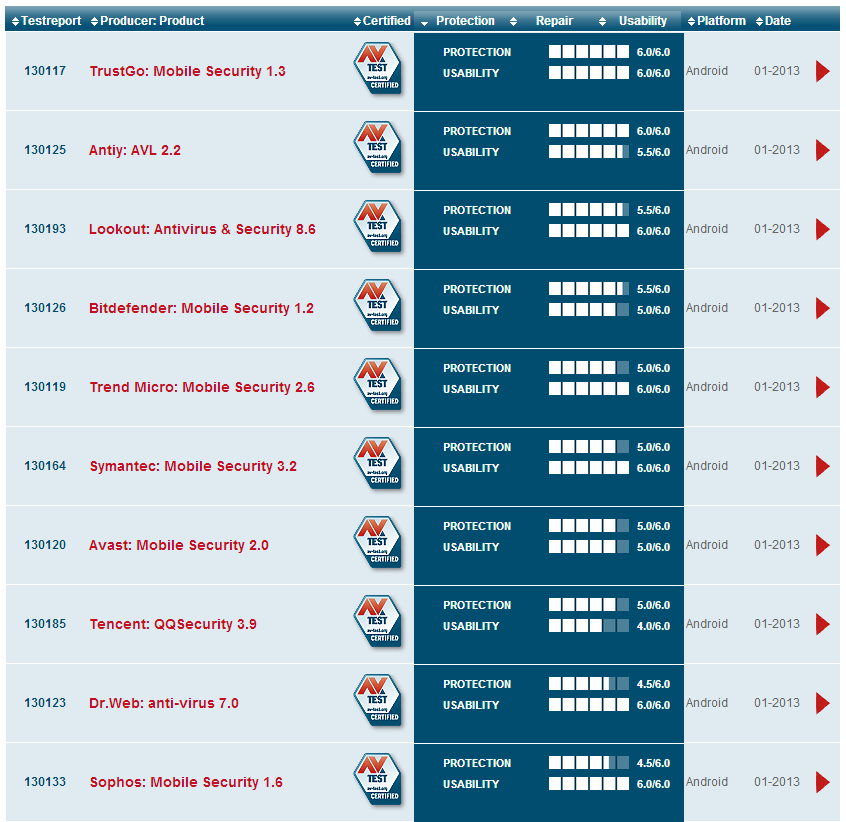
image


In a nutshell, the company found TrustGo: Mobile Security 1.3 to be the all-around best of the bunch, with it being the only app to score 6/6 in both protection and usability. Following close behind is Antiy: AVL 2.2, with a 6/6 in protection and 5.5/6 in usability; Lookout, with 5.5/6 in protection and 6/6 in usability; BitDefender, with 5.5/6 in protection and 5/6 in usability; and Trend Micro with 5/6 in protection and 6/6 in usability. Symantec, Avast, Tencent, Dr. Web, and Sphos rounded out the rest of the top 10, with most scoring at least a 4.5/6 in overall protection.
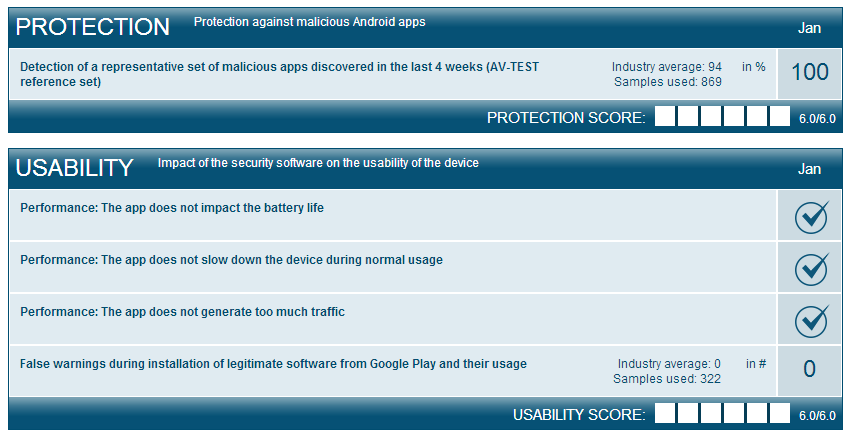
While "protection" is pretty cut-and-dry, what exactly does the company test in the "usability" category? Basic things like the app's effects on battery life, whether or not it takes a hit on the system during "normal use," how much web traffic it generates, and the number of false positives it flags during installation of legitimate software.


2013-02-21_10h11_50 2013-02-21_10h11_58


Each comparison also lists the features of each app. Does it have a call blocker? How about a message filter, safe browsing, or parental controls? Does it offer a backup system or encryption? Is anti-theft part of the package? No need to dig through apps in the Play Store to find those answers – they're all laid out very clearly on AV-test's results page.


Ultimately, Android AVs are a part of life on the platform. Whether or not you elect to have one installed based purely on its malware detection is entirely up to you – but it's at least worth considering the value of other aspects of each app. Simply put, AV-test makes that part easy to parse. Is it a definitive guide? Not really, but it's an excellent place to start looking for a good AV app, or to see how the one you're currently using compares to the competition. While these tests were conducted in January of 2013, the company has already stated it will do another round of testing (presumably with different apps) in March, and publish the results in April; so don't sweat it if you don't see your favorite in the list right now.
Hit the link below to check out the full comparison.
AV-Test.org

Source: http://www.androidpolice.com/2013/02/21/av-test-org-releases-its-first-report-on-android-antiviruses-22-different-apps-compared/

February 10, 2013

PCW: How (and why) to surf the web in secret


They say no one can hear you scream in space, but if you so much as whisper on the Web, you can be tracked by a dozen different organizations and recorded for posterity. Simply visiting a website can allow its operators to figure out your general physical location, identify details about your device information, and install advertising cookies that can track your movements around the Web. (Don't believe me? Check this out.)
Not everyone likes the idea of having his or her entire digital lives scraped, analyzed and (in countries with restrictive regimes) controlled outright by third parties. So please consider the following tools and tips, which will hide your IP address and have you surfing the Web in blissful anonymity in no time.

Knowing is half the battle

There are a few crucial tidbits you should know before you start down the path to online anonymity. First, it's important to know how anonymizing proxies work so you can understand their inherent flaws. Anonymizers act as a man in the middle while you're browsing the Web, handling communications between your PC and the website you want to access anonymously. If you do everything correctly, the target website only sees information from the anonymizing service, so it can't identify your home IP address or other personal information.
While the websites that you're browsing won't have any idea who you are, the man-in-the-middle anonymizing services certainly will (and some proxy services keep server logs of user activity that can be subpoenaed). For these reasons, it's important to do your research before you pick a proxy service.
Furthermore, websites can access data stored by browser plug-ins to try and track down your actual IP address. Media-playing plugins such as Flash are notorious for passing along more user data than is necessary, so stick to a plug-in-free browsing experience if you're concerned about third-party programs sharing information about you or your PC.
Speaking of browsers, you might want to set aside a second browser on your PC that you use solely for your anonymous activities. Most anonymizer services still allow websites to place cookies on your computer by default, and if you use the same browser for both everyday activities and the browsing you want to keep anonymous, websites could theoretically use those cookies to identify you.
To avoid this, download a second Web browser (Chrome and Firefox are great choices) and change your anonymous browser's settings to wipe cookies every time you close the browser. If you're worried about local users snooping on your Internet exploits, be sure to use your browser's Private or Incognito mode so anyone who opens your browser won't be able to check the history and see where you've been.
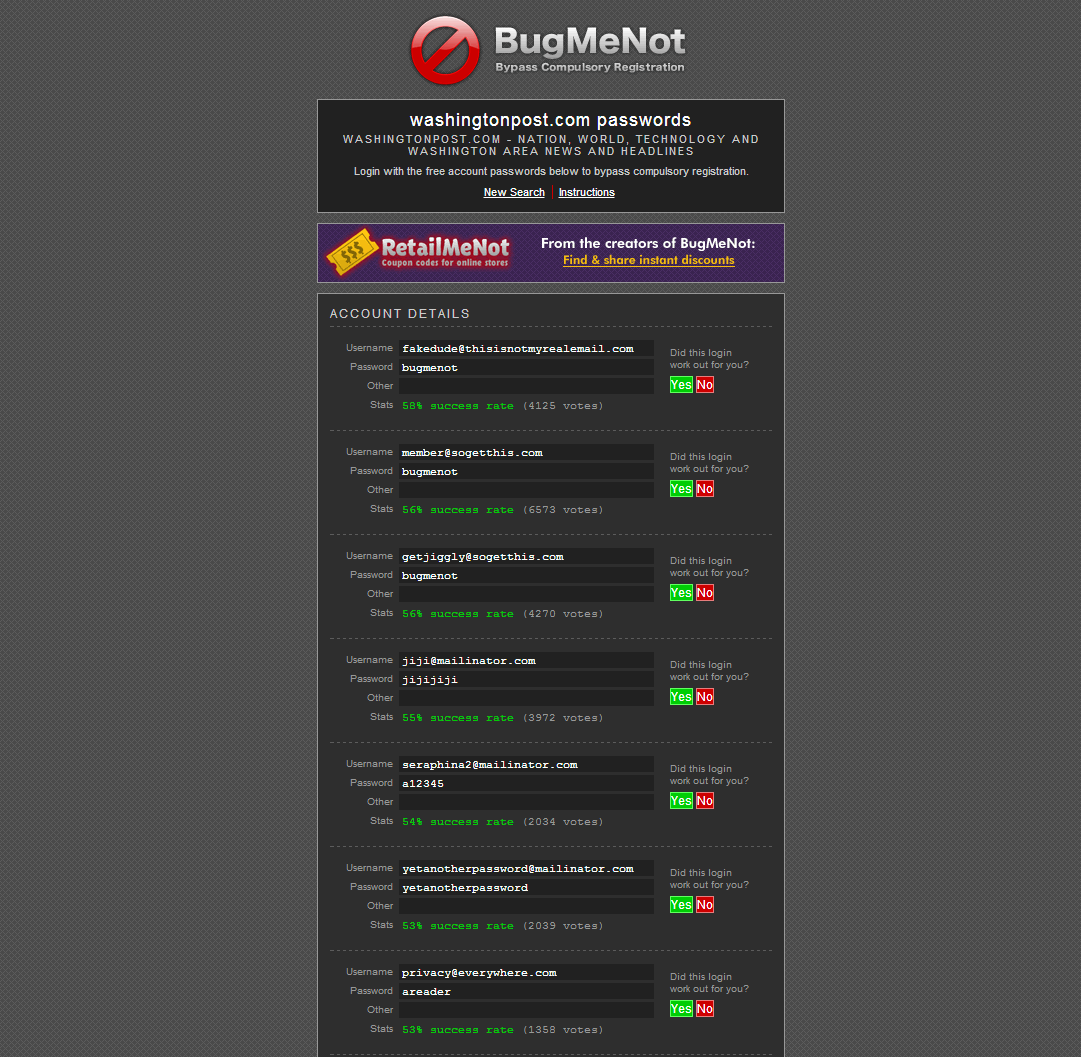
BugMeNot maintains a database of login information you can use to remain anonymous on free websites that require registration.
Finally, this probably doesn't need to be said, but if you log into a website using a username/password combination, the website administrators can track you regardless of whether you're using an anonymizer service. If you need to log in to a website to tap into its full features, see if BugMeNot has a generic login available for the site.
Got it? Good! Let's dig into the various anonymizing tools at your disposal.

Web proxies

The most basic way to surf websites anonymously is by using Web-based proxies likeProxifyAnonymouse or Hide My Ass. Web proxies are simple and easy to use: Just head to the anonymizing website, type in the URL of the website you want to visit anonymously, and you're off! Some even include advanced features like the ability to encrypt your connection or block ads, cookies, and JavaScript.
Web proxies may be straightforward (and often free), but they have several drawbacks. Data speeds can be atrocious, certain types of content (videos, music, etc.) may be difficult to access, many proxy services interject their own advertising, and some websites simply won't work through a proxy.
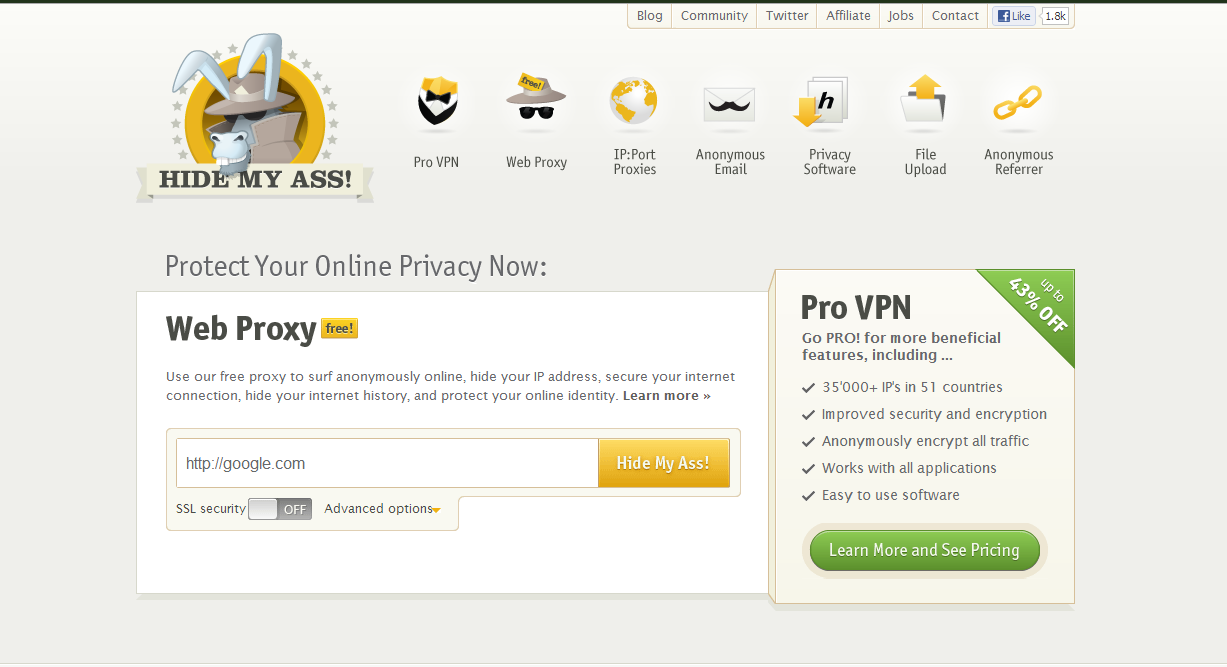
Web-based proxies like Hide My Ass claim to keep your IP address and other identifying information anonymous while you're browsing the Web.
Also, while free Web proxies are a dime a dozen and new ones pop up on an almost hourly basis, it's difficult to tell which ones are honeypots set up by bad guys hoping to sneak a peek at your personal information as you share it through their proxy server. In other words, you shouldn't do your online banking or log into a password-protected website when you're using a Web proxy—especially if the connection isn't encrypted via HTTP Secure (denoted by an https:// prefix in your browser's address bar).
The three Web proxies identified above are long-standing and well-trusted, however, and each offers a paid subscriber service that nixes the speed and content complaints.Proxy.org and PublicProxyServers.com also maintain extensive, frequently updated lists of Web proxies.

Manual proxy servers

Some proxy servers don't have a simple website interface, but still allow you to utilize their service for anonymous browsing. You just need to manually configure your browser to connect to the proxy's IP address. As with Web-based proxies, you'll want to shy away from revealing sensitive information or passwords with a proxy server.
Hide My Ass and ProxyNova keep two of the best lists of active proxy servers, with each individual proxy's speed, uptime, country of origin and level of anonymity clearly identified. (You want an anonymous or high anonymous proxy server, of course.)
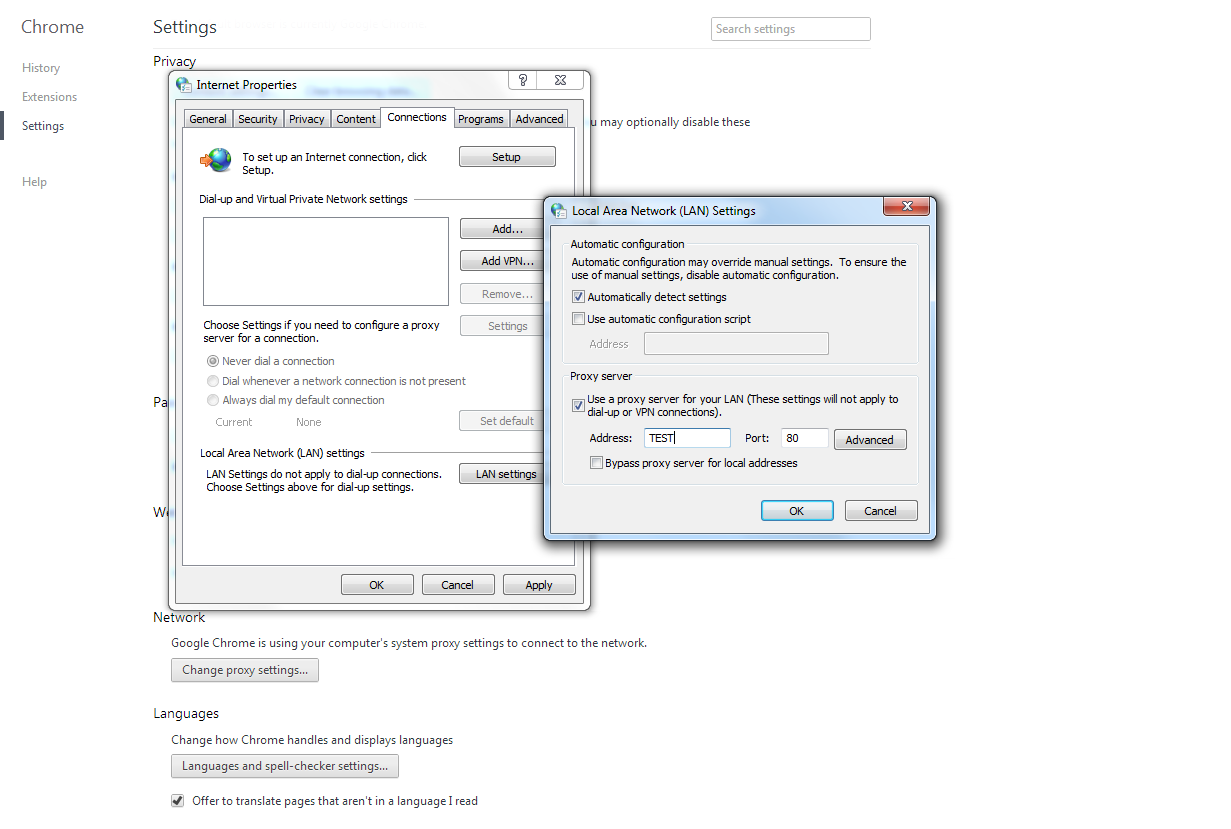
Once you've picked a proxy server, you'll need to configure your browser to connect to it, a simple procedure that's slightly different depending on your browser. Here's how to do it on the big three:
Powerful options to browse the Web through a proxy server or VPN can be found in your browser settings menu.
Internet Explorer 9: Navigate to Tools > Internet Options > Connections tab > LAN Settings. Check the Use a proxy server box and enter the port and IP address info for the proxy server, then click OK. If the proxy you chose uses a secure or SOCKS connection rather than HTTP, enter the settings in the Advanced option.
Firefox: Click the Firefox button, select Options > Advanced Tab > Network Tab, and then click the Settings button in Connections.
Chrome: Click the wrench icon, choose Show Advanced Settings > Change Proxy Settings, and then proceed as you would with Internet Explorer.

Hide your IP address with a VPN

Virtual Private Networks are a good option for people who want an anonymous yet speedy connection and don't mind paying for the privilege. Premium VPNs maintain dedicated proxy servers for their users. Your connection is encrypted and the websites you visit see the VPN's identifying information, not your own.
There are a ton of VPNs out there, and virtually all of them block your identity from third-party websites, but the question an anonymous-minded person wants to ask is, Does my VPN provider keep server logs? TorrentFreak asked several top VPNs that very questionand several answered with a resounding "No!" Once you've settled on a provider, you'll need to configure Windows 7 to connect to the VPN.
One of the best and most well-known virtual private networks is The Onion Router, or Tor for short. The Tor network has proven its mettle under fire, helping journalists file reports from countries where Internet access is restricted and allowing citizens to communicate digitally when governments shut down the Internet. Rather than establishing a direct connection between your PC and a proxy server, then connecting the proxy server to the website you want to visit, Tor bounces your data request through several random Tor server relays before pointing it to the final destination. In fact, Tor got its name because like an onion (or an ogre), this network has layers.
The server at each of those layers only knows the identity of the relay that passed it information and the relay it subsequently passes that information along to, with each hop in the chain being encrypted with a totally new encryption key. The robust security measures mean that even if someone is able to intercept one of the data packets en route and crack the encryption, they won't be able to identify you or your final destination. New relay paths are randomly generated every ten minutes or so.
It sounds complicated, but tapping into Tor couldn't be easier. Simply download the Tor Browser Bundle for your operating system of choice (there's even an Android version) and boot up the browser file when you want to surf anonymously. The program handles all the dirty work automatically and even goes so far as establishing an HTTPS connection at your final destination if it's possible. But if you're feeling particularly vulnerable, you can right-click on the Vidalia onion icon in your system tray and select New Identity to tell the browser to create a new relay server path.
The Tor Browser doesn't require installation and can be run from a flash drive if you want to carry a copy with you.

Send email anonymously

Now that you know how to cloak your online activities from prying eyes, here's a bonus tip for sending email anonymously for free. See, most of the anonymizers outlined above only play nice with Web browsing, but Anonymouse and Hide My Ass both offer free, basic anonymous email services. The recipient won't know your IP address, actual email address or any other personally identifiable information. With these tips and tools you should be well-equipped to improve your online anonymity; be sure to share your tips with other readers in the comments section and enjoy a safe browsing experience.

5 Excellent Email Apps For Android, Compared


5 Excellent Email Apps For Android, Compared


android email apps
I recently wrote an article about smartphone addiction and how it can be detrimental if it’s interfering with your everyday life. One of the biggest contributing factors to smartphone addiction is the ability to receive notifications and check messages at a whim. This is especially true for emails, which fly into your inbox all throughout the day.
Assuming you aren’t addicted to your smartphone or you don’t care if you are, you may want to find the best Android email apps to manage your emails and control all of the hectic activity it brings. You could use the default Email app, but there are so many better options out there and they’re all free, so why not? If you check email on the go, you should really consider these apps.
Note: I do not include the default email app in this comparison because everyone can check that out on their own, plus different phones often come bundled with different versions of the default email app. If you want to try it out, just give it a whirl.

Gmail

android email apps


The Gmail app is the official Android app for interfacing with Gmail, which isn’t much of a surprise since the app is developed by Google themselves. A lot of Google’s design philosophy revolves around the idea of minimalism and whitespace, and the Gmail app brings a lot of that to the table. It’s very clean, easy to navigate, and pleasant to look at.
The feature set isn’t all too impressive, which also isn’t a surprise. After all, Google isn’t known for putting a lot of flashy features in their products. However, the app does have push notifications, multiple account management, searching through emails, composition, labels, and attachments, so it’s not as barebones as I’m making it out to be.
The actual interface for viewing an email chain is quite good. The app tracks conversations just like web-based Gmail does, and with a simple menu drop, you can navigate between messages within a conversation extremely easily. I love it and use it on a daily basis.
Overall: B+

Yahoo! Mail

email apps for android


Yahoo! Mail used to be one of the leading free email services way back in the day, but that quickly fell by the wayside when Gmail proved to be the superior force. Nowadays, Yahoo! Mail is still alive and they’ve gone through a few revamps over the years, and I guess people are still using their Yahoo! accounts because they do keep their Android app updated.
Having given the app a test run, I was first struck by the difficulty I had in using it. Now, to be fair, the app wasn’t ugly or aesthetically abhorrent. In fact, I found the gray-and-purple scheme to be quite nice and calming. The theme is modern and clean and I would totally use it if it weren’t for the poorly designed layout.
Yahoo! Mail gets it right by having only a few buttons with recognizable icons, but they’re placed in weird spots that aren’t very intuitive. For example, I thought the “back arrow” button would return me to the previous screen but it replied instead. A “down arrow” in the top bar should’ve brought a new menu down, but it navigated to the next email. Small things like that made the experience a little hard to learn.
Now, email apps don’t have very high learning curves in general, so keep in mind that Yahoo! Mail isn’t difficult to use at all. But compared to other email apps, it’s enough of an inconvenience to lose a few points. Plus, I couldn’t find a way to browse a whole email conversation chain in one go.
Overall: B-

Aqua Mail

email apps for android


Aqua Mail is the first app on this list to support multiple email services, including the main three: Gmail, Yahoo!, and Hotmail. However, if you use your own email server, you can still use Aqua Mail since it supports any service using IMAP, POP3, and SMTP. If you use many different email accounts and want to sync them under one app, Aqua Mail does the job.
Account creation is very simple (I managed to do it in under 2 minutes) and the “Smart Inbox” feature is great. Basically, it aggregates all of your unread inbox messages into a single inbox so you can browse through them quickly and painlessly at your leisure. Other great features include widgets and lots of settings customization.
The downside to Aqua Mail is that the free version, while unlimited in length, limits you to 2 accounts and adds a promotional signature to all outbound emails. And on a more preferential note, the aesthetics aren’t the best. If you want to upgrade to Pro version, it’ll cost you $4.95 USD.
Overall: B

K-9 Mail

email apps for android


Like Aqua Mail, K-9 Mail is another multi-service email app that can track multiple accounts. On first glance, it looks too primitive to be useful, but after using it for a while, you can really begin to appreciate the way in which it approaches email. Account setup was really easy (it automatically detected my Gmail settings) and I got it up and running almost instantly.
The interface is designed to maximize the amount of information you can see on the screen without leaving you confused and lacking options. There are a TON of customizable settings and you can alert the way messages are displayed. Even though the inbox shows each email individually (not grouping them into conversations), you can easily go from one email to the next in the conversation with one button.
Perhaps the coolest aspect about K-9 Mail is that it’s a community-developed project. There’s a group of people dedicated to improving the app and they’re open to bug reports and feature suggestions, so if you’re into that sort of community feel, you could fit right in. For a more in-depth review, check out Saikat’s K-9 Mail article.
Overall: B+

MailDroid

android email apps


If you’re looking for an aesthetically minimal Android email app, I don’t know if it gets any more minimal than MailDroid. It utilizes a lot of whitespace – so much so that some may be tempted to think of it as unfinished or boring. Underneath that simplicity, however, there’s a good amount of power in features and performance.
MailDroid is a multi-service app that can handle multiple email accounts. Unfortunately, as much as I searched, I couldn’t find a way to unify the accounts under one unified inbox. On the other hand, it does support combining multiple emails into conversations, which makes it a lot easier to read through big chains.
It’s definitely a powerful app: you can do a lot in terms of signature control, full WYSIWYG editor, split screen support for tablets, and you can also create Quick Responses, which allow you to set up a number of template responses in case you make the same replies over and over again.
Again, don’t be turned off by the lack of pretty eye candy. This is a beast of an app and it’s only getting better over time. The only downside is that the free version is ad-supported and the Pro version costs a whopping $17.99 USD. A bit too heavy for my wallet, but I’m sure some people find it useful enough that the price is justified.
Overall: B+

Conclusion

There you have it: five of the best email apps available on Google Play today. What are you looking for? Aesthetics? Features? Reliability? Speed? Each of these apps has their ups and downs and hopefully you now know just a little more of what you can expect from these apps. Ultimately, before you make a decision, you’ll need to try them out and see if they fit your needs.
Know of any other free email apps that deserve a mention? Feel free to share them in the comments. It never hurts to have more variety in the mix.
Image Credit: Smartphone Email Via Shutterstock

January 30, 2013

How to Use the Web to Find a Cell Phone Number: Five Different Ways

By , About.com Guide
Tracking down someone's cell phone number can be difficult, if not impossible. After all, one of the reasons that people purchase a mobile phone is so they can have some measure of anonymity. In addition, phone books do not (usually) carry listings of cell phone numbers, so there's no paper trail to follow. 

However, that doesn't mean that finding a cell phone number listing is an impossible task. While mobile phone numbers are notoriously tricky to look up, there are a couple of tricks you can try:
Try a search engine. If you know the mobile phone number already, try entering it into your favorite search engine and see what comes up. If the cell phone number you are looking for has ever been entered somewhere on the Web - a blog, a public job profile - it will show up and you'll be able to track to whom it belongs to.


Try social networking sites. There are literally hundreds of millions of people who are active on various social networking sites all over the world. Many people use these social networking sites to share information with each other, and yes, that does include phone numbers. Simply type the person's name into the site's search function and see what comes back.
In addition, one of the most popular social networking sites is Facebook, which boasts at the time of this writing over 500 million members. It's a great source for tracking people down, and while most of the ways you can find people here are somewhat obvious, there are other informational sources within Facebook that might not be quite as easy to use. Read How to Use Facebook to Find People - Ten Easy Ways to learn more about how you can use Facebook to find cell phone numbers and (potentially) much, much more.


Try searching via username. Usernames, individual identification codes/names for people accessing a computer, network, or website, are also good jumping-off points for tracking down a cell phone number. Since many people use the same username across multiple sites, you can sometimes hit pay dirt simply by typing that username into your favorite search engine and waiting for the results. If the person has entered in their phone number somewhere on the Web underneath their username, it will come up in a search engine query.


Try a niche search engine. There are a wide variety of search engines on the Web, and all of them serve up unique results. While general search engines are quite useful in most search situations, sometimes niche search engines - tools that fulfill a specific search purpose - can come in handy. People search engines can be extraordinarily useful in this regard since they search and retrieve only people-related information, which includes cell phone numbers. Type in the person's name (use quotation marks around the name to make the search even more focused), or type in the phone number itself to find related information.


Try a reverse cell phone directory. There are some pretty useful phone directories on the Web that offer reverse cell phone look-ups. Two of the most reliable include:
  • Argali White & Yellow: This is a metasearch site for dozens of different phone directories; a great place to start your reverse cell phone search.
  • The Ultimates: Simple yet powerful phone directories all in one spot.
Should I pay for this information? After years of receiving literally hundreds of emails from frustrated readers that have paid so-called "legit" services that promise to do a mobile phone number search, I can say confidently that no, you should not pay for this information. Not one of these folks has ever had success with these sites that offer to find this information for you. They have access to the same information you do on the Web - if you can't find it, they probably can't either.


What if I can't find the mobile phone number I'm looking for? Unfortunately, that's going to be the norm and not the exception. Mobile phone numbers are kept very private by most people, and since they are not in any kind of published directory (yet), they are next to impossible to track down. However, don't give up - try the tips I've mentioned in this article to help you in your free mobile phone number search, and you just might get lucky.

January 23, 2013

Best Free Android Apps from GIZMO

This list of Best Free Android Apps now includes 205 apps in 115 categories. To read brief descriptions of the applications, click a page number or a category icon below.
  • Page 1. Introduction / What's New
  • Page 2. Home and Office
    Best Free Office Suite for Android - Kingsoft Office (Free) | Documents To Go | Google Drive
    Best Free PDF Reader for Android - Adobe Reader
    Best Free E-Book Reader for Android - FBReader | Moon+ Reader | Cool Reader
    Best Free Comic Book Reader for Android - Perfect Viewer | A Comic Viewer
    Best Free Calendar for Android - Jorte | Calendar Pad
    Best Free Timer and Alarm Clock for Android - StopWatch & Timer | AlarmDroid | ZDclock
    Best Free Notepad and Notebook for Android - Evernote | Springpad | Catch Notes
    Best Free Reminder / To-do List for Android - Astrid Tasks & To-do List | ColorNote Notepad Notes | Remember The Milk
    Best Free Personal Finance for Android - Financisto | Expense Manager | Personal Finance
    Best Free Dictionary and Thesaurus for Android - Merriam-Webster Dictionary | Arcus Dictionary | Dictionary.com
    Best Free Encyclopedia for Android - Wikipedia | Wikidroid for Wikipedia
    Best Free Genealogy or Family Tree for Android - Ancestry
    Best Free Translator for Android - Google Translate
    Best Free Calculator for Android - Cube Calculator | RealCalc | handyCalc Calculator
    Best Free Unit and Currency Converter for Android - Unit Converter | Exchange Rates
    Best Free Compass for Android - Compass
    Best Free Flashlight for Android - Tiny Flashlight + LED
  • Page 3. Image Tools
    Best Free Image Viewer for Android - QuickPic | JustPictures!
    Best Free Image Editor for Android - Snapseed | Photoshop Express | PicSay - Photo Editor | Pixlr-o-matic | PhotoFunia | PicsArt - Photo Studio
    Best Free Paint Program for Android - SketchBook Mobile Express
    Best Free Digital Image Stitcher for Android - Photaf Panorama (Free)
    Best Free Photo Collage for Android - Photo Grid
    Best Free Business Card Reader for Android - CamCard Lite
    Best Free Barcode Scanner for Android - Barcode Scanner | QR Droid
    Best Free Document Scanner for Android - CamScanner -Phone PDF Creator
  • Page 4. Multimedia
    Best Free Media Player for Android - MX Player | MoboPlayer | QQPlayer | mVideoPlayer | RealPlayer
    Best Free Music Player and Organizer for Android - TTPod | Winamp | MyMusicOn Music Player | 3 (Cubed)
    Best Free Music Streaming Software for Android - Audiogalaxy Music
    Best Free Media Server and Renderer for Android - iMediaShare Lite
    Best Free Video Sharing for Android - YouTube
    Best Free Video Trimmer for Android - AndroVid Video Trimmer
    Best Free Movie Resource for Android - IMDb Movies & TV
    Best Free Radio Broadcasting for Android - TuneIn Radio | A Online Radio
    Best Free Ringtone Changer for Android - Zedge
    Best Free Ringtone Maker for Android - Ringdroid
    Best Free Lyrics Player for Android - musiXmatch Lyrics Player
    Best Free MP3 Tag Editor for Android - Pimp My Music
    Best Free Remote Control for Android - Gmote 2.0
  • Page 5. Disk and File Tools
    Best Free File Manager for Android - X-plore File Manager | ES File Explorer | ASTRO File Manager
    Best Free Storage Manager for Android - App 2 SD Free
    Best Free Online Backup for Android - Dropbox
    Best Free App Backup for Android - App Backup & Restore
    Best Free File Encryption Utility for Android - File Locker
    Best Free File Cleaner for Android - 1Tap Cleaner
  • Page 6. Desktop and System
    Best Free Program Launcher for Android - GO Launcher EX | LauncherPro | Apps Organizer
    Best Free Onscreen Keyboard for Android - GO Keyboard
    Best Free Desktop Search for Android - Gesture Search
    Best Free Wallpaper Changer for Android - PicSpeed HD Wallpapers | Flikie Wallpapers HD | Backgrounds
    Best Free Task Manager for Android - Advanced Task Killer
    Best Free Task Switcher for Android - Task Switcher
    Best Free Default App Manager for Android - Default App Manager
    Best Free Installer for Android - Easy Installer
    Best Free Uninstaller for Android - Easy Uninstaller
    Best Free Battery Saver for Android - JuiceDefender - battery saver | Battery Dr saver
    Best Free Automation Tool or Profile Changer for Android - Llama - Location Profiles | AutomateIt
    Best Free Remote Desktop for Android - AirDroid | WiFi File Explorer | Browsix Lite
    Best Free System Monitor for Android - SystemPanel Lite
    Best Free System Information for Android - Elixir 2
    Best Free System Toolbox for Android - ZDbox
    Best Free Widget Maker for Android - Widgetsoid2.x
    Best Free Clipboard Manager for Android - Clipper
  • Page 7. Security and Privacy
    Best Free Anti-malware for Android - Antivirus Free - Lookout | avast! Mobile Security
    Best Free Apps Protection for Android - Perfect App Protector - FREE | Application Protection
    Best Free Password Manager for Android - KeePassDroid | Keeper Password & Data Vault
    Best Free Private Gallery for Android - Gallery Lock
    Best Free Device Tracker for Android - Wheres My Droid | Prey Anti-Theft
  • Page 8. Internet and eMail
    Best Free Web Browser for Android - Dolphin Browser HD | Chrome | Firefox | Opera Mini | Skyfire | Maxthon Browser
    Best Free Webmail for Android - Gmail | GMX Mail
    Best Free Email Client for Android - K-9 Mail
    Best Free Download Helper for Android - Download All Files
    Best Free News Reader or Feed Aggregator for Android - Flipboard | Pulse News | World Newspapers | Google Reader
    Best Free Bookmark Manager for Android - Pocket
    Best Free Web Search for Android - Google Search | Google Goggles
    Best Free Navigation for Android - Maps | Waze social GPS traffic & gas
    Best Free Weather Alert and Monitoring for Android - GO Weather
  • Page 9. Phone & Messaging
    Best Free Dialer for Android - Dialer One
    Best Free Contact Manager for Android - aContacts | Contact Group Manager (Free)
    Best Free Contact Sharing for Android - Bump
    Best Free Messaging Client for Android - GO SMS Pro
    Best Free Browser Texting for Android - MightyText - SMS from Computer
    Best Free Instant Messaging for Android - eBuddy Messenger | WhatsApp Messenger
    Best Free Voice Over Internet Protocol (VoIP) for Android - Skype | LINE | Tango Voice & Video Calls
    Best Free Walkie-Talkie for Android - Voxer Walkie-Talkie PTT
    Best Free Voice Activation for Android - Vlingo Virtual Assistant
    Best Free Call & Message Filter for Android - BlackList
  • Page 10. Network, Website & Server
    Best Free Social Networking for Android - Google+ | Facebook for Android | Twitter | Instagram | Foursquare | TweetDeck
    Best Free Blog Publishing for Android - Posterous Spaces
    Best Free BitTorrent Client for Android - aDownloader
    Best Free Remote Access Software for Android - TeamViewer Free
    Best Free Network Traffic Counter for Android - 3G Watchdog | NetCounter
    Best Free Network Speed Test for Android - Speedtest.net
    Best Free Wi-Fi Analyzer for Android - Wifi Analyzer
    Best Free FTP Client for Android - AndFTP
  • Page 11. Education
    Best Free Language Learning for Android - A Word A Day
    Best Free Articles and Answers for Android - HowStuffWorks
    Best Free Astronomy Software for Android - Google Sky Map
  • Page 12. Games
    Best Free Sports Tracking for Android - My Tracks | CardioTrainer
    Best Free Action Game for Android - PapiJump | Fruit Slice | Tank Hero | Labyrinth Lite | NinJump
    Best Free Physics and Chemistry Game for Android - X Construction Lite | Angry Birds | Cut the Rope: Experiments FREE | Pinball Deluxe | Alchemy Classic
    Best Free Simulation Game for Android - Smurfs' Village | Air Control Lite
    Best Free Shooting Game for Android - Defender
    Best Free Match-2 Puzzle for Android - Flow Free | Trainyard Express
    Best Free Match-3 Puzzle for Android - Jewels | Bubble Blast 2 | Puzzle Blox Arcade! | Move the Box
    Best Free Jigsaw Puzzle and Creator for Android - Jigsaroid
    Best Free Sliding Puzzle for Android - Mouse
    Best Free Word Game for Android - Wordfeud | Words With Friends Free | wordoid!
    Best Free Jawbreaker for Android - Bebbled
    Best Free Card Game for Android - 250+ Solitaire Collection | Hearts Deluxe
    Best Free Computer Chess for Android - Chess for Android | Chess
    Best Free Sudoku for Android - OpenSudoku
    Best Free Casual Game for Android - Talking Tom Cat Free | Paper Toss
    Best Free Reversi for Android - Reversi Free | DroidZebra Reversi
    Best Free Backgammon for Android - Backgammon Free
    Best Free Reaction Game for Android - 2 Player Reactor
    Best Free Dressup Game for Android - Androidify
Source: http://www.techsupportalert.com/best-free-android-apps.htm

Turn An Android Phone Into A Wifi Hotspot Without Rooting


Foxfi: Turn An Android Phone Into A Wifi Hotspot Without Rooting [Android 4.0]


turn android phone into a wifi hotspot


Would you like to turn your Android phone into a Wifi hotspot without rooting your phone? If you are interested, then you should check out Foxfi. This simple Android app turns your phone into a Wifi hotspot without the need for a root or a tethering plan.


Using Foxfi is very simple. Just open the app and click to activate the hotspot. You can set the name of your network and a password if you wish. You can also turn on Bluetooth mode so that you can tether your Internet to Bluetooth enabled devices.
Foxfi works with computers, consoles, or any appliance with a Wifi connection.  However, it runs only on Android 4.0 Ice Cream Sandwich, so you are out of luck if you are running any other version. Still, this tool is a great way to get over the restrictions of carriers, while getting an easy-to-setup Wifi hotspot for your phone.
Features:
  • Turn Android into a free wifi hotspot without rooting.
  • Works with bluetooth.
  • Works only with Ice Cream Sandwich.
  • Connect from any computer or tablet.
Check out Foxfi @ https://play.google.com/store/apps/details?id=com.foxfi


Source: http://www.makeuseof.com/dir/foxfi-turn-android-phone-wifi-hotspot-rooting-android-40/

January 18, 2013

Sending huge files from one Android device to another

 CNET Michael Tan

Android 4.1 and above has a nifty feature--Wi-Fi Direct--which lets you send a file from one Android device to another quickly, conveniently and free.
Say you and your family meet your parents at the amazing Gardens By The Bay, took some videos and then stopped for lunch. One of the nicest videos of your children enjoying the cold spray from the huge waterfall shot by grandpa is about 100MB. How are you going to get that from Grandpa?

WhatsApp sends up to 12MB so that's out. Gmail sends only 30MB tops, and the new feature to use Google Drive to send files still does not have a direct download feature, so you can only stream the video from your Google Drive. And Grandpa doesn't know how to do this from his mobile because the Google Drive "send file" feature is not available on mobile and asking grandpa to use a PC would necessitate you heading down to his condo to do tech support. Dropbox needs your dad to install dropbox on his Android phone and it's not easy.
Overriding all these considerations, is that all the Singapore telcos drastically cut our data quota from 12GB to 2-4GB and suddenly, 3G/4G bandwidth has become precious--we can't just use up 100MB just like that if we could have a cheaper way.
And you can't just stick a USB drive into your Android phone because the plug's wrong, and even if you get an adapter from Micro-USB to USB, the phone may not support USB host mode. And don't even talk about swapping SD cards, it's like surgery.
The best way would be to send the files directly from grandpa's device to your own. You could use Bluetooth but that'd be like pulling teeth, it's so slow that you'd have to be there for hours just waiting for the transfer. Wi-Fi would be the only way, because it's fast and every phone has it.
When you search for Wi-Fi file-transfer apps on the Google Play store, you'd get confused. Let me cut through the confusion. There are two types of Wi-Fi file-sending apps which send files directly from one Android device to another.
  1. Require both of you to be on the same Wi-Fi network. Apps like Wi-Fi File Transfer do that, but the problem is that both of you would have to be on the same Wi-Fi network. There isn't free Wi-Fi at Gardens by the Bay, so you can't use this method.
  2. Doesn't require both of you to be on the Wi-Fi network; both phones just connect to each other and file-transfer begins.
Obviously, choice number two is the solution, but it's not that easy to zero in too. There's a new technology called Wi-Fi Direct, which sets the rules for appmakers to initiate connections between two Android devices and control the flow of data between those two devices.
Searching for "Wi-Fi Direct" in the Play Store reveals several applications, but cutting to the chase, there's one which works for me and the rest don't. Wi-Fi Shoot! Wi-Fi Direct works well between two Samsung, HTC and some Acer tablets and phones with Android 4.1++ installed.
The Wi-Fi Direct standard is still in its infancy, and some devices just don't work. Just select the files you want to share in any application, and share them with Wi-Fi Shoot!, start the Wi-Fi Shoot Receive app on the other phone and when they connect, just press Shoot! and the hundreds of megabytes just shoot over to the other phone.
Simple, fast, safe and convenient.

Michael Tan is a member of CNET Asia's regional blogger network and is not an employee of CNET Asia.

 Another review and wrap of of other large file transfer apps...

How To: Send Large Digital Files


The convenience of USB drives and burning CDs only go so far. When you need to send large pictures, videos, or documents immediately, these relatively antiquated solutions just don't go the distance. Large file sharing requires the extra power of web services that send multi-MB data in a flash. Though there are dozens of file sharing sites available on the web, these are the ones we find to be the easiest and fastest solutions.


  • WeTransfer — It's as simple as adding files (up to 2GB), enter your email address, then your recipient's, and that's it. WeTransfer is free and requires no registration, making sending big files as painless as possible. They'll even send you a receipt once the recipient has successfully downloaded the file.

  • Adobe SendNow — For $20 a year, send multiple files at once, up to 2GB, and the service provides a confirmation that the file was received, so you're not fretting from your side of the Internet. An optional desktop app is available to easily drag and drop files to share. Plus, get up to 20GB of storage with an account too.
  • More mega file sharers after the break.


  • Box — Sign up for an individual free account to store 5GB of data on the web and send files up to 100MB. Multiple-user business accounts start at $15 per month and offer higher data sending options. 

  • DropSend — A free plan offers five transfers per month up to 2GB while premium options range from $5 a month for 15 shares and web storage to $99 a month for a business-friendly plan for unlimited shares and higher security. 

  • YouSendIt — The site offers a free 14-day free trial to send high-quality videos, whole albums of music, and a ton of high-resolution photos at once, up to 50MB in size. Paid accounts start at $10 a month and allow or file transfers up to 2GB. 

  • Dropbox — This service for Mac, Windows, and Linux, allows you to share files with authorized users who have also installed Dropbox on their machine. Dropbox is free to use for up to 2GB of storage, and subscription rates start at $10 a month for 50GB of storage up to $20 for 100GB, or more with a custom quote.

    Source: http://www.geeksugar.com/Send-Large-Files-19536121

January 11, 2013

Top 5 IM Clients for Android

written by: Arnold Zafra • edited by: Simon Hill • updated: 9/29/2010

Looking for the best Android IM app? Then read on to find the best options available for you from the Android Market. Here we review five of the best Android IM apps including the best Yahoo chat for Android. You will surely find one that you can use on your Android phone.
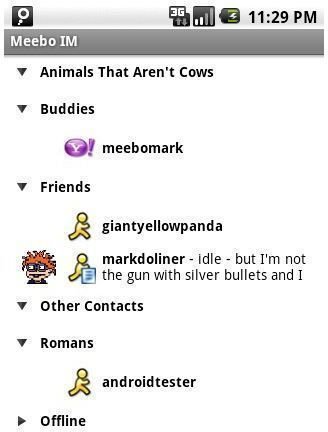
  • Meebo IM

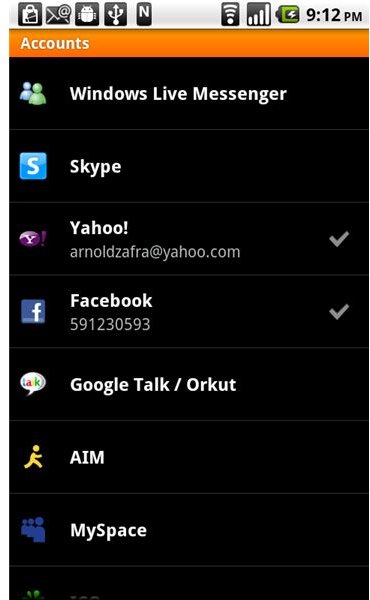
    meebo IM Meebo is not a novice when it comes to mobile IM apps. I've used Meebo on various platforms and I would have to say that it's probably one of the best IM apps around. The Android version of their IM chat is not an exception. In fact, it's a rock solid Android app that answers all your mobile chatting needs. This Android IM app lets you log in to all your IM accounts and send messages for free. It stays connected and keeps track of your chat history, ensuring that you'll never miss an important message. Meebo IM Android app supports major IM clients including Google Talk, MySpace, Facebook, Yahoo, Windows Live Messenger, ICQ, Jabber, and AIM. (Download link)
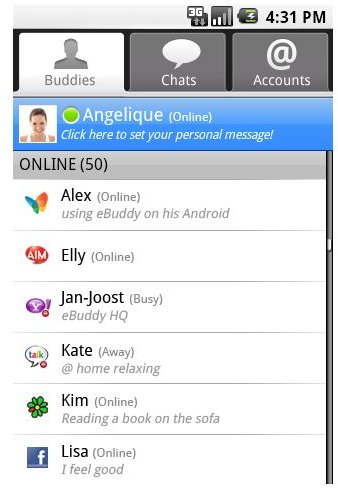
  • eBuddy for Android

    buddy list scr Here's another nice Android IM app that runs in the background so that you can do other things on your Android phone while ensuring that your buddies will know that you are still online. It will even alert you through sounds or vibration whenever new messages come in. It also automatically reconnects you when your Internet connection is lost. eBuddy for Android also integrates your buddy list from GTalk, MSN, Facebook, MSN, Yahoo, ICQ and other IM and social networking accounts. One nice feature of the app is that you can easily switch between chat windows, making it easier to chat with several of your buddies at the same time. Finally, something that those who've been chatting since time immemorial will appreciate - emoticons and buzzers to personalize your chat. (Download link)


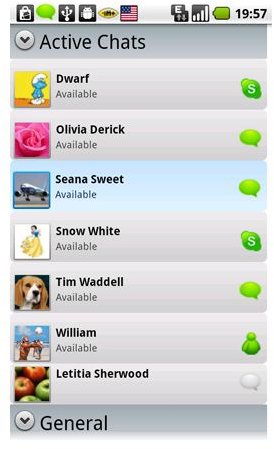
    • IM+: Instant Messaging for Android

      im android screenshot1 I've used IM+ in both my iPad and iPhone before and I would have to say that it's really a great mobile IM app. Available in both free and paid versions, IM+ for Android is a pretty robust and feature-rich IM app. Like the previous IM options on our list, this app keeps you connected with buddies on various major IM clients. One great feature of this IM app is that it allows you to view all open dialogs and unread messages in one window. It also supports emoticons and avatars. (Download link)
    • Nimbuzz

      Nimbuzz 2 Another Android IM app that you may want to check out is Nimbuzz IM which was released just last month. It supports major IM platforms and lets you connect your existing accounts. The app features a smart buddy list layout that displays avatar and presence information in a single list. Like IM+, it also automatically reconnects when your Android phone loses its connection. A unique feature of this Android IM app is the time sensitive UI that detects how long you press on a buddy's name - if you tap on your buddy's name lightly it opens their profile and if you tap on it with a stronger touch, the app instantly opens up a new chat window. Another great feature of this app that I like is that it allows you to share links to multimedia content and the app will play the content in a browser window. Then, you can swiftly switch from your chat window to the browser window. The app also sends alerts for incoming chats while the app runs in the background. (Download link)
    • Yahoo Messenger for Android

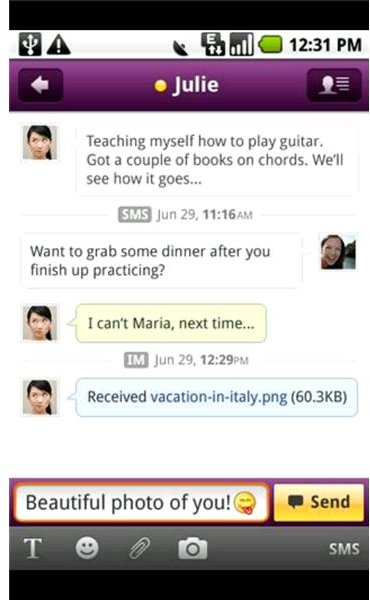
      Yahoo Messenger for Android What could be the best Yahoo chat for Android other than Yahoo's own Messenger app for Android? It also has instant notifications, lets you view your friend's status and update your own, check out your existing friends and make new ones, send camera and gallery photos, and supports emoticons. The app also lets you chat with your MSN/Windows Live friends. If you've always been a Yahoo Messenger user, you'll love to have this app on your Android. Even if you're not a YM fan, you might want to check this app out anyway. (Download link)
    • IM+: Instant Messaging for Android

      im android screenshot1 I've used IM+ in both my iPad and iPhone before and I would have to say that it's really a great mobile IM app. Available in both free and paid versions, IM+ for Android is a pretty robust and feature-rich IM app. Like the previous IM options on our list, this app keeps you connected with buddies on various major IM clients. One great feature of this IM app is that it allows you to view all open dialogs and unread messages in one window. It also supports emoticons and avatars. (Download link)
    • Nimbuzz

      Nimbuzz 2 Another Android IM app that you may want to check out is Nimbuzz IM which was released just last month. It supports major IM platforms and lets you connect your existing accounts. The app features a smart buddy list layout that displays avatar and presence information in a single list. Like IM+, it also automatically reconnects when your Android phone loses its connection. A unique feature of this Android IM app is the time sensitive UI that detects how long you press on a buddy's name - if you tap on your buddy's name lightly it opens their profile and if you tap on it with a stronger touch, the app instantly opens up a new chat window. Another great feature of this app that I like is that it allows you to share links to multimedia content and the app will play the content in a browser window. Then, you can swiftly switch from your chat window to the browser window. The app also sends alerts for incoming chats while the app runs in the background. (Download link)
    • Yahoo Messenger for Android

      Yahoo Messenger for Android What could be the best Yahoo chat for Android other than Yahoo's own Messenger app for Android? It also has instant notifications, lets you view your friend's status and update your own, check out your existing friends and make new ones, send camera and gallery photos, and supports emoticons. The app also lets you chat with your MSN/Windows Live friends. If you've always been a Yahoo Messenger user, you'll love to have this app on your Android. Even if you're not a YM fan, you might want to check this app out anyway. (Download link)


      Source: http://www.brighthub.com/mobile/google-android/articles/89073.aspx